TimeTrex Workforce Management Review
TimeTrex has great customer service, scalable pricing, and plenty of advanced features, but may not be ideal for businesses with basic payroll needs.
-
WRITTEN & RESEARCHED BY
Expert Contributor
Last updated onUpdated
-
REVIEWED BY
Editor & Senior Staff Writer


Our content reflects the editorial opinions of our experts. While our site makes money through referral partnerships, we only partner with companies that meet our standards for quality, as outlined in our independent rating and scoring system.
TimeTrex Workforce Management
| Total Rating |
4.1 |
|---|---|
| Pricing3.4 | |
| Ease Of Use4.3 | |
| Features4.1 | |
| Customer Service4.1 | |
| User Reviews4.4 | |
Payroll Processing Time
VariesPricing Range
$0-$100+/monthBusiness Size
Small businesses - international enterprisesTimeTrex Workforce Management At A Glance
- TimeTrex is a workforce management platform with payroll, time tracking, scheduling, HR, and attendance tools.
- TimeTrex offers a free open-source Community Edition, plus paid plans for businesses that want cloud hosting, support, and advanced features.
- The software includes advanced tools such as geofencing, biometric time clocks, job costing, recruiting, onboarding, and expense tracking, depending on the plan.
Pros
- Positive customer reviews
- Good customer service
- Scalable pricing plans or free open-source plan available
- Advanced features like geofencing & biometric facial recognition
Cons
- Minimum one-year commitment
- Some additional pricing fees are not disclosed
- UI could be more modern & better organized
Table of Contents
What is TimeTrex?
TimeTrex Workforce Management is a payroll, time tracking, scheduling, HR, and workforce management platform for businesses with more complex workforce needs.
Its free open-source Community Edition may appeal to businesses that want a DIY workforce management tool, earning it a spot on our list of the best free payroll software for businesses. Its paid plans add cloud hosting, support, mobile tools, and more advanced functionality.
TimeTrex is feature-rich and scalable, but it may be more software than very small businesses need if they only want simple payroll.
TimeTrex Pricing
| Pricing3.4 |
|---|
| Software Plans 4.2 |
| Pricing Transparency 4.2 |
| Pricing Customization 3.1 |
TimeTrex offers a free open-source plan and three different paid pricing plans that range from $0-$100+/month. The smaller plan is focused on payroll and time tracking, while each subsequent plan adds additional features like accounts receivable and full recruiting and onboarding.
| TimeTrex Workforce Management Plans | Price | When To Use |
|---|---|---|
| Open Source Community Edition | $0 | A free open source workforce management software with unlimited employees and international payroll support, but no customer service available |
| Professional Edition | $50/month+ | If you want a basic workfroce management software for managing time tracking, employee scheduling, payroll, and HR |
| Corporate Edition | $80/month+ | If you want an advanced workforce management software that adds job costing, GEO fencing, and AR |
| Enterprise Edition | $100/month+ | If you want an advanced workforce management software that adds recruiting, onboarding, applicant tracking, and expense management |
Instead of charging a monthly fee and a per-person fee like most payroll software, TimeTrex’s plans include 10 employees by default. If your team has more than 10 members, pricing will apply per person. TimeTrex offers a pricing guide that allows you to compare costs based on your number of employees.
TimeTrex’s prices are based on a minimum one-year commitment. There is no cancellation fee, but you will need to pay your account in full for the remainder of your commitment if you want to cancel your account early.
There is a free trial available, or you can schedule a demo with a TimeTrex rep.
TimeTrex Open Source Community Edition
You can download a free, open-source version of TimeTrex. Because this is a self-hosted open-source product, it’s best for businesses with the technical know-how to install, maintain, and troubleshoot the software themselves.
With this download, you get:
- Basic time tracking
- Basic employee attendance
- Employee scheduling
- Leave management
- HR Management
- Unlimited users
The downside is that there is no technical support and no mobile app with this plan, though there is a large local network and community that lets you connect with other users and developers if you need help, tips, or advice.
TimeTrex Professional Edition
TimeTrex’s Professional Edition includes 10 employees with custom pricing available for larger businesses, plus:
- Time tracking
- Payroll
- Employee scheduling
- Attendance, leave, & absence management
- HR management
- Web punch in/out
- Biometric facial recognition time clocks
- Mobile app
TimeTrex Corporate Edition
TimeTrex’s Corporate Edition plan includes 10 employees with custom pricing available for larger businesses. This plan includes everything in the Professional Edition, plus:
- Job costing
- Geofencing for managing multiple locations
- Document storage
- Invoicing
- Accounts receivable
TimeTrex Enterprise Edition
TimeTrex’s Enterprise Edition plan includes 10 employees with custom pricing available for larger businesses. This plan includes everything in the Corporate Edition plus:
- Expense tracking
- Recruiting
- Onboarding
- Advanced application tracking system
TimeTrex may charge extra fees for advanced features like biometric scanning. There is an account activation fee as well, though TimeTrex does not disclose these costs.
Is TimeTrex Easy To Use?
| Ease Of Use4.3 |
|---|
| Set Up 4.3 |
| Software Reliability 2.5 |
| Everyday Use 4.0 |
| Integrations 5.0 |
The TimeTrex UI looks a bit outdated and isn’t as modern as other payroll software options. Some users find the sidebar to be cluttered with too many features they don’t use, but features are organized well into feature types (like payroll, schedule, HR, etc.).
The dashboard has a nice feature where it tells you any outstanding tasks that need to be completed for important payroll and HR tasks like employee requests that need approved or schedules that need to be finalized.
White glove implementation is available for businesses that want TimeTrex to handle installing and setting up their account. Cloud-based and on-site deployment are both available.
TimeTrex Features
| Features4.1 |
|---|
| Payroll Processing 4.7 |
| Employee Management & PTO 5.0 |
| Time Tracking 4.5 |
| Payroll Tax Support 4.1 |
| Reporting & Tax Forms 4.6 |
| Onboarding & HR 5.0 |
| Benefits Administration 0.0 |
| Niche Features 4.0 |
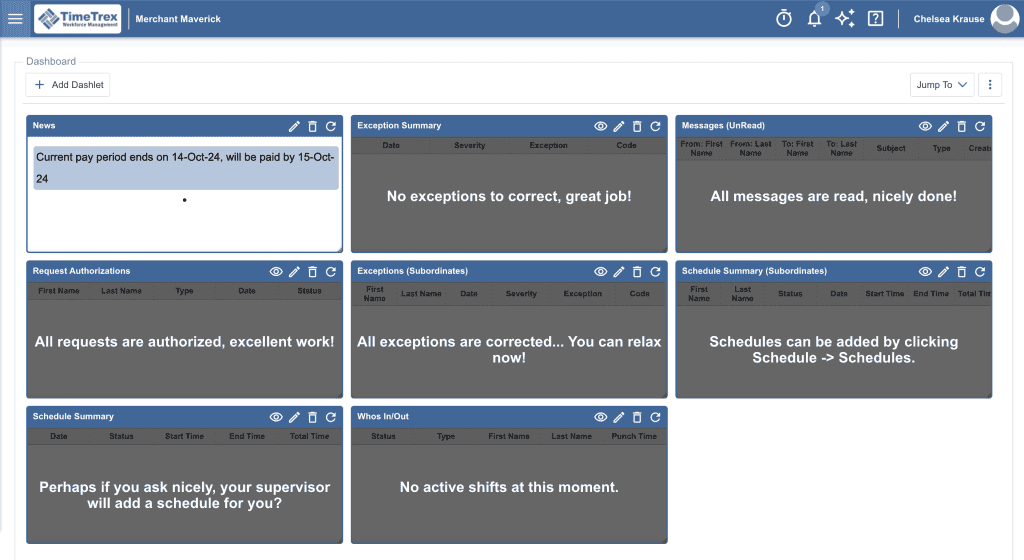
TimeTrex offers a large selection of features. The software’s feature set is much larger than many other payroll software options and includes some unique touches that we don’t see often, like geofencing, time-tracking rules, and more.
| TimeTrex Workforce Management Features | Availability |
|---|---|
| Payroll Tax Support | |
| Auto-Schedule Payroll | |
| Bonus Payroll | |
| Off-Cycle Payroll | |
| Employee Management | |
| Paid Time Off | |
| Time Tracking | |
| HR Support | |
| Onboarding Support | |
| Benefits Administration | |
| Number Of Reports | 30+ |
| Number Of Integrations | 65+ |
| Number Of Users Supported | Varies |
Some customers say the software has too many features. If you’re looking for simple payroll software, TimeTrex might be overkill, but for small business owners with complex payroll needs and for enterprises that need advanced features, TimeTrex is highly competitive and capable.
In addition to the typical payroll, HR, and time tracking features that we dive into below, TimeTrex also offers noteworthy additional features like expense tracking, invoicing, job costing, and more.
These extra features allow TimeTrex to be a true workforce management solution that gives added insights into your business’s overall financial picture — not just your payroll.
Here’s a look at some of TimeTrex Workforce Management’s features. Features may vary based on the pricing plan.
Payroll Processing
TimeTrex Workforce Management’s payroll features include:
- Direct deposit
- Year-end forms & compliance
- Automatic payroll & payroll tax calculations
- Payroll deductions, including benefits, insurance, vacation accruals, sick leave, etc.
- Garnishments
- Electronic pay stubs and/or physical check printing
- Expense tracking with built-in expense reimbursements
- Tax reporting available for the US, Canada, and select international payroll needs
- Custom payroll reporting
Employee Management
TimeTrex offers some well-thought-out and unique employee management features like allowing employees to request their preferred hours for easy scheduling.
Here are some of the employee management features you’ll find with TimeTrex:
- Employee scheduling
- PTO submissions
- Preferred scheduling submissions
- Schedule & PTO approvals
- Easy-to-use scheduling calendar
- Labor law compliance
- Mobile app
Time Tracking
TimeTrex Workforce Management has some of the most advanced and unique time-tracking features we’ve seen.
Here are some of the time tracking features and automations TimeTrex is capable of:
- Auto-track employee PTO & leave
- Custom rules & restrictions for managing time tracking
- Easily allow employees to view accrued & used time off
- Digital clock-in-out
- Geofencing
- Biometric facial recognition time clocks
- Reporting
HR & Onboarding
Each TimeTrex plan has some basic HR management, but the larger the plan the more advanced features you get. Recruiting, for example, is only available with the Enterprise Edition.
Here are some of the HR features TimeTrex is capable of:
- Recruiting with qualification tracking
- Easily scan for skills, education, memberships, licenses, languages, etc.
- Manage employee benefits & information
- Allow employees to easily see personal salary, employee hierarchy, & other HR information
- Performance reviews
Benefits Administration
TimeTrex does not offer built-in benefits administration. There is a self-managed HSA option and you can manage payroll deductions for benefits, but you’ll need to integrate with another provider to offer benefits.
TimeTrex Integrations
TimeTrex offers 65+ integrations. The majority of the integrations are with each state’s payroll portals, though you’ll find some accounting and larger payroll software integrations as well. TimeTrex also has a custom API available.
TimeTrex Customer Service
| Customer Service4.1 |
|---|
| Personal Support 3.9 |
| Self-Service 4.2 |
TimeTrex has a decent number of support options, including phone, email, and live chat.
TimeTrex also offers self-service resources, including guides, calculators, and support materials.
| TimeTrex Workforce Management Customer Service | Availability |
|---|---|
| Phone Support | |
| Email Support | |
| Support Tickets | |
| Live Chat | |
| Dedicated Support Representative | |
| Knowledge Base or Help Center | |
| Videos & Tutorials | |
| Company Blog | |
| Social Media |
Most user reviews report positive customer service experiences.
You can purchase support packages for a more dedicated support experience. Support packages are on an hourly basis with a discount for blocks of five hours.
TimeTrex is not clear about what qualifies for free support versus paid packages, but the number of positive customer reviews leads us to believe that general support is available without upcharges.
TimeTrex Reviews
| User Reviews4.4 |
|---|
| Customer Feedback 5.0 |
| Review Site Aggregate 4.2 |
TimeTrex receives primarily positive reviews from customers. Many users report having used TimeTrex happily for years, and most of the complaints found are fairly minor. The company is not BBB accredited, but it does earn an A+ rating on the BBB.
Negative TimeTrex Reviews
- No “undo” button, and if support has to undo a change, it appears under the admin’s name, not under the support rep’s name
- Some users find the interface busy and cluttered with unused features
Positive TimeTrex Reviews
- Easy to track time and payroll
- Positive customer support experiences
- Good fit for small businesses and startups
- Good value for both free and paid plans
Is TimeTrex Secure?
TimeTrex prides itself on “implementing measures to secure personal information,” including regular data backups, advanced data encryption, and both cloud-hosted and on-site data storage.
TimeTrex says it implements data protection measures aligned with privacy and security requirements such as GDPR, CCPA, and HIPAA. The company also has monitoring systems in place to mitigate risk and provide “audit-ready reporting.”
Final Verdict: Is TimeTrex Worth It?
| TimeTrex Workforce Management Review Summary | |
|---|---|
| Pricing Range | $0-$100+/month |
| Choose If You Need |
|
TimeTrex is a workforce management software worth looking into if you want free open-source payroll software or if you want a scalable time tracking and employee management solution that has unique, comprehensive features like geofencing, recruiting screening, and more.
Tax reporting is available for US, Canada, and international businesses, making TimeTrex a good option for companies that operate in multiple locations or internationally.
TimeTrex is fairly affordable and receives positive customer reviews. One drawback is that the UI is a bit outdated. Another drawback is that while the pricing plans are scalable, the company isn’t transparent with pricing for companies larger than 10 employees.
There is also a minimum one-year commitment when you purchase TimeTrex Workforce Management (unless you go with the free open-source plan). If you want to cancel your paid plan, you’ll need to pay out the rest of your agreement in full first.
Some small businesses find that TimeTrex has too many features for their needs, so if you are looking for something more basic, try comparing TimeTrex to our top payroll software for small businesses instead. There is also a free trial and demo available if you want to see the software in action before deciding.
Chelsea Krause
Expert Contributor
Chelsea Krause is a writer who specializes in accounting, payroll, and small business loans. She has been helping small business owners manage their finances since 2016. She is a QuickBooks Certified User and former eCommerce store owner. Her accounting expertise has been quoted in Forbes and her work appears in Startup Nation, Small Business Bonfire, and Women on Business. Chelsea graduated summa cum laude with a BA in English & Creative Writing from George Fox University and studied abroad at the University of Oxford as well.
View Chelsea Krause's professional experience on LinkedIn.

Latest posts by Chelsea Krause (see all)
- TimeTrex Workforce Management Review - October 15, 2024
- eSmart Paycheck Review - October 15, 2024
- U.S. Bank Commercial Rewards Card Review - September 26, 2024
- U.S. Bank Business Banking Review - September 26, 2024
- Prime Alliance Bank Review - September 25, 2024
To learn more about how we score our reviews, see our Payroll Software Rating Criteria.