Mercury Bill Pay Review
Signing up with Mercury gives you more than just access to business banking.¹ It also offers built-in bill pay at no additional cost.
-
WRITTEN & RESEARCHED BY
Editor & Senior Staff Writer

UPDATED

Our content reflects the editorial opinions of our experts. While our site makes money through referral partnerships, we only partner with companies that meet our standards for quality, as outlined in our independent rating and scoring system.
Mercury Bill Pay

| Total Rating |
3.7 |
|---|---|
| Pricing4.3 | |
| Ease Of Use4.8 | |
| Features1.6 | |
| Customer Service4.8 | |
| User Reviews4.1 | |
Mercury Bill Pay At A Glance
- Mercury Bill Pay is available to Mercury customers at no additional cost
- Drag and drop or email your bills to Mercury to eliminate manual entry
- Checking and savings, corporate cards, and bill pay can be accessed from one intuitive platform
Pros
- Unlimited bill payments for all Mercury accounts
- Business banking¹ with built-in accounting features
- Unlimited invoice generation
- Integrates with popular accounting software
- Expense management features
Cons
- Only available to Mercury customers
What Is Mercury Bill Pay?
Mercury is a fintech company that has become popular with startup businesses for online business checking and savings accounts,¹ even earning it a spot on our list of best online business bank accounts. When you sign up for Mercury, you also get access to free bill pay, unlimited invoicing, expense management tools, and accounting integrations, with additional features available through paid plans.
Mercury makes it easy to pay vendors, track finances, manage expenses, and send invoices from one platform. It won’t cover all of your accounting needs in most cases, but these built-in features are great to have, especially if your business needs a business checking account with no surprise fees.
Mercury Bill Pay Pricing
| Pricing4.3 |
|---|
| Software Plans 4.2 |
| Pricing Transparency 5.0 |
| Pricing Customization 4.0 |
Mercury has three monthly plans for its accounts, all of which include Bill Pay.
| Mercury Bill Pay Plans | Price | When To Use |
|---|---|---|
| Mercury | $0/month | If you need business banking with unlimited bill pay and invoice generation |
| Mercury Plus | $35/month | If you need automations like recurring invoices |
| Mercury Pro | $350/month | If you want free ACH debits and reimbursements for up to 250 users per month |
The standard Mercury account will cover the needs of most customers, as it includes the following:
- Unlimited bill payments
- FDIC-insured checking & savings accounts¹
- Corporate debit & credit cards²
- Online ACH, checks, & wires
- Unlimited invoice generation
- Reimbursements for up to five users per month
- Integrations with Xero & QuickBooks
The paid plans add recurring invoices, branded invoices, ACH debits, and additional user reimbursements. The Pro plan also includes a NetSuite integration, free ACH debits, and a dedicated relationship manager.
On all plans, you can add on additional reimbursements for $5 per month per active user.
Is Mercury Bill Pay Easy To Use?
| Ease Of Use4.8 |
|---|
| Initial Setup 5.0 |
| Software Reliability 5.0 |
| Everyday Use 5.0 |
| Integrations 3.0 |
Mercury’s platform is intuitive and easy to navigate. Your Mercury account can be accessed through the web or its apps for iOS or Android devices.
Mercury allows you to drag and drop, upload, or email your bills. Mercury automatically extracts the information, eliminating time-consuming data entry while reducing errors.
With Mercury Bill Pay, you can set payment controls, schedule bill payments, and select how your bill is paid (ACH, international or domestic wire transfer, or check). Recurring payments can also be set up.
From the platform, you can also view and categorize transactions, set up and manage employee cards, submit and approve expenses, and more. Mercury offers a free interactive demo that you can use to get hands-on with the platform before signing up.
Mercury integrates with Xero and QuickBooks on all plans. If you subscribe to Mercury Pro, you can also integrate with NetSuite. A Slack integration is also available that allows you to view balances and approve payments right within Slack. API is available for developers.
Mercury Bill Pay Features
| Features1.6 |
|---|
| Invoicing Basics 1.3 |
| Invoice Automations 2.0 |
| Inventory 1.0 |
| Currency & Languages 0.0 |
| Time Tracking 0.0 |
| Reporting 3.0 |
| Accounting & Bookkeeping 4.0 |
Mercury offers a neat set of tools built into its platform that you won’t find with most other fintech companies or traditional banks.
| Mercury Bill Pay Features | Availability |
|---|---|
| Customizable Invoices | |
| Estimates | |
| Client Portal | |
| Contact Management | |
| Expense Tracking | |
| Multilingual Invoicing | |
| Invoice Scheduling | |
| Automatic Invoice Reminders | |
| Inventory | |
| Time Tracking | |
| Project Management | |
| Sales Tax Support | |
| Payment Gateway Integrations | |
| Number Of Reports |
Here’s a more in-depth view of the features available through Mercury.
Bill Payments
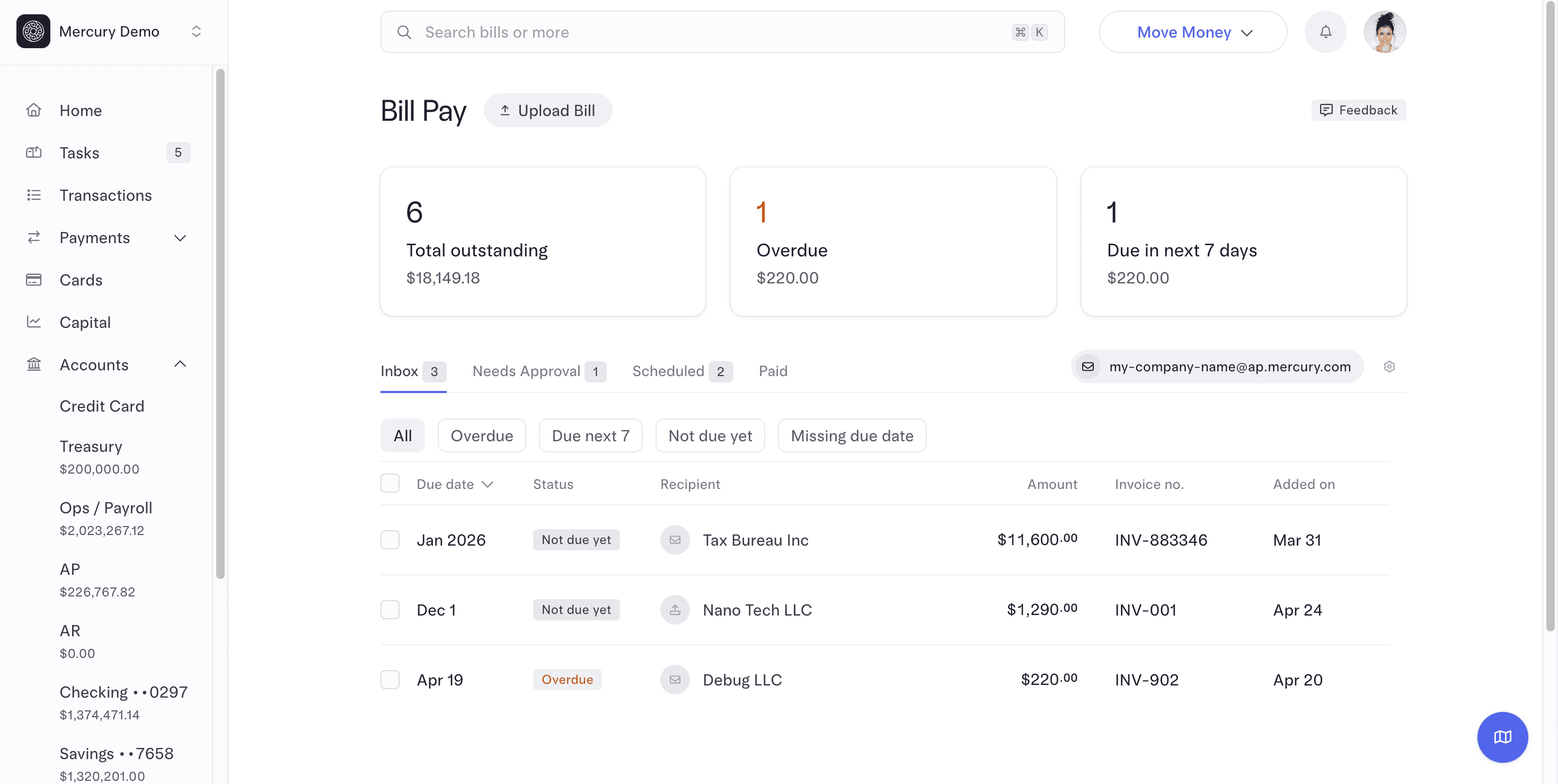
Paying bills with Mercury is easy, from adding vendors to scheduling payments. Here’s what to expect from Mercury Bill Pay.
- Unlimited bill payments
- Set custom approval rules for bill payments
- Schedule bill payments
- Schedule recurring payments
- Pay your way (ACH, wire transfers, or checks)
- Bill pay automations including automated bill scanning and duplicate bill detection
- Email your bills to Mercury, upload bills, or drag and drop to extract vendor information
- View scheduled, overdue, and upcoming payments in your dashboard
- Preapproved vendor lists to help prevent unauthorized payments
- Direct GL-code categorization and accounting sync
Invoices
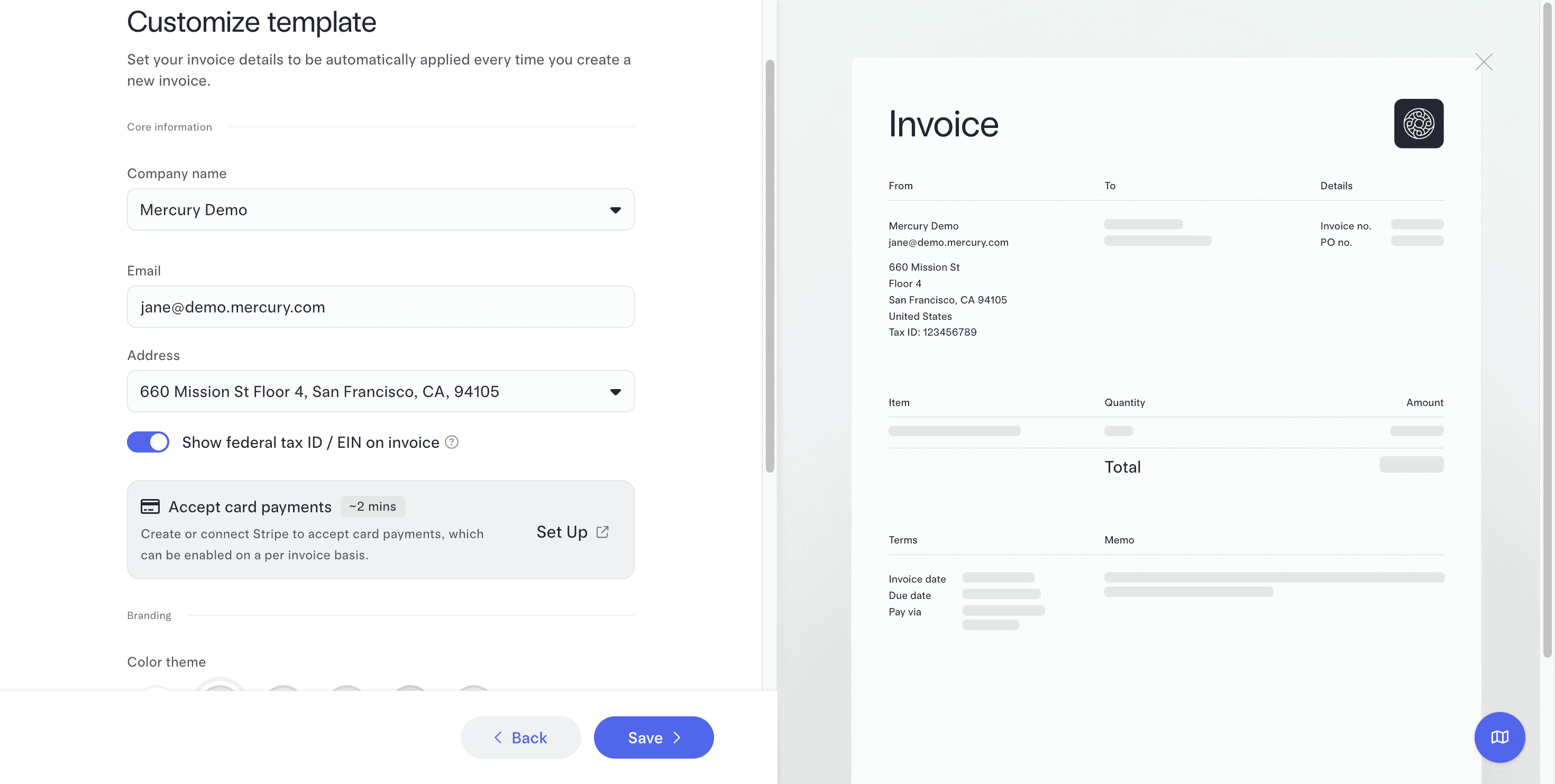
Mercury doesn’t have the most advanced invoicing, but what it lacks in features and customizations, it makes up for in simplicity and ease of use.
Highlights include:
- Unlimited free invoices
- Credit card, Apple Pay, Google Pay, ACH transfer, wire, and paid-plan ACH debit acceptance
- Invoice status tracking
- Payment reminders
- Customer management
- Automatic payment matching
- Team permissions
- Recurring invoicing and an invoicing API on paid plans
Contact Management
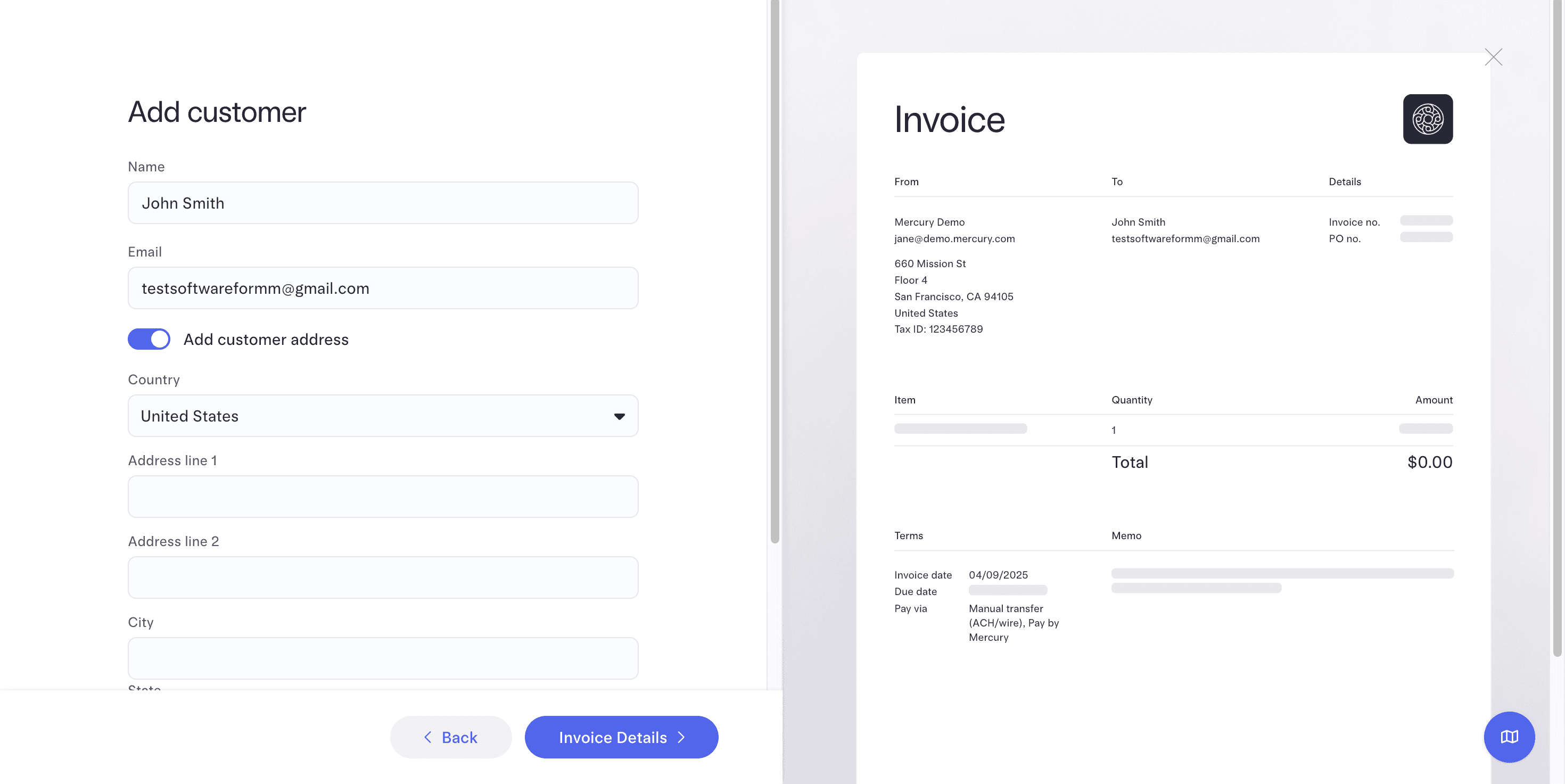
Mercury’s contact management feature is simple. You can add customer info like names, email addresses, and mailing addresses before paying bills or sending invoices.
Mercury Bill Pay Customer Service
| Customer Service4.8 |
|---|
| Personal Support 4.8 |
| Self-Service 4.8 |
Mercury offers a number of ways to get in touch.
| Mercury Bill Pay Customer Service | Availability |
|---|---|
| Phone Support | |
| Email Support | |
| Support Tickets | |
| Live Chat | |
| Dedicated Support Representative | Mercury Pro or $10M+ account balance |
| Knowledge Base or Help Center | |
| Videos & Tutorials | |
| Company Blog | |
| Social Media |
If you subscribe to Mercury Pro or have balances of $10 million or more, you’ll have a dedicated relationship manager.
Mercury does offer a few additional resources for the help you need, including a company blog, YouTube videos, and profiles on X/Twitter, LinkedIn, and Instagram.
Customers seem pleased overall with the quality of support they receive from Mercury. However, there are a few complaints regarding slow responses.
Mercury Bill Pay Reviews
| User Reviews4.1 |
|---|
| User Feedback 4.0 |
| Review Site Aggregate 4.1 |
Mercury receives mostly positive reviews online, although there are some complaints. One thing worth noting is that most of the complaints are centered on banking services and don’t specifically address Mercury Bill Pay.
Mercury is not accredited by the BBB, but it holds an A+ rating. On Trustpilot, Mercury receives a score of 3.9 out of 5 stars (based on 2,500+ reviews).
Negative Mercury Bill Pay Reviews & Complaints
- Sudden account closures
- Issues with logging in
- Long transfer times
Positive Mercury Bill Pay Reviews
- Good customer support
- Easy to use
- No monthly fees
- Good features and automations
Is Mercury Bill Pay Secure?
Security measures are in place to protect your personal data and accounts. Some of the security features Mercury offers include:
- Multi-factor authentication
- Device verification and HIBP
- Dark web monitoring
- SOC 2 Type II compliance
Final Verdict: Is Mercury Bill Pay Worth It?
Mercury is primarily known for its banking¹ services with accounting features like bill pay and invoicing mixed in. Combined, that makes for a pretty great product.
While you shouldn’t sign up for Mercury solely for Bill Pay, it’s a great option if you need business checking and savings accounts. When integrated with QuickBooks, Xero, or NetSuite, it’s an even more powerful tool for your business. With its IO business credit cards,² it’s also a great way to manage employee spending and simplify reimbursements — all while earning cash-back rewards.
If you’re looking for robust accounting software, we recommend looking elsewhere, starting with our list of the best accounting software for small businesses. However, if you want a platform that combines business banking, bill payments, and expense management, Mercury is worth a look.
Erica Seppala
Editor & Senior Staff Writer at Merchant Maverick
Erica has been writing about small business finance and technology since 2008. She joined Merchant Maverick in 2018 and specializes in researching and reviewing business software, financial products, and other topics to help small businesses manage and grow their operations. Her expertise has been cited in MSN, Reader's Digest, Vox, U.S. News & World Report, and Real Simple. She is a Certified ProAdvisor for QuickBooks Online and QuickBooks Payroll, a graduate of Limestone University, and currently resides in Greenville, South Carolina.
View Erica Seppala's professional experience on LinkedIn.

Latest posts by Erica Seppala (see all)
- Employment Hero Review - June 11, 2026
- How To Start A Business - April 30, 2026
- Finix Review - April 7, 2026
- What Is Sam’s Club Point Of Sale By Clover? - September 8, 2025
- What Is Costco Merchant Services? - September 8, 2025
To learn more about how we score our reviews, see our Invoicing Software Rating Criteria.