
Square Invoices Review
Square Invoices is a free invoicing solution that makes it easy for small businesses to send invoices and accept online payments.
-
WRITTEN & RESEARCHED BY
Editor & Senior Staff Writer
Last updated onUpdated
-
REVIEWED BY
Expert Contributor


Our content reflects the editorial opinions of our experts. While our site makes money through referral partnerships, we only partner with companies that meet our standards for quality, as outlined in our independent rating and scoring system.
Square Invoices

| Total Rating |
4.2 |
|---|---|
| Pricing4.6 | |
| Ease Of Use5.0 | |
| Features2.7 | |
| Customer Service5.0 | |
| User Reviews4.4 | |
Invoice Limit
UnlimitedPricing
$0 - $149/monthBusiness size
Small to mid-sized businessesGet a free card swiper from Square at no cost when you create a free account. Claim your card reader.
Square Invoices At A Glance
- Free invoicing software within the Square ecosystem
- Access to the full Square Dashboard
- Extensive integrations
Pros
- No monthly fees
- Easy to use
- Strong mobile apps
- Strong invoicing & payment features
- Numerous integrations
Cons
- Limited project management features
- No multicurrency support
- Unsuitable for high-risk businesses
Square recently consolidated all of its industry-specific products — including Square Invoices — into three main plans: Square Free, Square Plus, and Square Premium.
Invoicing features are no longer part of a separate plan and are now included within Square’s unified pricing structure.
Table of Contents
What Is Square Invoices?
Square Invoices is Square’s invoicing solution that gives businesses a simple way to create invoices, accept online payments, track sales, and manage customers. Because it’s part of the Square ecosystem, users also have access to additional business tools through the Square Dashboard.
Unlike traditional invoicing software, Square Invoices focuses on payments rather than project management or advanced service-based workflows. It also lacks multicurrency support and offers more limited tax features than some competitors.
Where Square stands out is its seamless payment processing, free POS software, inventory management, and sales reporting. For businesses that already use Square — or want an easy way to invoice customers and accept payments — it’s one of the strongest free invoicing solutions available.
Square Invoices Pricing
| Pricing4.6 |
|---|
| Software Plans 5.0 |
| Pricing Transparency 5.0 |
| Pricing Customization 3.0 |
When you sign up for a Square account, you’ll get access to the Square Dashboard (where you’ll find the invoicing feature). A Square account is completely free, but processing fees apply if you accept online invoice payments.
You’ll also have to pay for a monthly Square subscription if you want more advanced invoicing features and automations.
| Square Invoices Plans | Price | When To Use |
|---|---|---|
| Square Free | $0/month | If you have basic invoicing needs for your small business |
| Square Plus | $49/month | If you want discounted processing fees and more customization options |
| Square Premium | $149/month | If you advanced features and 24/7 support |
Square Free Plan
For invoicing, Square Free Plan includes:
- Invoices
- Recurring invoices
- Deposits
- Automatic payment reminders
- Project workspace & dashboard
- Contracts
- Contract templates
- e-Signatures
- Estimates
- Reports
Square Plus Plan
The Plus plan includes everything in the Free plan, plus:
- Reduced processing rates for online & in-person payments
- Custom invoice templates
- Batch invoices
- Payment schedules
- Custom contract fields
- Multi-package estimates
- Automatically convert estimates to invoices
Square Premium Plan
The Square Premium plan does not have any additional invoicing features when compared to the Plus plan. However, it does have more advanced features in other areas, including 24/7 phone support and additional features and reports for retail shops, restaurants, and service-based businesses.
Is Square Invoices Easy To Use?
| Ease Of Use5.0 |
|---|
| Initial Setup 5.0 |
| Software Reliability 5.0 |
| Everyday Use 5.0 |
| Integrations 5.0 |
Overall, Square Invoices is extremely easy to use. The UI is modern and well-organized, and the features are intuitive and easy to navigate. There’s a Getting Started dashboard to help you get up and running, and there’s a built-in help center if you need any additional assistance along the way.
If you want to take invoicing on the go, Square has you covered with its great mobile apps.
Square offers 100+ integrations for accounting, eCommerce, inventory, healthcare management, and more. API is available for developers.
Square Invoices Features
| Features2.7 |
|---|
| Invoicing Basics 2.8 |
| Invoice Automations 4.5 |
| Inventory 5.0 |
| Currency & Languages 0.0 |
| Time Tracking 0.0 |
| Reporting 3.0 |
| Accounting & Bookkeeping 1.0 |
Square offers an incredible number of features, including some unique additions that you won’t find anywhere else.
However, Square Invoices is missing some invoicing features you’ll find with most of its competitors, such as expense tracking, built-in time tracking, and projects.
| Square Invoices Features | Availability |
|---|---|
| Customizable Invoices | |
| Estimates | |
| Client Portal | |
| Contact Management | |
| Expense Tracking | |
| Multilingual Invoicing | |
| Invoice Scheduling | |
| Automatic Invoice Reminders | |
| Inventory | |
| Time Tracking | |
| Project Management | |
| Sales Tax Support | |
| Payment Gateway Integrations | |
| Number Of Reports | 15+ |
Here’s an overview of what the software can do:
Dashboard
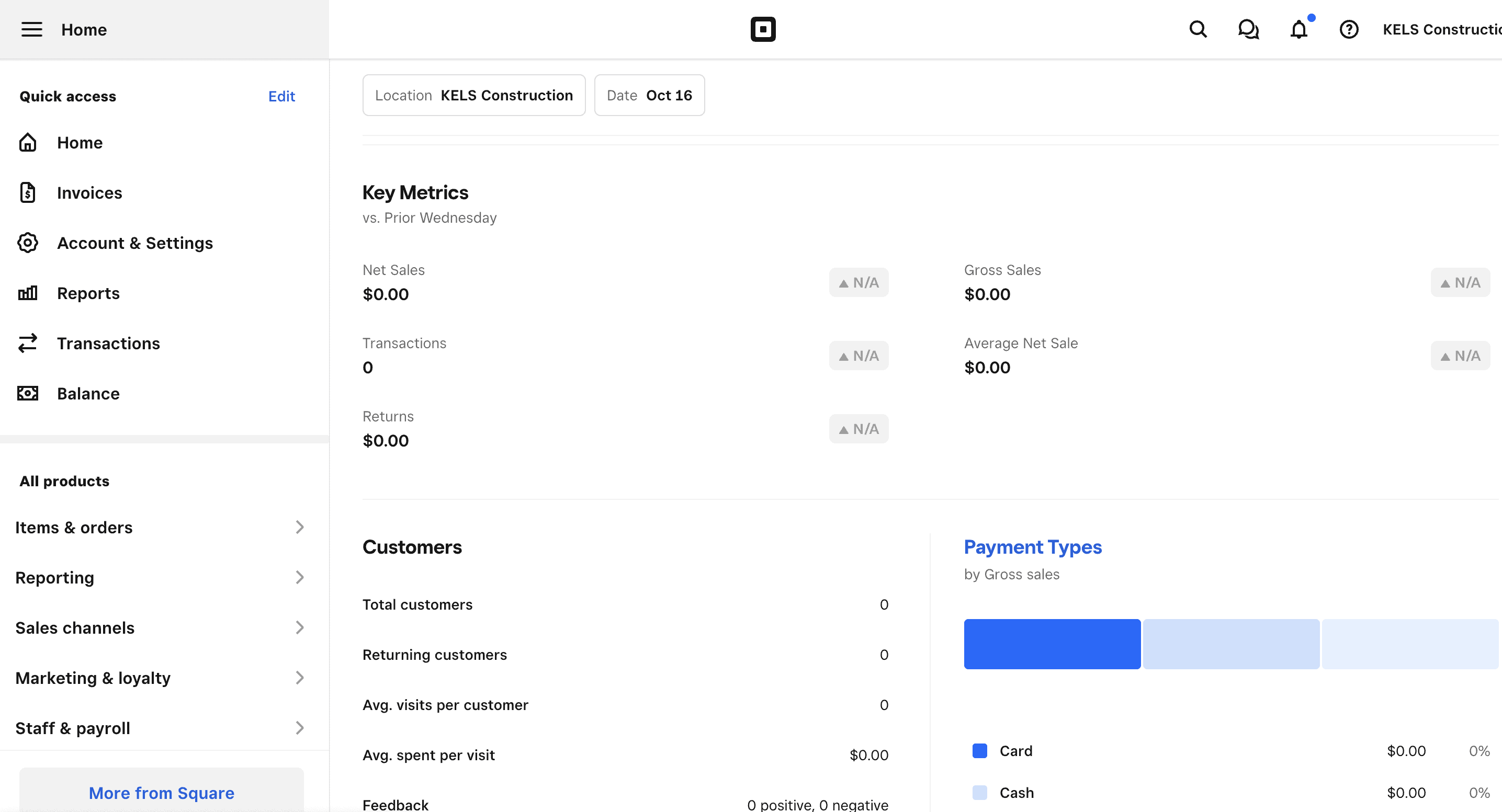
Once you finish setting up your account, you’ll be taken to your home dashboard. This dashboard highlights your deposits, gross sales, payment methods, invoices, payroll, top items by sales, and more. You can customize your dashboard with 15 different widgets.
Invoicing & Estimates
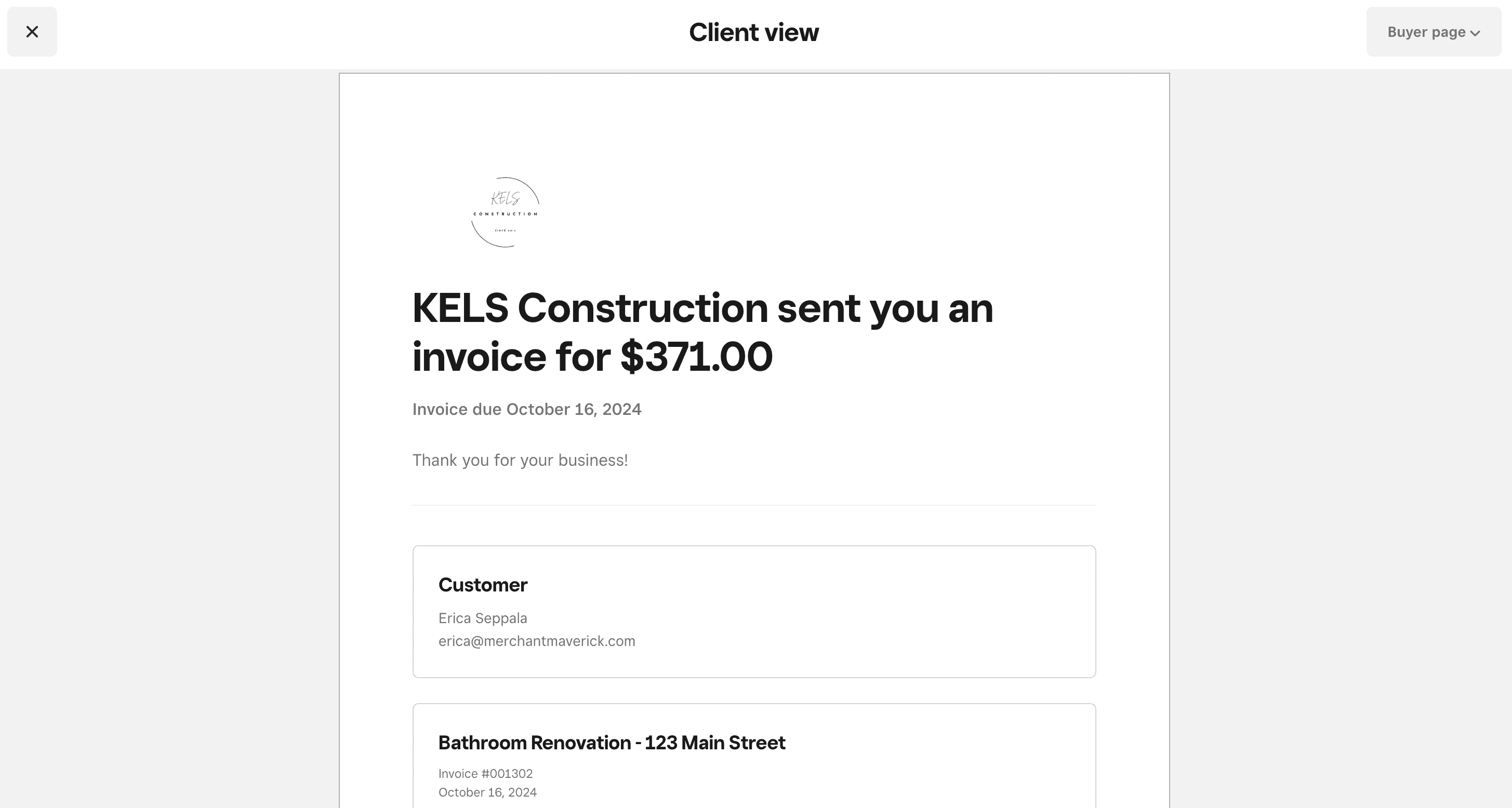
While not the most advanced invoicing solution on the market, Square does invoicing well. Standout features include:
- Single template with customizable logo and color
- Invoice tracking
- Automatic invoice reminders
- Recurring invoices
- Auto-scheduling
- Batch invoicing
- Add attachments
- Add discounts
- Set sales tax
- Add a tip
- Partial payments
- Create estimates & easily convert to invoices
Inventory
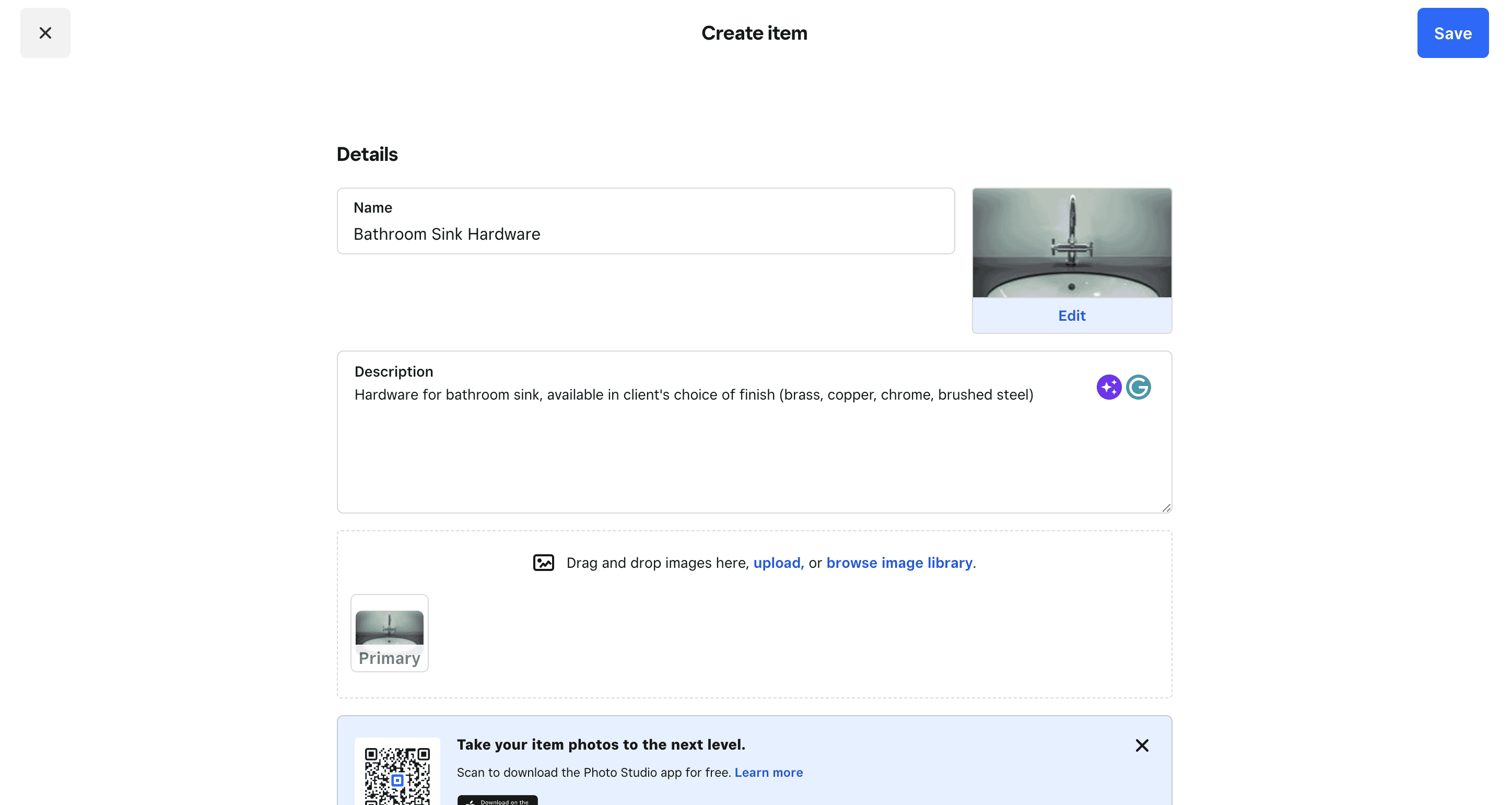
Square has a pretty great inventory feature that’s easy to use. With this feature, you can:
- Manually add or import items
- Add basic inventory information
- Include a photo, SKU, default sales tax rates, and product variations
- Create modifiers for custom orders
- Create a dining menu
- Monitor comps and voids
- Create item categories
- Set low-stock alerts
- Connect inventory to your eCommerce platform
Square Invoices Customer Service & Support
| Customer Service5.0 |
|---|
| Personal Support 5.0 |
| Self-Service 5.0 |
Square offers several great support options, and representatives are generally kind and knowledgeable. Phone support is limited to business hours during the week, but Premium accounts have access to it 24/7.
| Square Invoices Customer Service | Availability |
|---|---|
| Phone Support | |
| Email Support | |
| Support Tickets | |
| Live Chat | Chatbot |
| Dedicated Support Representative | |
| Knowledge Base or Help Center | |
| Videos & Tutorials | |
| Company Blog | |
| Social Media |
Square gets it right with its help center and has tons of guides for using the software. Email support, a Square Community to connect with other Square users, in-software help, YouTube tutorials, and a company blog are also available.
Square also maintains active profiles on X, Facebook, and Instagram.
User Reviews
| User Reviews4.4 |
|---|
| User Feedback 4.0 |
| Review Site Aggregate 4.7 |
Square reviews are a mixed bag, but it’s important to note that not all user feedback is specific to Square Invoices. Square has had over 1,100 complaints on the BBB over the past year, and the company receives a rating of just 1.1/5 stars on Consumer Affairs.
On the plus side, Square Invoices specifically has good ratings across several review sites, including a rating of 4.7/5 (based on 120+ reviews) on GetApp.
Negative Reviews & Complaints
Here are some of the recurring issues users experience:
- Limited invoice templates & customizations
- Emailed invoices end up in spam folders
- Expensive processing fees
- Cancelled accounts & fund holds
Positive Reviews & Testimonials
Here are some of the things users love about Square Invoices:
- Affordable invoicing solution
- Professional invoice template
- Time-saving automations
- Invoice tracking
- Easy to use
- Mobility
Is Square Invoices Secure?
Square uses data encryption and two-factor authentication to protect your company’s data. Data is stored in a secure, undisclosed facility. The company is PCI-DSS compliant as well. Square also uses risk visualization to “stop fraud before it happens.”
This feature, in particular, is a double-edged sword. While it’s nice that the company watches out for unusual activity, this often leads to funds being held or accounts being closed — even when a transaction is legitimate.
What does all of this mean for your business in terms of security? Make sure any emails you receive are actually from Square, and use Square Secure to help prevent your funds from being held. Check out Square’s help center for additional resources on recognizing and reporting phishing scams.
Square Secure
Square has a built-in feature called Square Secure that helps protect your company in the case of disputes or chargebacks. The way Square puts it, the bank fights for the customer, but Square fights for you — the seller.
This service is also incredibly important to help safeguard your funds. As we mentioned in the negative reviews section, users have had issues with their funds being held or accounts being closed entirely for abnormal or large transactions. You can use Square Secure to provide sample invoices and legal documentation about your business’s proceedings so Square can better understand what “normal processing” looks like for your business.
Final Verdict: Is Square Invoices Worth It?
Square offers pretty decent invoicing, considering it’s more known for its POS and payment processing. Square has one of the best point of sale apps you’ll find, with advanced inventory, detailed customer analytics, and sales insights that you won’t find with most invoicing software apps.
Square also offers an attractive invoice template and makes it incredibly easy for customers to pay invoices online. The auto-schedule invoicing feature and strong mobile apps are nice additions. For businesses in need of these features, we give Square two thumbs up.
Something else to consider is that small business owners will frequently purchase invoicing software and integrate it with Square to accept online payments. Square cuts out the middleman and saves you quite a bit of money in the process. The software is ideal for business owners looking for an all-in-one invoicing and payment processing solution and is ideal for product-based businesses.
Square is missing project management, which could be a dealbreaker for certain businesses. There’s also no expense tracking or multicurrency support. However, if you can live without these features, get started with a free Square account and take the software for a spin.
Erica Seppala
Editor & Senior Staff Writer at Merchant Maverick
Erica has been writing about small business finance and technology since 2008. She joined Merchant Maverick in 2018 and specializes in researching and reviewing business software, financial products, and other topics to help small businesses manage and grow their operations. Her expertise has been cited in MSN, Reader's Digest, Vox, U.S. News & World Report, and Real Simple. She is a Certified ProAdvisor for QuickBooks Online and QuickBooks Payroll, a graduate of Limestone University, and currently resides in Greenville, South Carolina.
View Erica Seppala's professional experience on LinkedIn.

Latest posts by Erica Seppala (see all)
- Employment Hero Review - June 11, 2026
- How To Start A Business - April 30, 2026
- Finix Review - April 7, 2026
- What Is Sam’s Club Point Of Sale By Clover? - September 8, 2025
- What Is Costco Merchant Services? - September 8, 2025
To learn more about how we score our reviews, see our Invoicing Software Rating Criteria.