


ZipBooks Accounting Software Review
With an intuitive interface and a free plan available, ZipBooks provides a good accounting software option for small business owners.
-
WRITTEN & RESEARCHED BY
Editor & Senior Staff Writer
Last updated onUpdated
-
REVIEWED BY
Expert Contributor


Our content reflects the editorial opinions of our experts. While our site makes money through referral partnerships, we only partner with companies that meet our standards for quality, as outlined in our independent rating and scoring system.
ZipBooks
| Total Rating |
4.0 |
|---|---|
| Pricing4.5 | |
| Ease Of Use2.9 | |
| Features3.9 | |
| Customer Service4.8 | |
| User Reviews4.2 | |
Accounting Method
Accrual & Cash BasisPricing Range
$0-$35/monthBusiness Size
Ideal for small businesses with growth potential in the near futureZipBooks At A Glance
- Exceptionally clean and user-friendly interface
- Full feature set at a low price
- Unique reporting features that can help you analyze how efficiently you’re running your business.
Pros
- Free pricing plan
- Numerous features
- Good customer support
- Easy to use
Cons
- Limited invoice customizations
- No inventory management
- No phone support
Table of Contents
What Is ZipBooks?
ZipBooks accounting software offers strong features, affordable pricing, and consistent updates. ZipBooks makes a point to simplify the confusing lingo and complexity of accounting by automating as many processes as it can. This accounting solution offers an intuitive, color-coded design with a number of features, including invoicing, contact management, project management, and time tracking.
ZipBooks is uniquely programmed to give you business advice and health scores based on the data you’ve entered. There is also a great free plan and excellent customer support.
ZipBooks isn’t without its drawbacks, though. There are hardly any invoice template customizations or integrations, and there’s no real inventory feature. However, the company is good about listening to customer feedback and has addressed several customer complaints through its updates.
ZipBooks Pricing
| Pricing4.5 |
|---|
| Software Plans 5.0 |
| Pricing Transparency 5.0 |
| Pricing Customization 0.4 |
ZipBooks offers three standard pricing plans. Payments are made monthly, and you can cancel your plan at any time. There is a free 30-day trial of all plans. No credit card information is required.
| ZipBooks Plans | Price | When To Use |
|---|---|---|
| ZipBooks Starter | $0/month | If you have basic reporting needs but want unlimited invoicing capabilities |
| ZipBooks Smarter | $15/month | If you have multiple bank accounts and up to five team members |
| ZipBooks Sophisticated | $35/month | If you want unlimited users and have advanced reporting needs |
Here’s what you need to know about ZipBooks’ main pricing plans.
ZipBooks Starter
The ZipBooks Starter plan costs $0/month and includes these features:
- Unlimited invoicing
- Custom quotes and estimates
- Contact management
- Live bank feeds for one bank account
- Business health scores
- Accept payments through Square or PayPal
- Multicurrency support
- One user
ZipBooks Smarter
The ZipBooks Smarter plan is priced at $15/month and includes everything from the Starter plan, plus:
- Recurring invoices
- Automated payment reminders
- Unlimited live bank feeds
- Automated categorization
- Time tracking
- Items list
- Project management
- Chat support
- Up to five team members
ZipBooks Sophisticated
The ZipBooks Sophisticated plan costs $35/month and includes everything from the Smarter plan, plus:
- Class tracking
- Document sharing
- Advanced reporting
- Advanced intelligence
- Unlimited users
ZipBooks also has an Accountant plan that includes everything from the Sophisticated plan, plus features such as time tracking, client management, and data migration. Contact ZipBooks for personalized pricing.
Overall, ZipBooks has great pricing, especially considering that its most expensive plan is the same cost as QuickBooks Online’s lowest-priced plan.
There are no additional add-ons, which is a drawback if you want extra services like live bookkeeping support or built-in payroll (although a Gusto integration is available for payroll). There’s also no option to purchase an annual plan upfront at a discount, which is offered by some of ZipBooks’ competitors.
Despite these minor drawbacks, we give the company a solid score of 4.5/5 for its extremely competitive pricing.
Is ZipBooks Easy To Use?
| Ease Of Use2.9 |
|---|
| Initial Setup 3.4 |
| Software Reliability 5.0 |
| Everyday Use 2.0 |
| Integrations 2.9 |
ZipBooks has a beautifully designed interface that is generally easy to navigate. The software is well-organized, and there is a decent amount of support in case you get stuck. ZipBooks also has fast loading times, which makes it a joy to use.
Importing your accounts is quick and easy, and it even auto-categorizes them for you, saving tons of time. Everything is accessible from the home page, and detailed reports and statements are just a click away and conveniently color-coded. You can also go deeper into a specific statement simply by clicking on it.
Invoicing is also simple. The software walks you through adding items for your customers and saving that information for the future. There is also a nice feature that allows you to create and customize your business profile, giving customers access to your contact information and reviews of your products.
One area where ZipBooks is lacking is integrations. ZipBooks only has 7 third-party integrations, including Google Drive, PayPal, Slack, and Gusto. ZipBooks has also discontinued its mobile app, although the company states it is working on improvements to bring the app back in the future.
While ZipBooks is easy to use and set up, it falls behind its competitors in terms of mobile apps, bookkeeping support options, and integrations. This brought the software’s rating in this category down to 2.9/5.
ZipBooks Features
ZipBooks offers traditional accounting features along with unique business advice tailored specifically to your company.
| ZipBooks Features | Availability |
|---|---|
| Budgeting | |
| Tax Support | |
| Invoicing | |
| Estimates | |
| Client Portal | |
| Contact Management | |
| Expense Tracking | |
| Bank Reconciliation | |
| Chart Of Accounts | |
| Accounts Payable | |
| Inventory | |
| Time Tracking | |
| Project Management | |
| Number Of Reports | 17 |
| Number Of Integrations | 7 |
ZipBooks has an overall solid set of features, although you’ll have to upgrade to a more expensive plan to take advantage of all features.
It does lack some features that you’d find with other software, such as journal entries, auto-categorization of transactions, and custom bank rules. Still, ZipBooks covers pretty much all of the basics, leading to our score of 3.9/5 in this category.
Here’s an overview of everything ZipBooks has to offer.
Invoices & Estimates
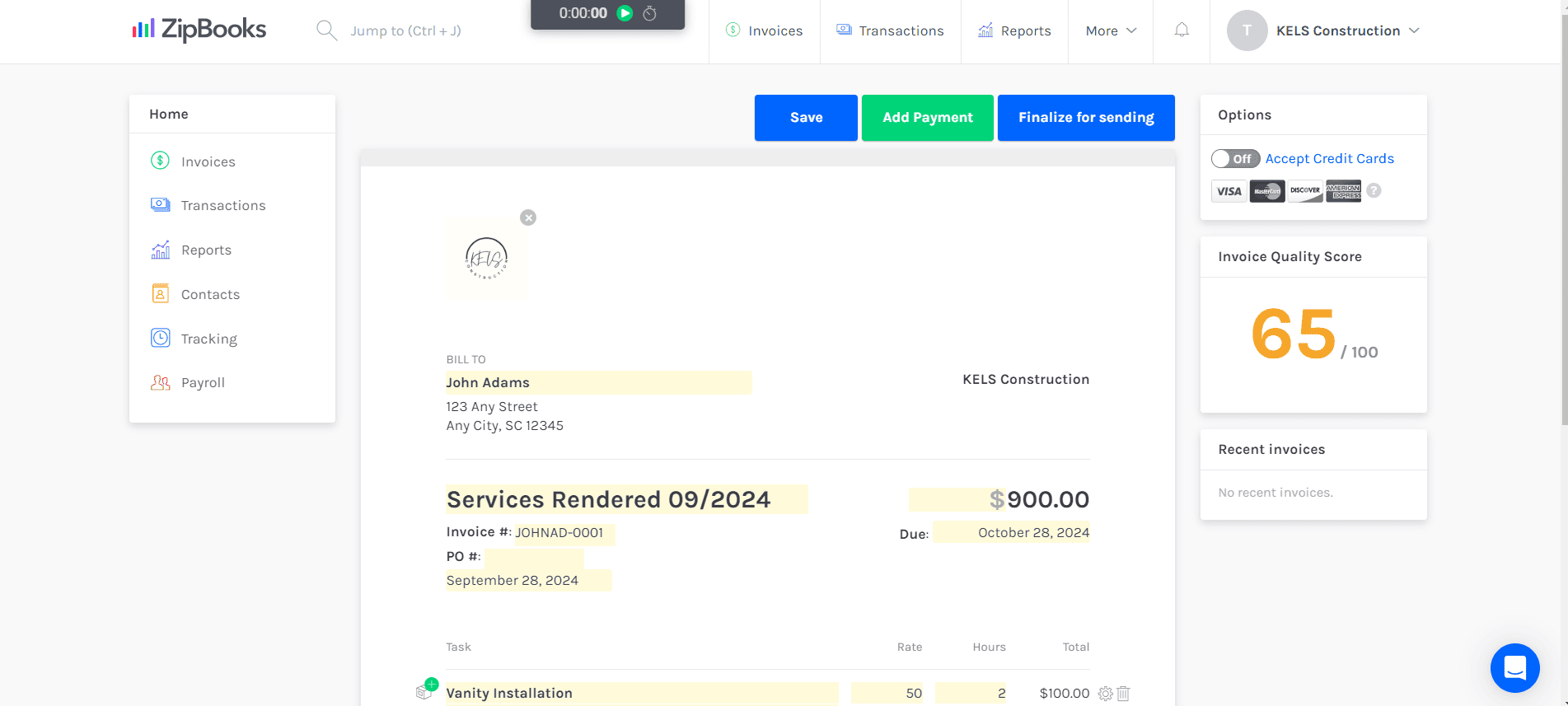
Using the invoice feature is quick and easy. There is only one invoice template, and only a few customization options. However, there are a few standout features, including:
- Unlimited invoicing, even on the free plan
- Unlimited estimates
- Convert estimates to invoices with one click
- Client portal for viewing and paying invoices
- Set default note, terms, and email messages
- Invoice reminders (Smarter and Sophisticated plans)
- Set recurring invoices (Smarter and Sophisticated plans)
- Default email messages for invoices and estimates
- Invoice health score to show how your invoices can be improved
Bookkeeping
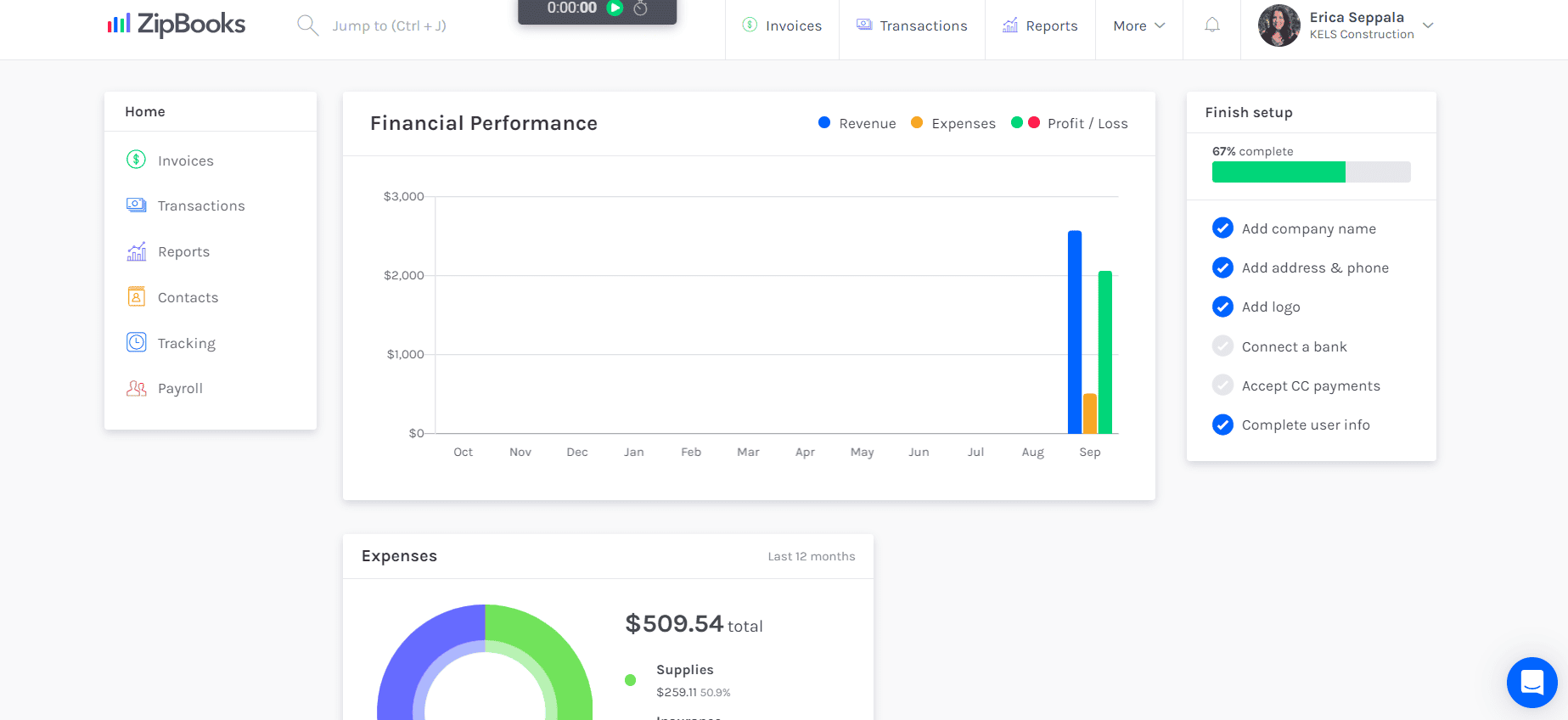
ZipBooks has plenty of bookkeeping features, such as:
- Dashboard with charts showing financial performance, accounts receivable, business health scores, and more
- Bank reconciliation
- Add transactions manually
- Import bank statements to add transactions
- Connect to your bank account
- Split transactions
- Add attachments to transactions
- Accounts payable
- Chart of accounts (customizable for Smarter and Sophisticated plan subscribers)
- Purchase orders
- Sales receipts (Smarter and Sophisticated plans)
- Class tracking (Sophisticated plan)
- Multicurrency support (160+ currencies)
- Import contacts, bank statements, invoices, and a chart of accounts
- Export transactions and reports
- Business intelligence features including business health scores, invoice health scores, and personalized recommendations
Inventory
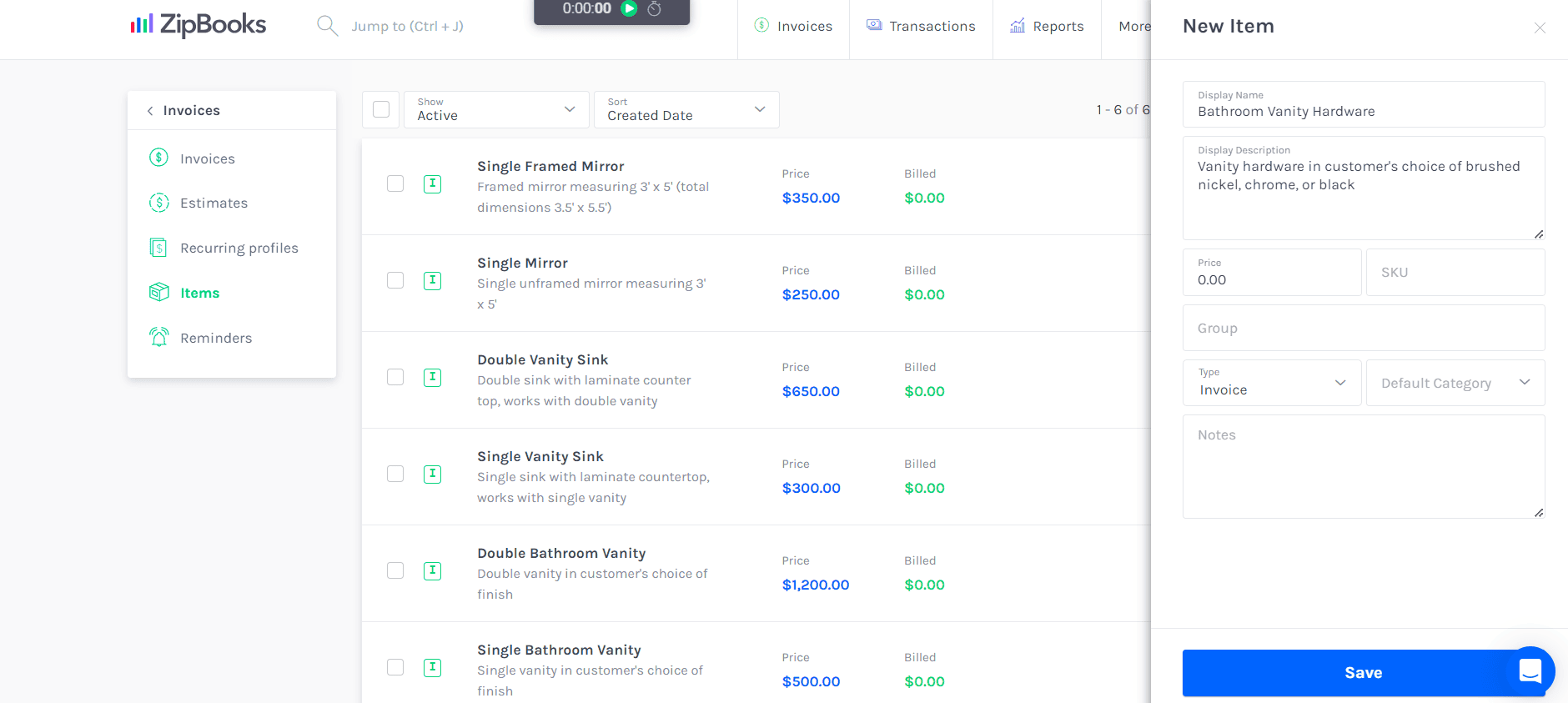
ZipBooks doesn’t have an advanced inventory management feature like some of its competitors. However, it does have an items list with descriptions, prices, SKUs, default categories, and types (invoices or bills).
An item can’t be used on both invoices and bills; you’d have to create separate items for both purposes. There is also no inventory tracking available.
Project Management

ZipBooks has a project management feature. Highlights of this feature include:
- Basic job costing
- Add contacts, billing methods, budgets, and descriptions to projects
- Break down budgets into tasks
- Attach expenses and time to tasks
- Assign projects to employees
- Invoice by project
ZipBooks Customer Service
| Customer Service4.8 |
|---|
| Personal Support 4.2 |
| Self-Service 5.0 |
ZipBooks provides great customer support with a good-sized collection of learning and support resources. In-software messaging is available during business hours, and, in my experience, responses are quick and thorough.
| ZipBooks Customer Service | Availability |
|---|---|
| Phone Support | |
| Email Support | |
| Support Tickets | |
| Live Chat | In app |
| Dedicated Support Representative | |
| Knowledge Base or Help Center | |
| Videos & Tutorials | |
| Company Blog | |
| Social Media |
I never had to wait for an email response for longer than a day, and several inquiries were responded to within an hour.
Unfortunately, phone support is not available. However, there are other ways to get in touch, including:
- Email: You can email the company for help.
- In-Software Support: There is a chat feature within the ZipBooks software. The company usually responds within minutes to inquiries made during business hours, and this feature is highly rated among customers.
- Help Center: ZipBooks offers a help center with tons of how-to articles and an FAQ section.
- Schedule A Demo: If you’d like to learn more about the software, you can schedule a demo with ZipBooks.
- YouTube: ZipBooks has a YouTube channel, but there are only a handful of old videos on its account.
- ZipBooks Blog: Zipbooks has an incredibly expansive blog covering topics like accounting, small business advice, taxes, and more. Unfortunately, these bits of wisdom are hard to find, as there is no search bar.
- Social Media: ZipBooks maintains active Facebook, X/Twitter, and LinkedIn pages.
Overall, ZipBooks offers solid customer support, earning it a rating of 4.8/5.
ZipBooks Reviews
| User Reviews4.2 |
|---|
| User Feedback 4.0 |
| Review Site Aggregate 4.3 |
Overall, ZipBooks gets positive ratings among its users. ZipBooks earns a rating of 4.5/5 (based on 100+ reviews) on Software Advice, 4.7/5 (based on 85+ reviews) on G2, and 7.3/10 (based on 20+ reviews) on TrustRadius.
Based on the quality and quantity of third-party reviews, we gave ZipBooks a score of 4.2/5 in this category.
Negative ZipBooks Reviews & Complaints
ZipBooks reviews are mostly positive, but there are a few complaints worth mentioning, including:
- Delays with invoice payments
- No inventory management
- Limited invoice customizations
- Limited reporting across the board (although, despite being limited, the feedback is still positive). There are a few complaints about the software, though, that are worth mentioning.
Positive ZipBooks Reviews
Overall, ZipBooks receives positive feedback across the board. Here is a collection of the most common points of praise.
- Easy to learn and use
- Aesthetically pleasing interface
- Good customer support
- Free plan
- Good amount of features, even on the free plan
Is ZipBooks Secure?
ZipBooks uses data encryption, redundancy, risk mitigation, and regular inspections to ensure security and prevent data loss. ZipBooks uses Google Cloud for its web hosting.
You can read more about ZipBooks’ security on its website.
Final Verdict: Is ZipBooks Worth It?
| ZipBooks Review Summary | |
|---|---|
| Accounting Method | Accrual & Cash Basis |
| Pricing Range | $0-$35/month |
| Pricing Range | $0-$35/month |
| Choose If You Need |
|
For such an affordable price, ZipBooks’ accounting software offers a lot to its users. A well-designed UI, good customer support, and a large selection of features are just a few things that make ZipBooks stand out from the crowd. Throw in more advanced features and support for unlimited users, and it’s easy to see why ZipBooks is a contender in the accounting software space.
However, there are a few drawbacks to the software. There are limited invoice templates and customizations, and the software lacks inventory management and traditional journal entries. There are minimal integrations, which may rule the software out for larger businesses.
The company’s constant updates are the reason for optimism that the software will become even better in the future. The software offers good features, strong customer support, competitive pricing, unlimited users for paid plans, and unique business insights. Overall, we recommend ZipBooks for small businesses and give it an overall rating of 4 out of 5 stars.
Schedule a demo or test out the software’s free trial to see if this option is right for you.
Not sure if ZipBooks is right for your business? Check out our picks for the best small business accounting software to find more options that may be a better fit.
Content Featuring ZipBooks
Erica Seppala
Editor & Senior Staff Writer at Merchant Maverick
Erica has been writing about small business finance and technology since 2008. She joined Merchant Maverick in 2018 and specializes in researching and reviewing business software, financial products, and other topics to help small businesses manage and grow their operations. Her expertise has been cited in MSN, Reader's Digest, Vox, U.S. News & World Report, and Real Simple. She is a Certified ProAdvisor for QuickBooks Online and QuickBooks Payroll, a graduate of Limestone University, and currently resides in Greenville, South Carolina.
View Erica Seppala's professional experience on LinkedIn.

Latest posts by Erica Seppala (see all)
- Employment Hero Review - June 11, 2026
- How To Start A Business - April 30, 2026
- Finix Review - April 7, 2026
- What Is Sam’s Club Point Of Sale By Clover? - September 8, 2025
- What Is Costco Merchant Services? - September 8, 2025
To learn more about how we score our reviews, see our Accounting Software Rating Criteria.



