
Paychex Review
If you have a small or medium-sized business and you're looking for payroll and a suite of additional HR and other business services, Paychex could be a great choice.
-
WRITTEN & RESEARCHED BY
Expert Contributor
Last updated onUpdated
-
REVIEWED BY
Editor & Senior Staff Writer


Our content reflects the editorial opinions of our experts. While our site makes money through referral partnerships, we only partner with companies that meet our standards for quality, as outlined in our independent rating and scoring system.
Paychex

| Total Rating |
4.1 |
|---|---|
| Pricing2.2 | |
| Ease Of Use4.4 | |
| Features4.6 | |
| Customer Service3.8 | |
| User Reviews3.9 | |
Payroll Processing Time
2 days (can pay for faster processing times)Pricing Range
$39/month + $5/employee or custom pricingBusiness Size
Self-employed contractors to enterprises with 1,000+ employeesPaychex At A Glance
- Paychex is payroll software designed to provide businesses with HR support, tax support, benefits administration, and payroll solutions.
- With an easy-to-use interface, onboarding support, and strong reporting features, Paychex is a solid option for businesses looking to manage multiple areas of their payroll and HR duties in a single platform.
- Although the company doesn’t publish its pricing online, Paychex offers different service packages to accommodate small to enterprise-sized businesses across various industries, depending on the business’s payroll needs.
Pros
- Easy to use
- Scalable
- Built-in onboarding and HR
- 2 days (can pay for faster processing times) payroll processing available
- Valid in all 50 states
Cons
- Non-transparent pricing
- Has many extra fees
Table of Contents
What Is Paychex?
Paychex is cloud-based payroll and HR software that provides payroll, HR, benefits administration, business insurance, retirement plans, health care, and more for small to enterprise-sized businesses.
Paychex’s most impressive features include strong employee management tools, direct deposit, 100+ reports, and employee onboarding support.
The downsides are non-transparent pricing, multiple add-on fees, and recurring customer complaints about payroll and tax issues.
Paychex Pricing
| Pricing2.2 |
|---|
| Software Plans 2.6 |
| Pricing Transparency 1.8 |
| Pricing Customization 2.1 |
Paychex doesn’t publish full pricing for all plans, doesn’t offer a traditional free trial, and has limited pricing customization options. Compared to similar solutions, such as Gusto or QuickBooks Online Payroll, Paychex’s starting pricing plan is affordable, but very limited by its employee cap.
Contact Paychex directly for pricing details on other plans.
Paychex’s base plan’s pricing is consistent with plans offered by other payroll software on the market. However, Paychex charges per payroll run, including off-cycle runs. Paychex lists payroll options starting at $39/month + $5/employee, but full pricing for higher-tier plans is not publicly available.
While no-contract plans may be available, users should review their agreement for any plan terms, notice requirements, or fees before signing up.
| Paychex Plans | Price | When To Use |
|---|---|---|
| Flex Select | Custom | If you need a dedicated payroll specialist to walk you through your payroll runs |
| Flex Pro | Custom | If you need accounting software integrations for your payroll software |
| Flex Enterprise | Custom | If you need advanced HR solutions, analytics, and insurance setup support |
Paychex Flex Select
Paychex Flex Select’s pricing is not published. The plan includes:
- Dedicated payroll specialist
- Paper checks, check-signing, or check logo services
- eLearning platform access
- Direct deposit
- Check-printing
- Free mobile app
- Employee self-service
- Reports
- General ledger service
- Garnishments (available as an add-on)
- Payroll tax support
- W-2s
- 1099s (extra cost)
- New-hire reporting
- Workers’ compensation insurance (available as an add-on)
- Compliance posters
- HR resource library and forms
- Financial wellness programs
- Tax credit services
- Employee paycards
- Employee assistance program
Paychex Flex Pro
Paychex Flex Pro’s pricing is not published. The plan includes everything from Flex Select, plus:
- Accounting software integrations
- State unemployment insurance services
- Onboarding tools
- Pre-employment screening
- Employee handbook tool
Paychex Flex Enterprise
Paychex Flex Enterprise’s pricing is not published. The plan includes everything from Flex Pro, plus:
- Custom analytics and reporting
- HR administration
- Online employee training
- Employee handbook resources
- Onboarding essential tools
- Custom analytic tools
- Professional support setting up SUI and workers’ compensation
Extra Paychex Costs & Fees
| Paychex Extra Costs | Price |
|---|---|
| Time Tracking | Varies |
| Employee Benefits | Varies |
| HR Packages | Varies |
| Hiring Services | Varies |
| Online Marketing | Varies |
| Business Insurance | Varies |
| Financing | Varies |
| Expense Management | Varies |
| Payment Processing | Varies |
| Tax Services | Varies |
| Professional Employment Organization (PEO) Services | Varies |
Paychex offers an incredible number of services, such as time tracking, business insurance, hiring services, payment processing, and more. Most of these services will integrate directly with your payroll dashboard, so you can manage many areas of your business in a single spot.
Paychex’s extra costs and fees can add up compared to payroll providers that include more features in their base plans. That said, the modular approach to business solutions allows larger businesses with sizable budgets to pay for only the services they need.
Is Paychex Easy To Use?
| Ease Of Use4.4 |
|---|
| Set Up 3.5 |
| Software Reliability 4.0 |
| Everyday Use 5.0 |
| Integrations 5.0 |
Paychex is generally easy to use, with a well-organized dashboard, mobile access, and support from Paychex representatives. Each major feature has its own place in the sidebar, making the platform relatively easy to navigate.
Paychex offers guided setup and implementation support on select plans, which can reduce the amount of setup work businesses need to handle themselves.
Paychex is cloud-based, so no downloads or installation is required.
Paychex Features
| Features4.6 |
|---|
| Payroll Processing 4.0 |
| Employee Management & PTO 5.0 |
| Time Tracking 5.0 |
| Payroll Tax Support 4.5 |
| Reporting & Tax Forms 5.0 |
| Onboarding & HR 5.0 |
| Benefits Administration 4.4 |
| Niche Features 5.0 |
Paychex offers a robust feature set for businesses that want payroll, HR, benefits, onboarding, time tracking, and compliance tools in one ecosystem.
However, several features cost extra or are only available on higher-tier plans, including faster payroll processing, time tracking, multistate payroll, and some HR tools.
| Paychex Features | Availability |
|---|---|
| Payroll Tax Support | |
| Auto-Schedule Payroll | |
| Bonus Payroll | |
| Off-Cycle Payroll | |
| Employee Management | |
| Paid Time Off | |
| Time Tracking | |
| HR Support | |
| Onboarding Support | |
| Benefits Administration | |
| Number Of Reports | 100+ |
| Number Of Integrations | 270+ |
| Number Of Users Supported | 1-1,000+ |
Ultimately, Paychex offers a robust suite of payroll features and solutions that are consistent with similar payroll software solutions.
Compared to other payroll software, Paychex is most similar to ADP in that it has a comprehensive feature set and extensive HR support. Check out our ADP vs. Paychex comparison for a breakdown of the differences between the two software options.
Payroll Processing
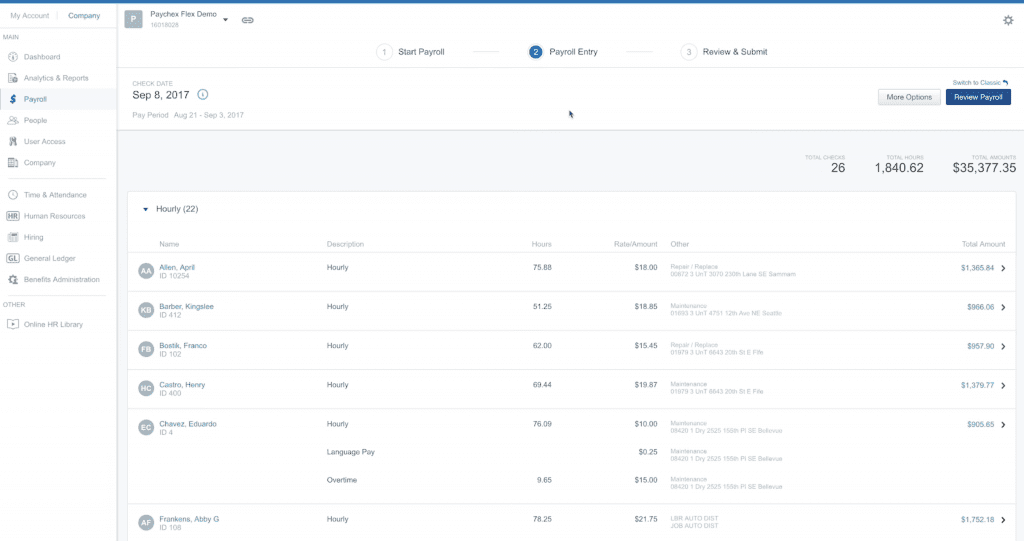
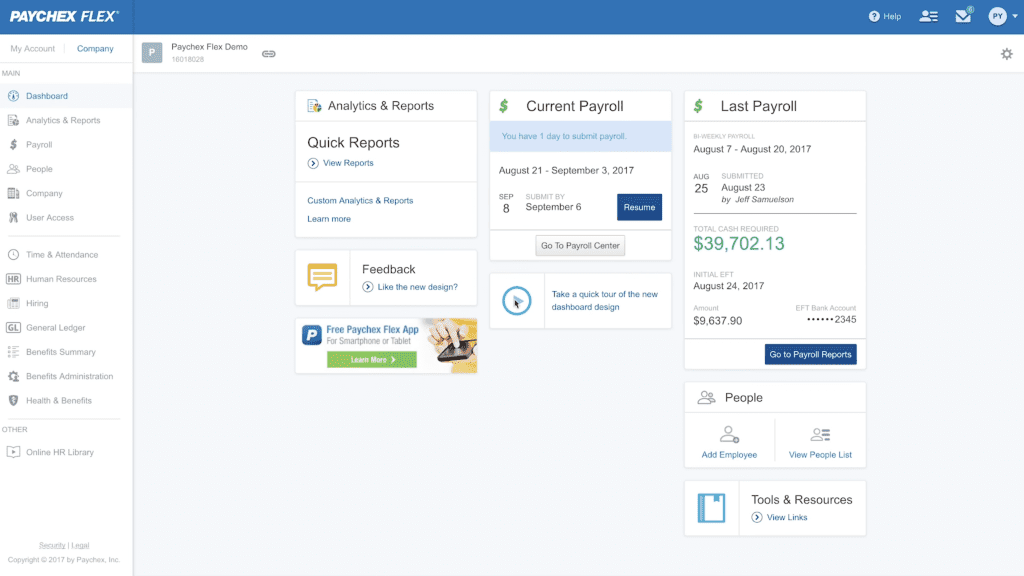
Paychex payroll processing takes two days (with faster options available at an extra cost). The software allows you to work on multiple payrolls at once, including future payroll, and you can run payroll from any device.
Some of Paychex’s most notable payroll processing features include:
- Mobile app
- Two-day payroll processing
- Same-day and ACH processing (extra cost)
- Direct deposit
- On-site check-printing
- General ledger report
- Multiple pay rates
- Off-cycle payroll (extra cost)
- Garnishments (not available for Flex Select)
- Dedicated payroll specialist (Flex Select and up)
- Accounting software integration (Flex Pro and up)
Employee Management & PTO
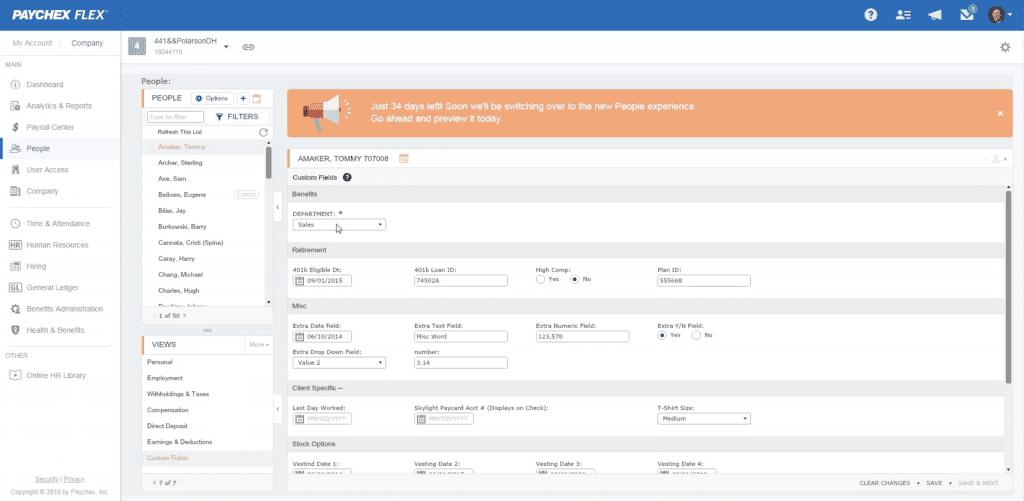
Paychex’s employee management feature is quite advanced and allows you to record personal information, employee history, direct deposit information, and more. You can add multiple employee pay rates and easily manage earnings and deductions.
Here’s a look at Paychex’s employee management and PTO features:
- Employee profiles
- Custom fields
- Employee portal
- Employee pay stub access
- PTO management (requires Paychex Time & Attendance add-on)
Time Tracking
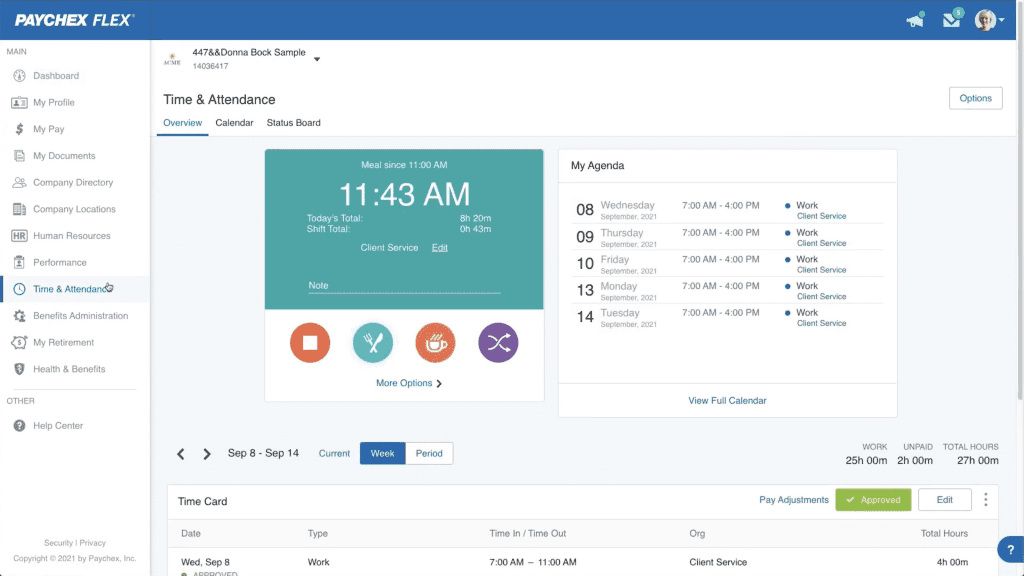
Paychex’s time-tracking features are limited to its add-on Flex Time. With the Flex Time add-on, you can manage your employee attendance and schedules anywhere you have internet access.
Paychex’s time tracking features include:
- Multiple time collection methods
- Employee self-service via mobile app
- Manage meals and breaks
- Timecard management
- Scheduling support
- Overtime rules
- Calendar integration
- Geolocation and geofencing
- Attendance alerts (Flex Time)
- Tips and reimbursements
Payroll Tax Support
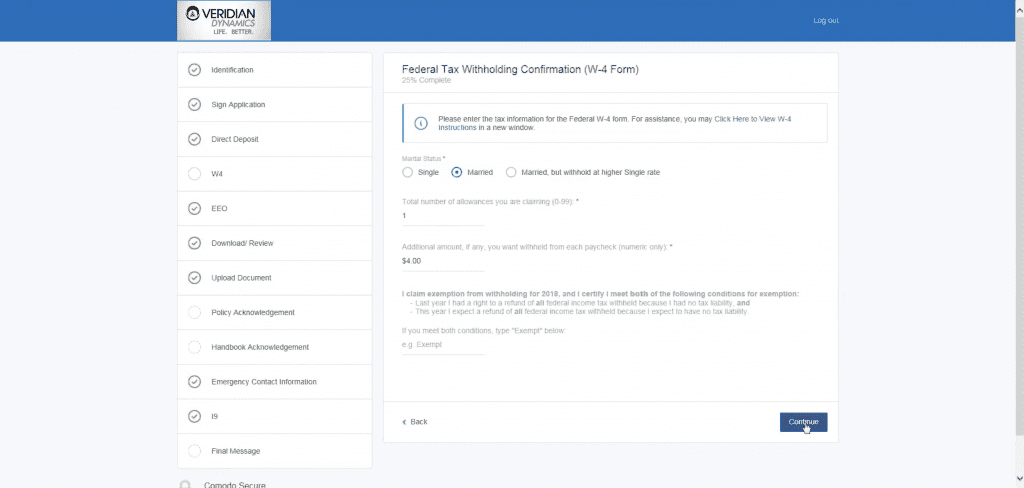
One of the best parts about Paychex payroll is that the company will handle calculating and filing your payroll taxes for you. The most notable payroll tax support features of Paychex include:
- The calculation, filing, and payment of federal, state, and local payroll taxes (may incur fees)
- W-2 tax form
- 1099 tax forms (extra cost)
Reporting
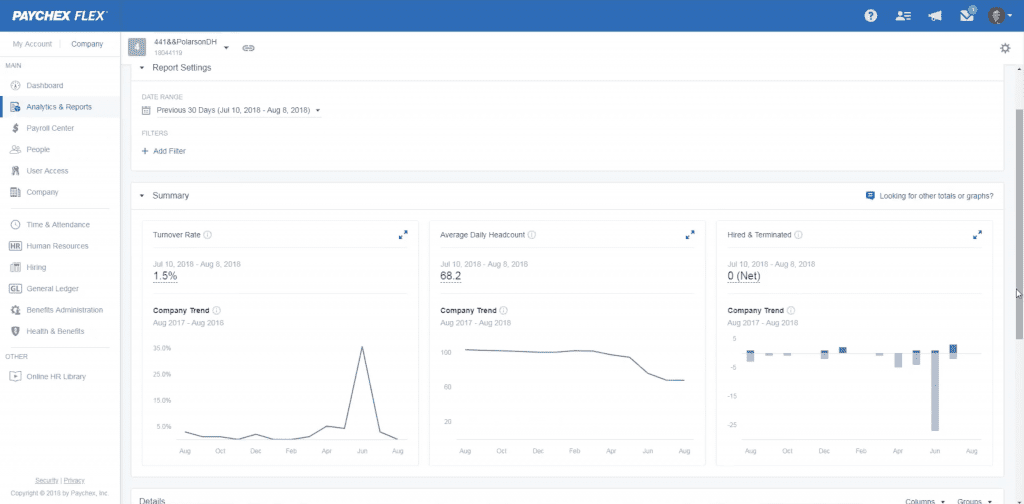
Paychex offers upwards of 100 reports and advanced analytics for customers on its Flex Enterprise plan. The software’s reporting feature highlights include:
- 100+ reports
- Customizable reports
HR & Onboarding
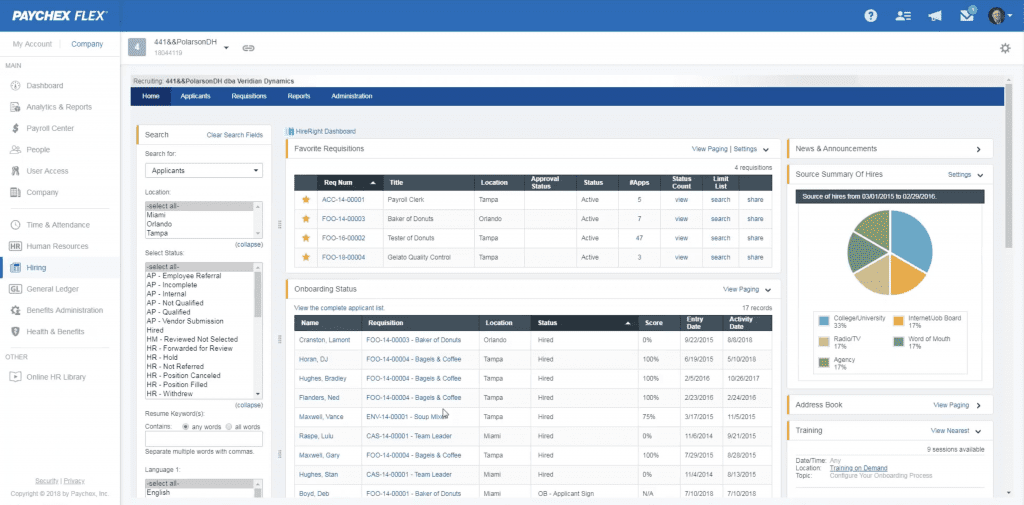
Each Paychex Flex plan includes a basic HR section where you can store key documentation. These plans also include a labor poster kit. However, you’ll need to upgrade to the Flex Enterprise plan to start using some of the software’s more advanced HR features, such as performance reviews and tracking employee training.
Here’s a look at some of Paychex’s HR and onboarding features:
- New-hire reporting
- Financial wellness course
- eLearning portal (Flex Select and up)
- Onboarding tools (Flex Enterprise only)
- Employee screening (Flex Enterprise only)
- Employee handbook tools (Flex Pro and up)
Benefits Administration
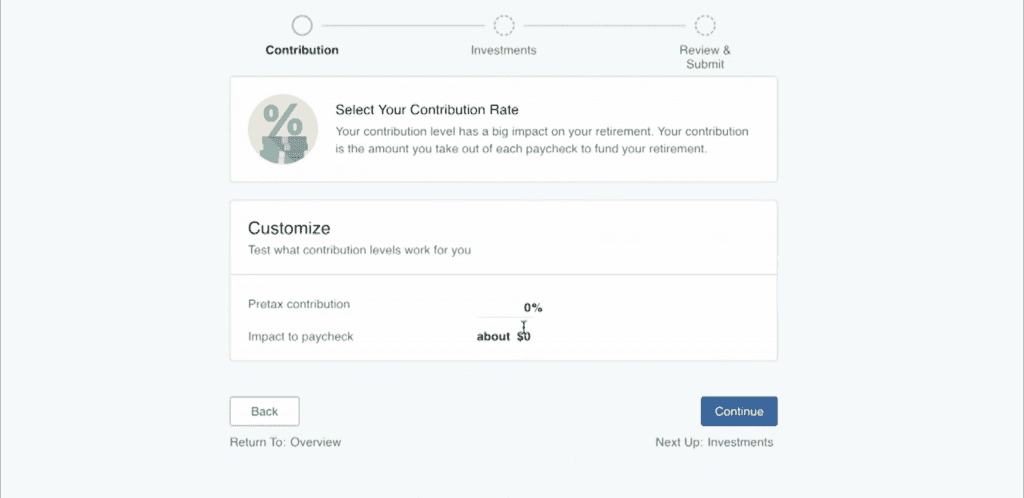
Paychex offers benefits administration as part of its broader HR and payroll ecosystem, though availability and pricing may vary by service and plan.
Here’s a look at what you can expect from Paychex’s benefits administration services:
- Integration with Paychex Payroll
- Medical contribution tracking
- Enrollment tracking
- 401(k) retirement accounts
- Health insurance benefits
- Dental and vision benefits
- Employee portal for benefits management
- Flexible spending accounts
- Health savings accounts
- Tax savings plans
Paychex Customer Service
| Customer Service3.8 |
|---|
| Personal Support 3.7 |
| Self-Service 3.8 |
Paychex has a variety of customer support options. Access to Paychex’s knowledgebase is limited to its users, but from what we could find, the content was helpful enough.
Paychex offers several support options, but software training appears limited compared to some competitors. Customer reviews of Paychex support are also mixed.
Paychex offers 24/7 support, with dedicated payroll support available on select plans.
Customers with the Flex Select plan and up are assigned a dedicated payroll specialist, making it easy and convenient to get answers to payroll-specific questions. Here’s a more in-depth look at Paychex’s customer service options:
| Paychex Customer Service | Availability |
|---|---|
| Phone Support | |
| Email Support | |
| Support Tickets | |
| Live Chat | |
| Dedicated Support Representative | Flex Select plan & up |
| Knowledge Base or Help Center | |
| Videos & Tutorials | |
| Company Blog | |
| Social Media |
The inability to contact a payroll specialist is usually a pain point cited by customers using other software solutions, so Paychex gets a big win in the customer service category.
Paychex Integrations
Paychex offers many additional services, but still has plenty of third-party integration options. You can connect your Paychex payroll services to 270+ software solutions, including QuickBooks Online, Xero, Sage Intacct, SimplyHired, and many more.
There is also an API available for developers.
Paychex Reviews
| User Reviews3.9 |
|---|
| Customer Feedback 4.0 |
| Review Site Aggregate 3.8 |
Paychex has thousands of customer reviews across review sites, with overall feedback trending positive but mixed. Many users praise the platform’s payroll tools and support, while negative reviews frequently mention payroll inaccuracies, missed tax filings, unauthorized withdrawals, and slow issue resolution.
Negative Paychex Reviews & Complaints
- Unauthorized payment withdrawals
- Missed tax filings
- Payroll inaccuracies
- Expensive
Positive Paychex Reviews
- Good customer support
- Easy to use
- Strong payroll features and tax support
- Time-saving
- Convenient mobile app
Is Paychex Secure?
Paychex employs strong security tools to keep your data safe. While the company doesn’t give much more detail about its security measures, Paychex provides a detailed privacy policy explaining how it collects, uses, and shares personal information.
Security features include:
- Data encryption
- Malware detection and prevention
- Firewalls
- Multifactor authentication
- Restricted access to confidential information
- SOC reports
Final Verdict Of Paychex
Paychex is a strong payroll and HR option for businesses that want more than basic payroll software. It offers payroll processing, tax filing, employee self-service, HR tools, benefits services, reporting, onboarding, and access to support in one platform.
The biggest drawbacks are pricing transparency and add-on costs. Paychex may be a good fit for small to midsize businesses that want a scalable payroll and HR provider, but businesses on a tight budget or those that want simple, upfront pricing may prefer alternatives such as Gusto, OnPay, or QuickBooks Payroll.
Before signing up, contact Paychex for a detailed quote and confirm which features are included in your plan.
If pricing is a concern and you need payroll software that won’t break the bank, check out our picks for the best free payroll software for an in-depth look at the top free payroll software options on the market.
Davina Ward
Expert Contributor
Davina began writing for small businesses in 2018 and has since gained expertise in the SaaS industry. She earned her Bachelor’s of Arts in English Literature from SUNY Geneseo in 2018.
View Davina Ward's professional experience on LinkedIn.

Latest posts by Davina Ward (see all)
- Homebase Payroll Review - December 18, 2023
- OnPay Payroll Review - December 1, 2023
- Toast Payroll Review - April 18, 2023
- How To Process Gusto Payroll - January 26, 2022
- Roll By ADP Review - September 8, 2021
To learn more about how we score our reviews, see our Payroll Software Rating Criteria.