


Toast Payroll Review
For restaurants already using Toast POS, Toast Payroll integrates payroll seamlessly with its many restaurant-industry specific features.
-
WRITTEN & RESEARCHED BY
Expert Contributor
Last updated onUpdated
-
REVIEWED BY
Editor & Senior Staff Writer


Our content reflects the editorial opinions of our experts. While our site makes money through referral partnerships, we only partner with companies that meet our standards for quality, as outlined in our independent rating and scoring system.
Toast Payroll

| Total Rating |
4.2 |
|---|---|
| Pricing2.9 | |
| Ease Of Use4.1 | |
| Features4.5 | |
| Customer Service4.5 | |
| User Reviews3.7 | |
Payroll Processing Time
1 business dayPricing Range
Starts at $69/month + $10/employeeBusiness Size
Restaurants with more than 3 employeesToast Payroll At A Glance
- Cloud-based restaurant-specific payroll software
- Excellent choice for restaurants already using Toast’s line of proprietary restaurant management products including Toast POS
- Payroll software pulls data from Toast POS, such as employee tips, clock in/out, and break times
Pros
- Integrates seamlessly with Toast POS, scheduling software, and tips manager
- Several restaurant-specific features and reports
- Lots of automation capabilities
- Easily feeds into accounting software
- Lots of training videos available
Cons
- Can be expensive
- Multi-year contracts may apply
- Early termination fees may apply
Table of Contents
What Is Toast Payroll?
Toast Payroll is cloud-based restaurant payroll and team management software that integrates with Toast’s line of products, including Toast POS. It’s best for midsize, growing, and multi-location restaurants that want to smoothly onboard and schedule employees, and automate tip calculations.
Toast Payroll is a full-scale HR solution and has a lot of niche features that restaurant managers will appreciate.
Toast Payroll Pricing
| Pricing2.9 |
|---|
| Software Plans 2.3 |
| Pricing Transparency 3.0 |
| Pricing Customization 3.1 |
Toast Payroll earned a low rating in the pricing category as a direct result of the software’s high cost compared to other payroll software pricing, lack of a free trial, and pricing structure.
Toast Payroll is an add-on product that syncs to Toast POS software. You will receive a custom quote on your monthly payroll software fees unless you opt into the New Restaurants plan, which bundles your monthly POS software fees and gives you access to the “Lite” version of Toast Payroll and Toast Scheduling.
Toast Payroll might be on the expensive side since you’ll need to purchase a Toast POS subscription and POS hardware to use it. As our Toast POS review covers, Toast POS has plans that are $0 - $69/month with custom plans available.
Here’s a look at Toast Payroll’s pricing. Drill down into Toast Payroll’s pricing below.
| Toast Payroll Plans | Price | When To Use |
|---|---|---|
| New Restaurant Basics | Starts at $69/month + $10/employee | If you don't already have Toast POS and need basic scheduling/payroll |
| Toast Payroll POS Add-On | Custom | If you already have a Toast plan and want to add a custom-quoted full-scale payroll solution |
New Restaurant Basics
Toast’s New Restaurant Basics starts at $69/month + $10/employee and includes:
- Toast cloud-based POS software
- Basic scheduling
- Payroll essentials
- Timekeeping
Toast Payroll POS Add-On
Toast Payroll pricing is custom-quoted and is typically based on either:
- A per-employee monthly fee, or
- A monthly minimum based on your restaurant’s pay groups and locations
Toast charges whichever amount is higher.
Restaurants with more employees or multiple locations will generally pay more each month. Additional Toast products and payroll add-ons can also increase overall costs.
Extra Toast Payroll Costs & Fees
| Toast Payroll Extra Costs | Price |
|---|---|
| Toast Tips Manager | $2.50/employee/month |
| Toast Scheduling | Custom quote |
| Off-Cycle Payroll | $50 |
| Sales Tax (If Applicable) | $30/month |
| Wage Amendments | $400/quarter + $50/employee (per EIN) |
| Stop Payment | $25 |
| Printed W-2 Forms | $5/copy |
Is Toast Payroll Easy To Use?
| Ease Of Use4.1 |
|---|
| Set Up 3.5 |
| Software Reliability 4.0 |
| Everyday Use 4.6 |
| Integrations 4.5 |
Toast Payroll is generally easy to use and boasts an impressive collection of integrations, including the seamless Toast POS integration. The software’s score was brought down as there is room for improvement in the setup and onboarding category.
Toast’s cloud-based platform comes with several forms of support documentation, including help articles, on-demand video training, and live webinars with Toast representatives at no extra cost to users. Toast gives you the option to self-install your POS, software, and hardware. You may also choose to purchase remote installation assistance or an on-site installation option.
Since Toast’s restaurant software ecosystem is large and very customizable, it can take a while to set up, and you may find it beneficial to get assistance or, at the very least, sign up for a free webinar.
Toast Payroll Features
| Features4.5 |
|---|
| Payroll Processing 4.3 |
| Employee Management & PTO 5.0 |
| Time Tracking 5.0 |
| Payroll Tax Support 4.8 |
| Reporting & Tax Forms 4.7 |
| Onboarding & HR 4.9 |
| Benefits Administration 4.0 |
| Niche Features 2.0 |
Toast Payroll offers essential payroll features, plus nice-to-haves like time tracking, HR solutions, and benefits administration. The software lacks some niche features, such as a standalone payroll mobile app and an employee directory, but these are usually easy to live without for most small businesses.
Toast Payroll’s features encompass everything you’ll need to run payroll for your restaurant, including garnishments, direct deposit, tax support, deductions, PTO, tip reporting, and much more. Once you get your POS software synced to your payroll software (and scheduling software, if you choose to purchase it as an add-on or sign up for the New Restaurants plan), most of the day-to-day information you need to run payroll is automated.
There is a bit of a learning curve when it comes to using this payroll software. At the same time, the product is designed for restaurants, with the kind of language, tools, and operations management that business owners in the industry will understand, so Toast Payroll will probably be easier for restaurant managers than other comprehensive payroll software.
Payroll Processing
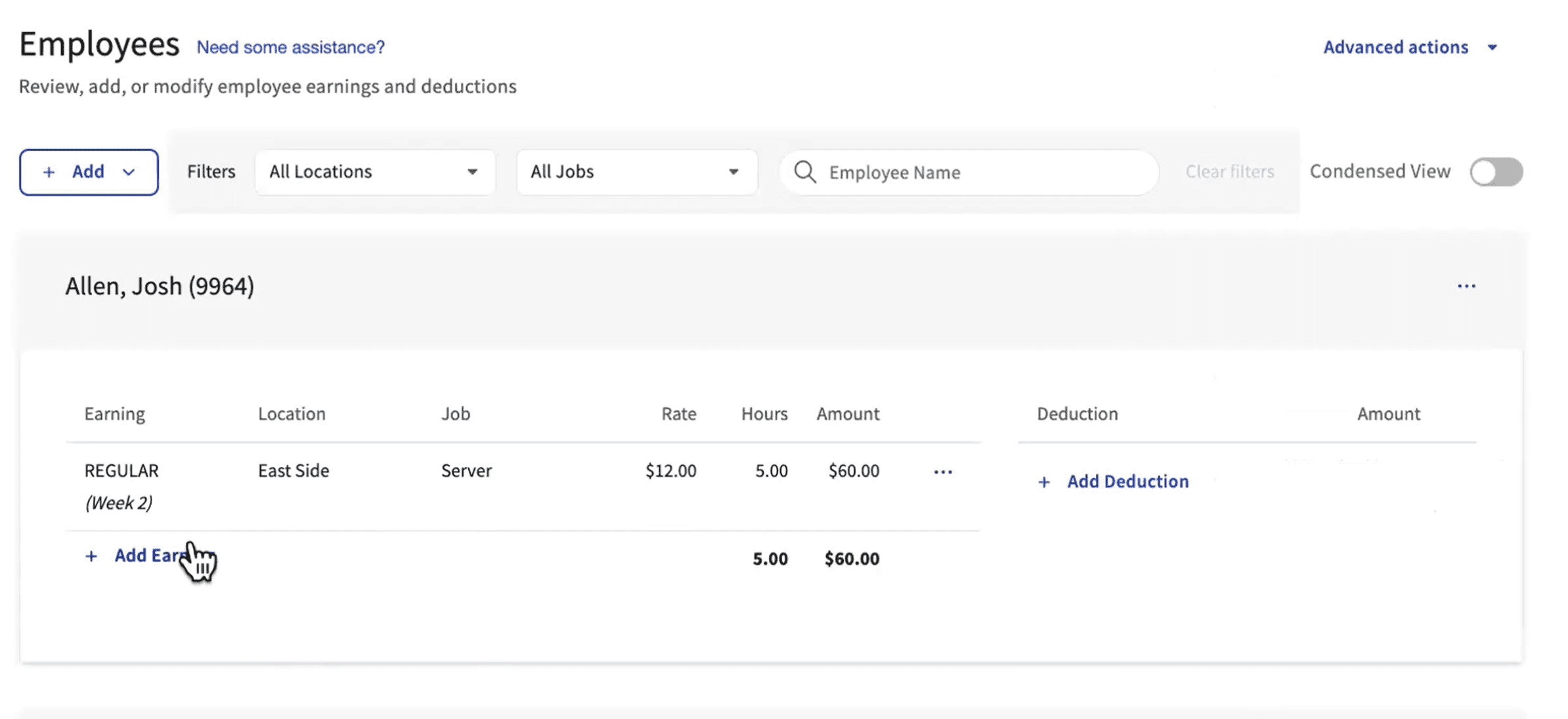
Adjust employee pay before processing payroll if needed.
Toast Payroll aims to be both easy and highly customizable, giving managers the ability to accept all timesheets, tip calculations, and deductions and run payroll with a few clicks, or manually go in and add hours.
Here is what Toast Payroll offers in terms of payroll processing:
- Unlimited payroll runs
- Off-cycle payroll runs
- Add or remove employee hours, tips, bonuses, etc.
- Add tips owed, tips declared, and tips paid (great for servers receiving cash tips)
- Pay via direct deposit, Toast Pay debit card loading, self-printed checks, Toast-printed checks (with shipping)
- Automated timesheet population via synced POS punch-in/punch-out
- Automated declared tip generation
- Tax support
- Garnishments for insurance, 401(k), etc.
- Reimbursements for expenses
- PTO scheduling
- Post-tax deductions
- Add or remove hours and pay rates for individual employees
Employee Management & PTO
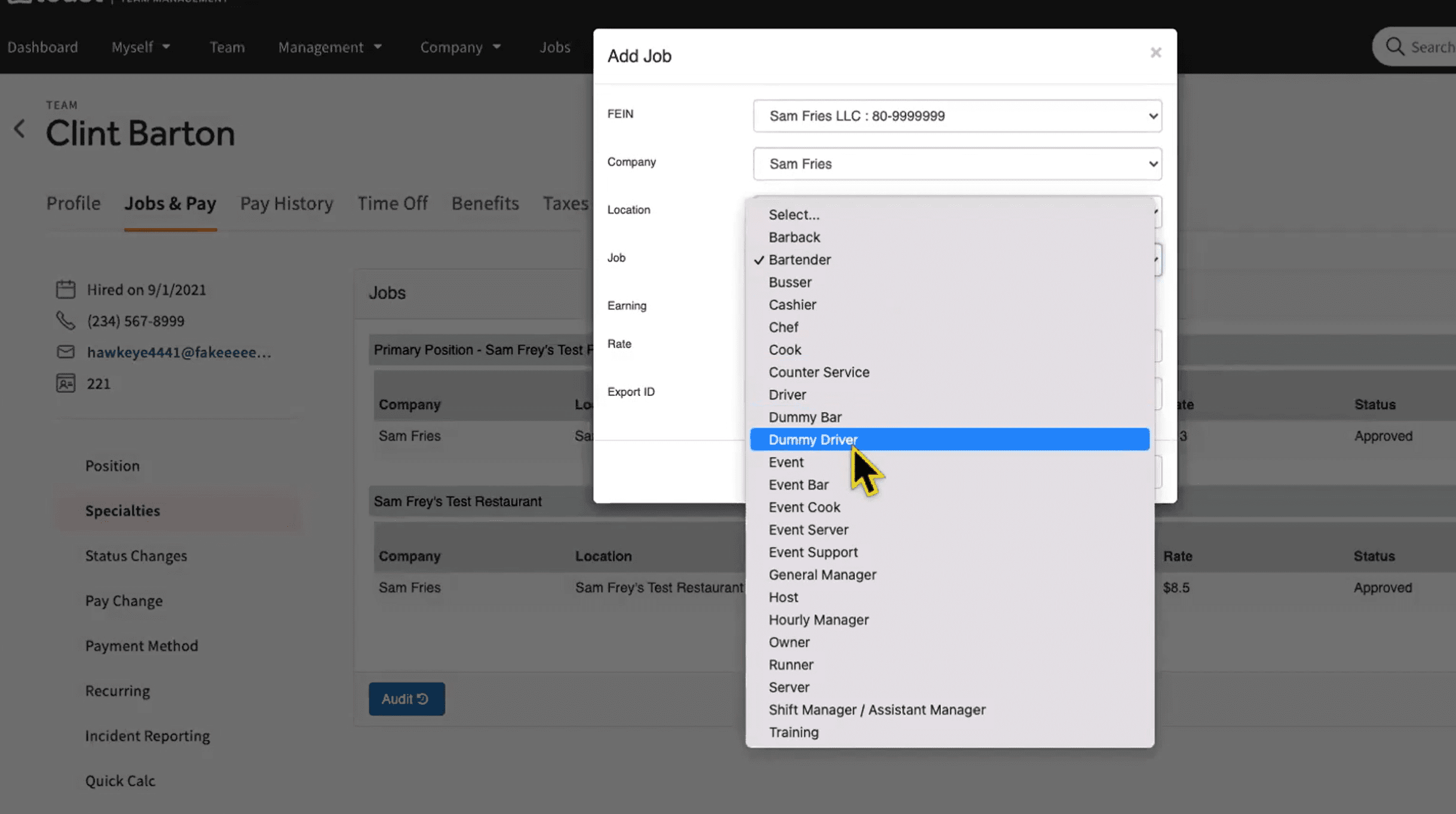
Assign different roles and pay rates to employees with multiple specialties.
Toast offers excellent employee management and PTO functionalities, especially if you add on Toast Scheduling and Toast Tips Manager. The payroll portal helps restaurant owners manage multiple scenarios, such as paying employees who perform multiple roles at different pay rates (e.g., host and server roles) in a single week. The portal also allows you to calculate tips under several scenarios,
Toast’s employee management and PTO features include:
- Pay by position, with one employee able to be paid for multiple positions
- Set PTO policies
- Hourly and salaried pay schemes
- Holiday and sick pay
- Online document storage
- Employee portal with timesheet viewing, PTO requests, and tax forms
- Scheduling and overtime calculations
- Benefits deductions and company contributions
- Paystub printing
- Automated filing and sending of tax documents
Time Tracking
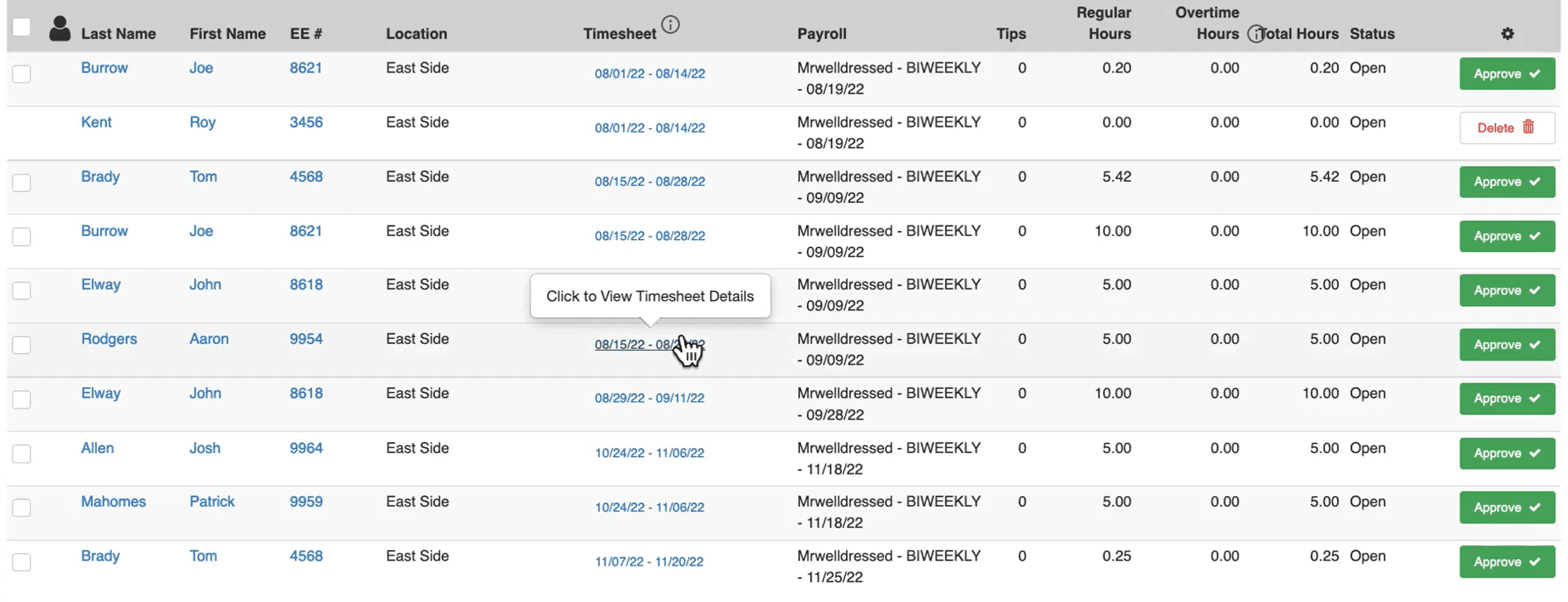
View timesheet details of restaurant employees.
Toast Payroll integrates with Toast POS, so when employees clock in/out for their shift and take breaks, that time will be automatically tracked and fed to the payroll system. This, plus the integration with scheduling software and the information employees provide in their portal, will make time tracking simple.
Toast’s time tracking features include:
- Tracking by position so that employees are paid the correct pay rate
- Time-off and sick leave tracking
- Holiday pay settings
- Overtime tracking
- Shift scheduling (with New Restaurants plan or Scheduling add-on)
- Thorough employee reporting (pay changes, incident reports, etc.)
Payroll Tax Support
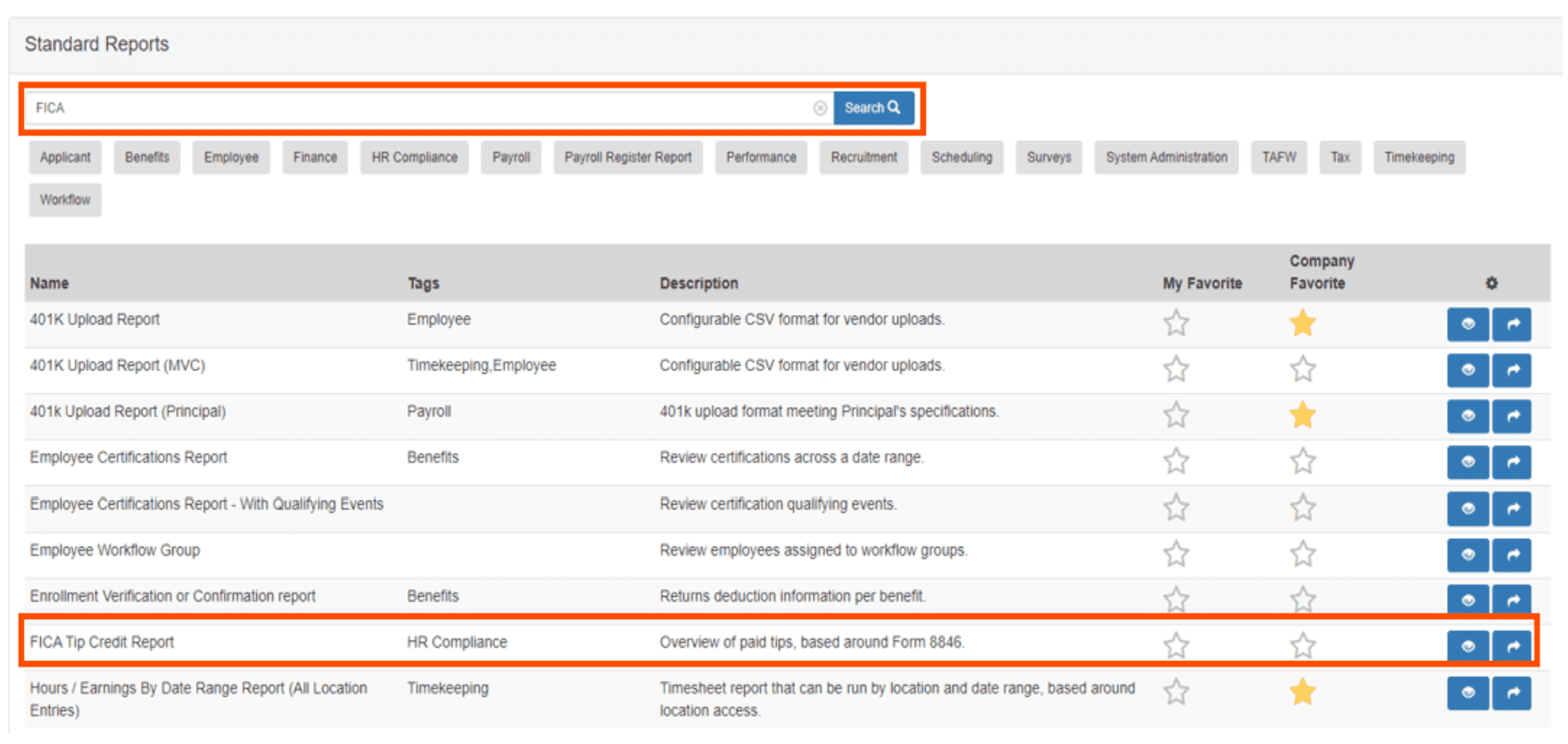
View report of tips in Toast Payroll when filing restaurant taxes to get FICA tip credit.
Toast provides full tax support, including quarterly tax filing on your behalf, as long as you provide the correct business and employee information during your onboarding process.
Here’s what tax support Toast offers for restaurant owners:
- Automated payroll tax filing and payments
- Garnishments
- New hire tax settings and reporting
- Supports 1099s, W-2s, I-9s, and W-4s (electronic and print)
- Automated FICA credit report (for use to claim a tip credit on tax forms)
- Employee tax form access in their payroll portal account
- View quarterly and year-end tax forms within Toast Payroll
- Automatic state tax calculation, filing, and payment (in most cases)
- Automatic federal tax calculation, filing, and payment
- Post-tax deductions
- Tax settings for employee benefits
Reporting
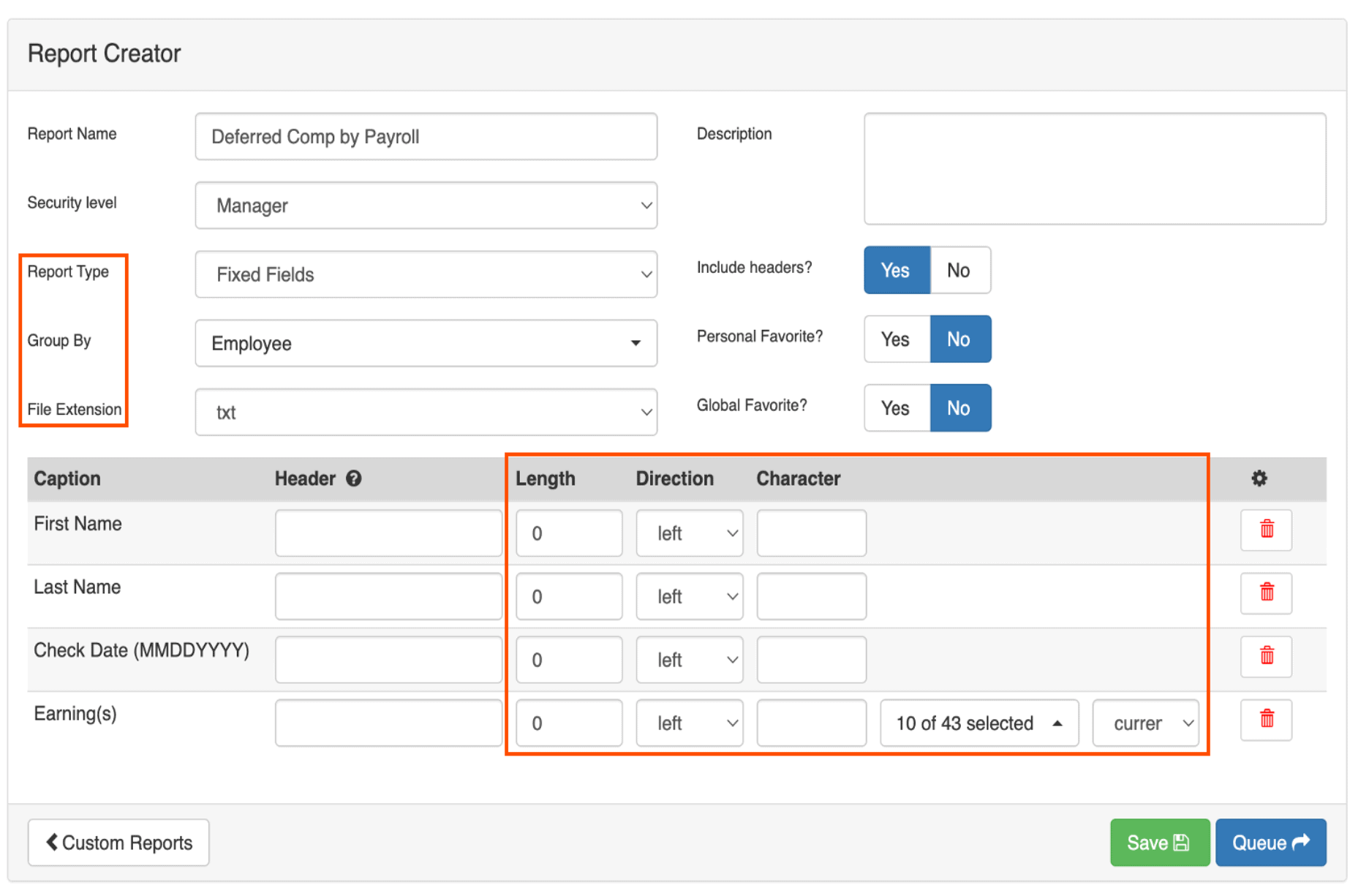
Create custom report types in Toast Payroll.
Toast offers an extensive number of reports on everything from employee performance to taxes to benefits administration, as well as the ability to build custom report templates.
The most used reports are the high-level payroll summary, employee details, payroll exceptions, labor distribution by department and location, employee comparisons, check register, and direct deposit lists. These reports can help you identify your highest-earning employees and departments, check for mistakes before posting payroll, and set aside the total funding you need to cover payroll and taxes.
Custom reports can be used for things like overtime analysis and loan forgiveness.
HR & Onboarding
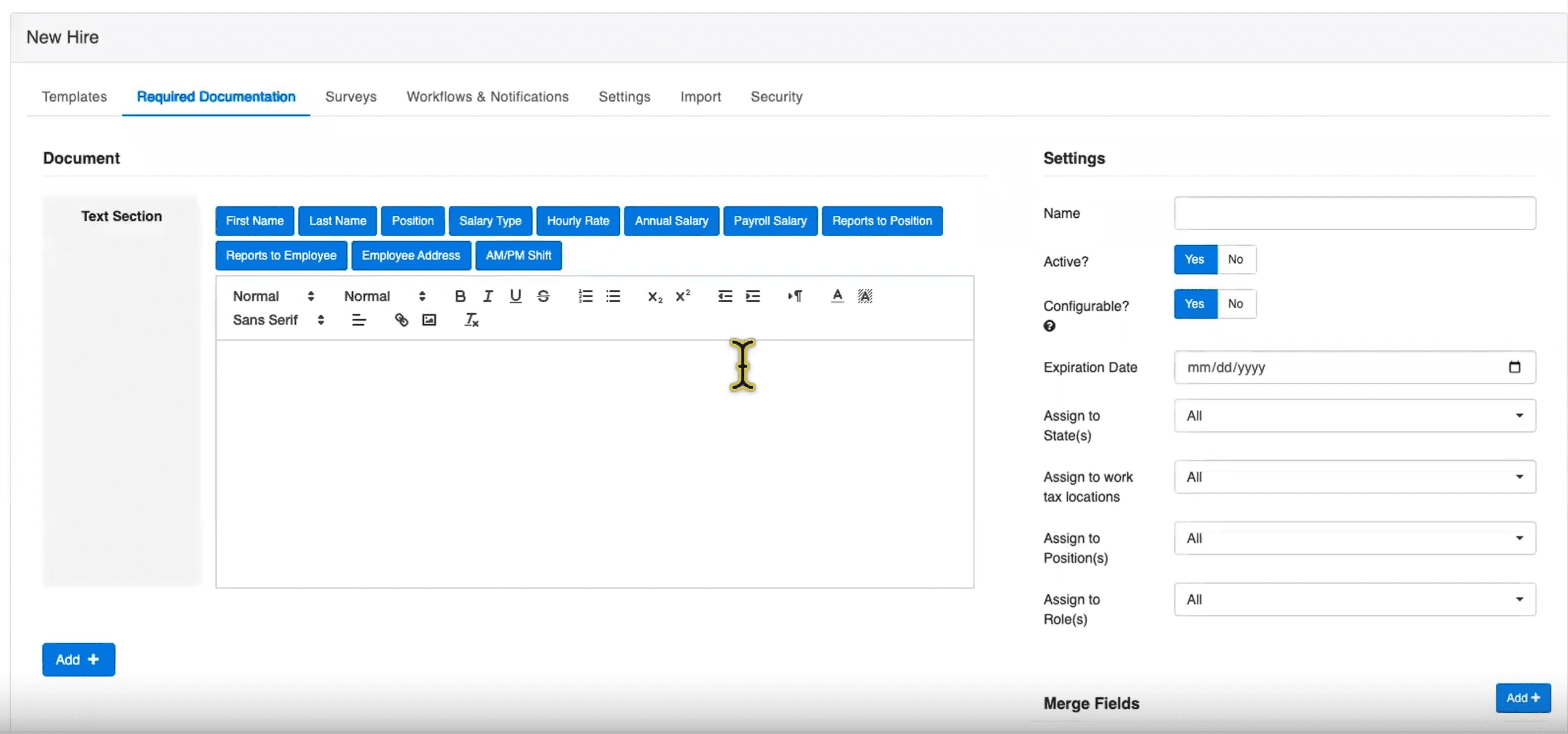
Toast Payroll new hire dashboard and custom onboarding process builder.
Toast offers a built-in applicant management dashboard for managers to create applicant templates and recruit new hires. There’s also a new hire onboarding portal for managers to customize the onboarding process and monitor how far along new hires are in the onboarding process. It’s easy to deliver required documentation, such as an employee handbook or tax forms, to employees and to request documents for employees to upload during onboarding.
Here are Toast’s HR and onboarding features:
- Customizable application templates
- Applicant management dashboard
- Digital document templates and storage
- Online offer letters
- Customizable onboarding checklist
- New hire dashboard (with onboarding completeness measurement)
- E-sign documents
- Certified HR professional advice
- HR resource center
- Compliance updates
- Customizable employee handbook template
Benefits Administration
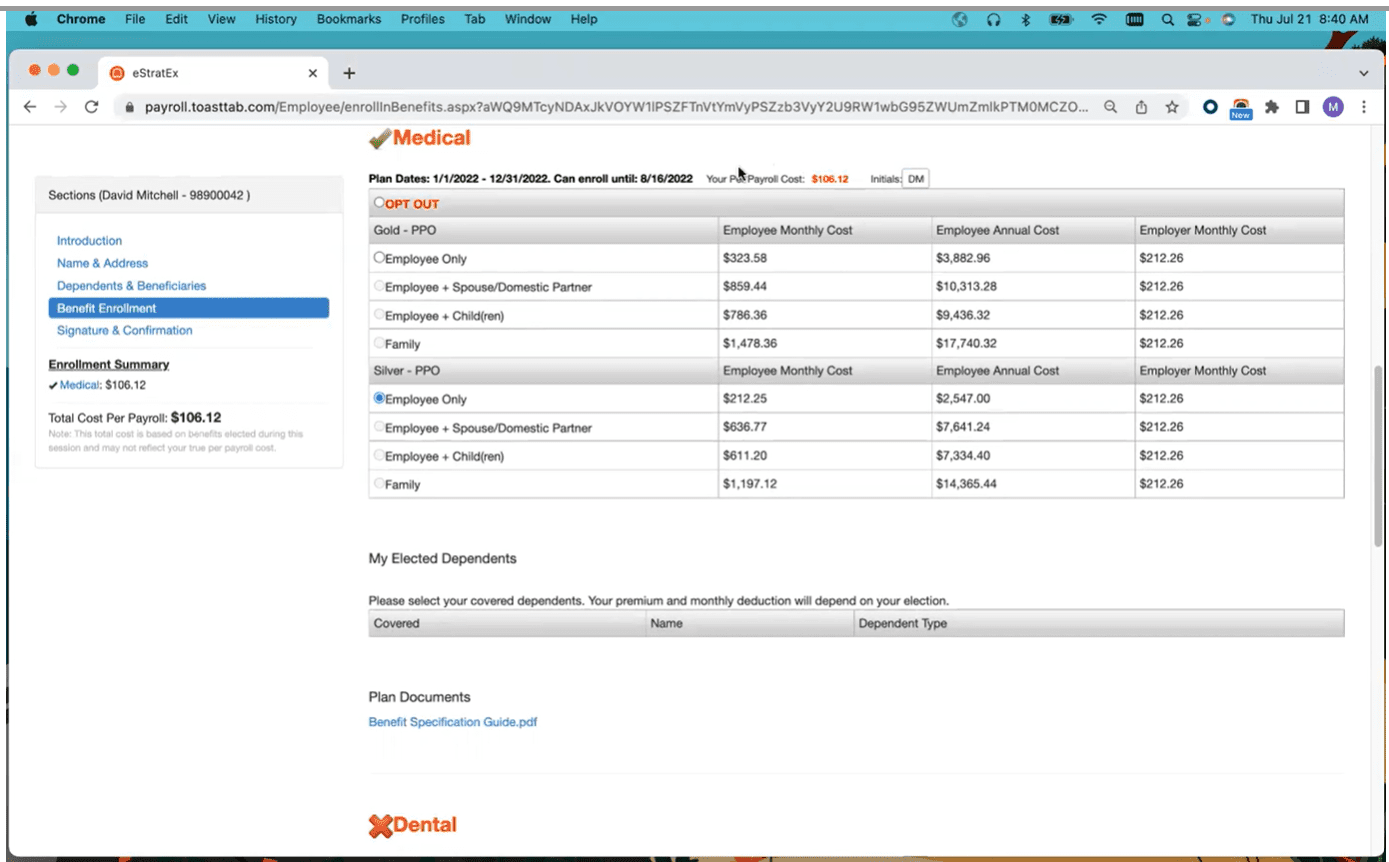
Toast Payroll online open benefits enrollment portal for employees.
Toast offers a benefits administration enrollment module for individuals on the Essentials and Pro Toast POS plans. The main purpose of Toast’s benefits administration module is to allow employees to opt-in/opt out of benefits and determine deduction percentages for employers and employees. With this module, you can:
- Offer health, vision, dental, and retirement plans
- Create yearly online open enrollment portals for employees
- Manage payroll deduction settings
- Create retirement accounts/plans for employees to enroll in
- Offer 401(k)s via Vestwell, which has uniquely partnered with Toast
Without the module, you can still manage deductions. You can’t offer employees the open enrollment portal.
Note: Toast’s benefits administration module only allows you to manage how much will be deducted from paychecks for benefits. Toast does not administer benefits, send benefit information to insurance companies, or provide brokerage services between your business and insurance companies.
Toast Payroll Customer Service
| Customer Service4.5 |
|---|
| Personal Support 4.0 |
| Self-Service 5.0 |
All Toast users get 24/7/365 support and their own support representative. You do have to pay for many one-on-one trainings/”tutorings” by the hour, but you can get questions answered or address problems with a phone call, support ticket, etc. You have to pay extra for anyone to come onsite to look over connectivity problems or issues with hardware, etc.
Here’s a more in-depth look at Toast’s customer support options:
| Toast Payroll Customer Service | Availability |
|---|---|
| Phone Support | |
| Email Support | |
| Support Tickets | |
| Live Chat | |
| Dedicated Support Representative | |
| Knowledge Base or Help Center | |
| Videos & Tutorials | |
| Company Blog | |
| Social Media |
Some users have complained that their representative wasn’t very knowledgeable about payroll or that representatives weren’t as responsive as they should be.
Toast Payroll Integrations
Toast Payroll integrates with all other Toast products, including Toast POS, Scheduling, Tips Manager, and xtraCHEF accounts payable software. You may also integrate QuickBooks Online and Homebase (an employee management software that’s a limited, cheaper version of Toast’s proprietary scheduling software).
Toast Payroll Reviews
| User Reviews3.7 |
|---|
| Customer Feedback 4.0 |
| Review Site Aggregate 3.5 |
As Toast Payroll is a newer Toast product offering, there are few reviews that are online. However, as those reviews average out to a 3.5/5-star rating, customers seem pretty “meh” about the product.
In positive reviews, business owners say they like that Toast Payroll integrates so well with their existing restaurant management software, while negative reviews mention that the software is a little too complex and they would like their representative to know more about payroll.
Negative Toast Payroll Reviews & Complaints
- Too complex
- Steep learning curve
- Pricey compared to other payroll software
Positive Toast Payroll Reviews
- All-in-one employee management platform
- Integrates well with Toast’s restaurant management tools
- All company sales and expenses on one app
Is Toast Payroll Secure?
Toast prioritizes security through device authorization, encryption, PCI compliance, and two-factor authentication.
Some updates may temporarily interrupt service, which isn’t necessarily a problem with running payroll software, but can be a problem when you’re taking sales on-site with POS devices.
The Final Verdict: Is Toast Payroll Worth It?
| Toast Payroll Review Summary | |
|---|---|
| Pricing Range | Starts at $69/month + $10/employee |
| Choose If You Need |
|
If you already use Toast POS for your restaurant and want to keep all your employee and financial data in one place, Toast Payroll is an excellent choice. It’s also a great choice for any restaurant owner looking for a restaurant-specific payroll system.
The software is a little expensive, so we recommend it only for restaurants that have more than a few employees, multiple job roles, and/or multiple locations. These restaurants have more complex payroll and tax needs, which Toast Payroll can easily fulfill. Smaller, simpler restaurant structures may find that Toast’s payroll software is an unnecessary expense.
Davina Ward
Expert Contributor
Davina began writing for small businesses in 2018 and has since gained expertise in the SaaS industry. She earned her Bachelor’s of Arts in English Literature from SUNY Geneseo in 2018.
View Davina Ward's professional experience on LinkedIn.

Latest posts by Davina Ward (see all)
- Homebase Payroll Review - December 18, 2023
- OnPay Payroll Review - December 1, 2023
- Toast Payroll Review - April 18, 2023
- How To Process Gusto Payroll - January 26, 2022
- Roll By ADP Review - September 8, 2021
To learn more about how we score our reviews, see our Payroll Software Rating Criteria.



