


OnPay Payroll Review
OnPay is a competitively priced payroll service for small businesses that want full-service payroll, tax support, and basic HR tools in one platform.
-
WRITTEN & RESEARCHED BY
Expert Contributor
Last updated onUpdated
-
REVIEWED BY
Editor & Senior Staff Writer


Our content reflects the editorial opinions of our experts. While our site makes money through referral partnerships, we only partner with companies that meet our standards for quality, as outlined in our independent rating and scoring system.
OnPay

| Total Rating |
4.3 |
|---|---|
| Pricing3.0 | |
| Ease Of Use4.4 | |
| Features4.5 | |
| Customer Service4.1 | |
| User Reviews4.7 | |
Payroll Processing Time
2 - 4 DaysPricing Range
$49/month + $6/month per personBusiness Size
Small to mid-sized businesses (1-500 employees)OnPay At A Glance
- OnPay is an online payroll service that enables small to midsize businesses to pay employees and manage payroll taxes at the federal, state, and local levels.
- In addition to offering essential payroll services, OnPay also boasts basic HR solutions, including digital onboarding, an employee self-service portal, PTO management, employee directories, access to an HR resource library, and much more.
- OnPay doesn’t offer built-in time tracking, but does support integrations to sync attendance data with payroll.
Pros
- Unlimited payroll runs
- Multistate payroll at no extra cost
- Built-in benefits administration
- Affordable
- Full-service tax support
- Easy to use
Cons
- No built-in time tracking
- Limited integrations
Table of Contents
What Is OnPay?
OnPay is among the best payroll software services for small to midsize businesses paying 5 - 500 employees. OnPay offers unlimited payroll processing, payroll tax support, benefits administration, time tracking integrations, reporting, and an affordable price point.
OnPay Pricing
| Pricing3.0 |
|---|
| Software Plans 3.8 |
| Pricing Transparency 5.0 |
| Pricing Customization 2.5 |
OnPay’s only pricing plan starts at $49/month + $6/month per person. As users get access to all available features for one price, OnPay has earned its spot as one of the cheapest payroll services. However, we were disappointed to see that OnPay recently increased its pricing.
| OnPay Plans | Price | When To Use |
|---|---|---|
| OnPay Monthly Plan | $49/month + $6/month per person | If you need essential payroll and basic HR features for up to 500+ employees |
OnPay customers don’t have to worry about long-term contracts and may cancel services at any time with at least 30 days’ written notice.
OnPay offers a non-interactive demo that shows some of what OnPay looks like once you get inside the software. Additionally, OnPay runs promotions for new customers that may help keep prices down.
OnPay does not offer a fully interactive free trial, but new customers may receive a free first month.
OnPay’s Monthly Plan
OnPay’s monthly pricing is $49/month + $6/month per person and includes the following features:
- Unlimited payroll runs
- Multistate payroll runs
- Payroll tax support at the federal, state, and local levels
- Support for multiple pay rates and schedules
- Payroll reports
- Integrated workers’ compensation insurance administration
- Benefits administration in all 50 states
- Employee profile management
- Digital onboarding
- New hire reporting
- HR resource library
- Integrations with time tracking, accounting, and HR software
- Employee portal with lifetime access
Extra OnPay Costs & Fees
| OnPay Extra Costs | Price |
|---|---|
| HR | $15/month + $2/month per person |
| Compliance Resources | $10 |
| Live HR Support | $75 |
| Insufficient Funds Fee | Undisclosed |
| Print & Mail W-2s and 1099s | Undisclosed |
| Benefits Premiums/Services Fees | Varies |
OnPay has an HR add-on that includes features like PTO management, onboarding workflows, eSignatures, an employee directory, records management, software provisioning, and more. This fee is paid in addition to your monthly payroll subscription.
OnPay charges a fee for insufficient funds when processing payroll and a fee for the service of printing and mailing annual employee forms on behalf of your business. Otherwise, you can expect the sticker price to match what you’ll actually be paying every month.
Is OnPay Easy To Use?
| Ease Of Use4.4 |
|---|
| Set Up 4.1 |
| Software Reliability 4.0 |
| Everyday Use 5.0 |
| Integrations 4.5 |
OnPay is one of the easiest-to-use payroll services available. OnPay performed well on nearly every ease of use metric but could improve by offering an API, simplifying setup and onboarding, and making its software more reliable.
OnPay stops just short of offering new users a fully-fledged interactive demo, so there are limited opportunities to trial the software before you use it. However, OnPay’s interface is modern and easy to navigate.
Critiques of OnPay’s ease of use include its general lack of customization options and challenges in handling less common payroll situations. However, most small business owners should find OnPay very easy to use — even those who are completely new to outsourcing payroll.
OnPay Features
| Features4.5 |
|---|
| Payroll Processing 4.9 |
| Employee Management & PTO 5.0 |
| Time Tracking 2.0 |
| Payroll Tax Support 4.8 |
| Reporting & Tax Forms 5.0 |
| Onboarding & HR 4.9 |
| Benefits Administration 4.7 |
| Niche Features 3.0 |
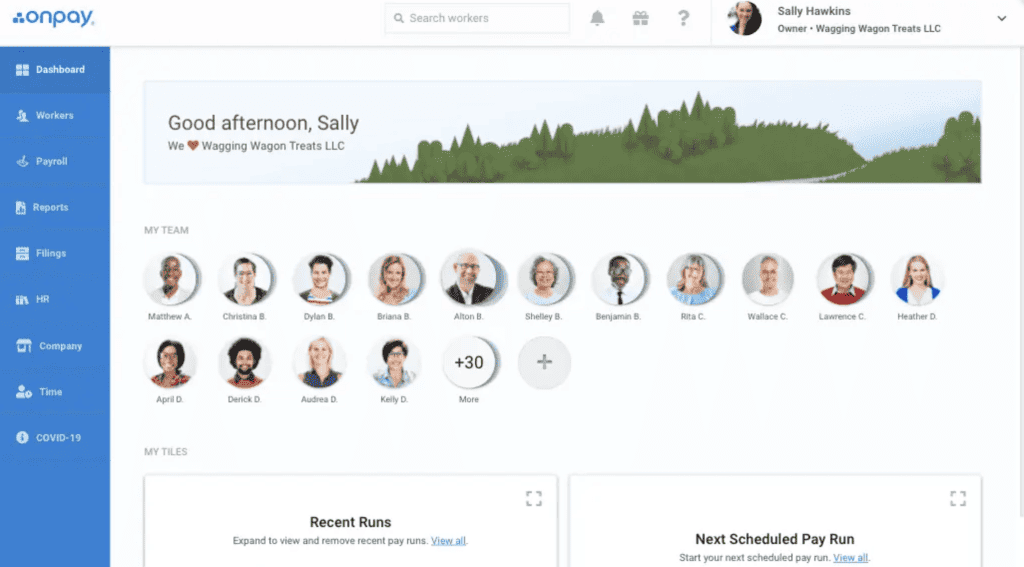
OnPay Home Dashboard
OnPay covers most core payroll and basic HR needs for small businesses. OnPay’s most significant point losses stem from its lack of built-in time tracking and some niche, nice-to-have features, such as access to HR professionals and geolocation for time tracking.
However, OnPay’s features are focused on getting your employees paid, including unlimited payroll processing, multistate payroll runs, lifetime employee accounts, and full tax support. Additionally, OnPay boasts basic HR functions. More advanced HR tools are available as a paid add-on.
Compared to other payroll services, such as Gusto or QuickBooks Online Payroll, OnPay falls short as a comprehensive payroll software solution because it lacks built-in time tracking solutions. However, OnPay does offer useful integrations with time-tracking software.
Here’s a more in-depth look at the features OnPay offers:
Payroll Processing
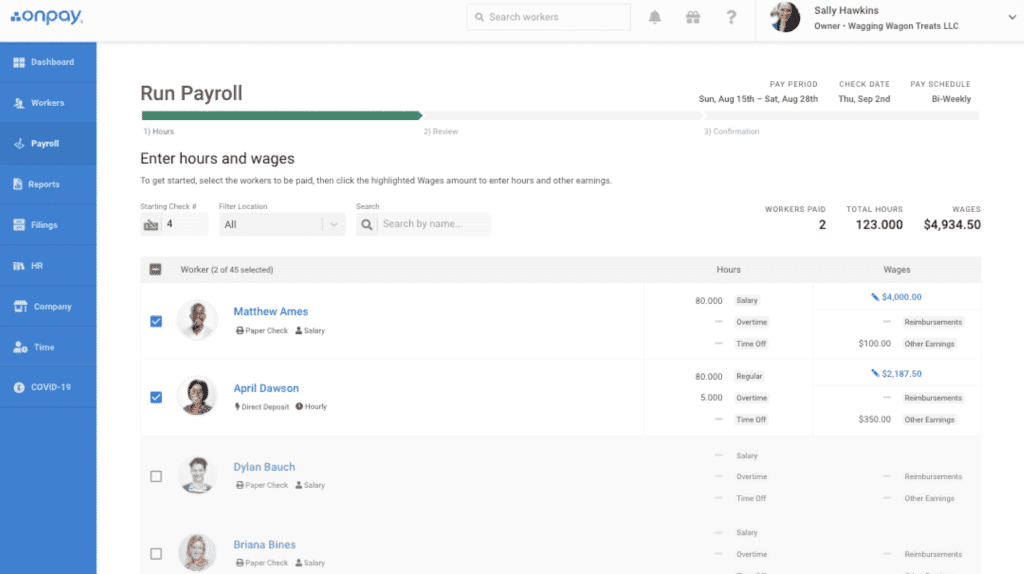
OnPay Payroll Dashboard
While there have been some complaints about OnPay’s ability to handle very complex payroll needs, OnPay is capable of handling payroll processing for most small to midsize businesses. OnPay’s payroll processing features include:
- Unlimited payroll processing for all 50 states
- Multistate payroll processing at no extra cost
- Support for paying 1099 contractors and W-2 employees
- Direct deposit, paper checks, and debit card payment options
- Support for multiple pay rates and schedules
- Garnishments and custom deductions
- Payroll tax calculations, withholding, and filing at the federal, state, and local levels
- Payroll reports
- New hire reporting
- Agricultural workers’ tax filings (Form 943) and workers on H-2A visas
Employee Management & PTO
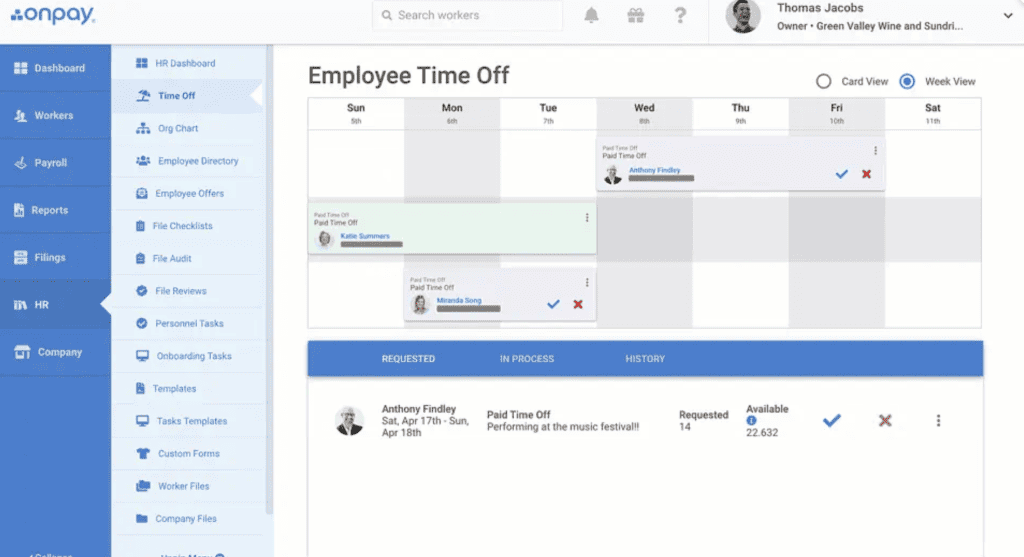
OnPay PTO Dashboard
OnPay boasts an impressive selection of employee management features and streamlines the process of managing time off requests. Here’s a look at OnPay’s employee management and PTO features:
- Employee self-service portal
- Lifetime access to pay stubs and tax documents
- Digital self-service onboarding
- Employee profiles
- Org charts and company directory
- Custom PTO policies
- PTO calendars and reminder notifications
- Time off accrual tiers
- Digital time-off requests
OnPay includes basic employee profiles, self-service onboarding, lifetime paystub access, and document tools. PTO management, time-off requests, employee directories, org charts, and more advanced records tools may require the HR add-on.
Time Tracking
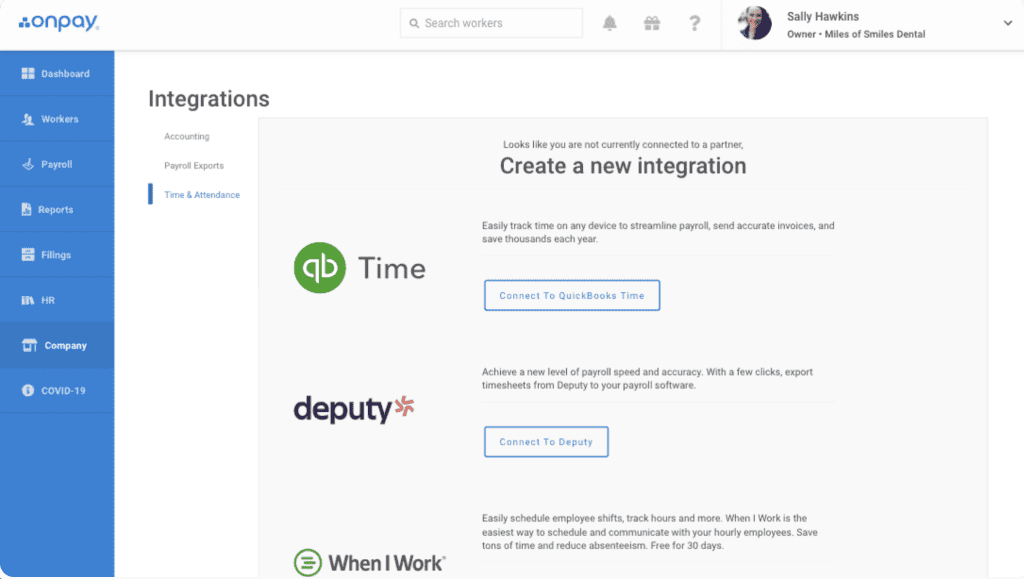
OnPay’s Time Tracking Integrations
OnPay does not support built-in time tracking, but does offer integrations with QuickBooks Time, Deputy, and When I Work to sync attendance data with payroll.
Payroll Tax Support
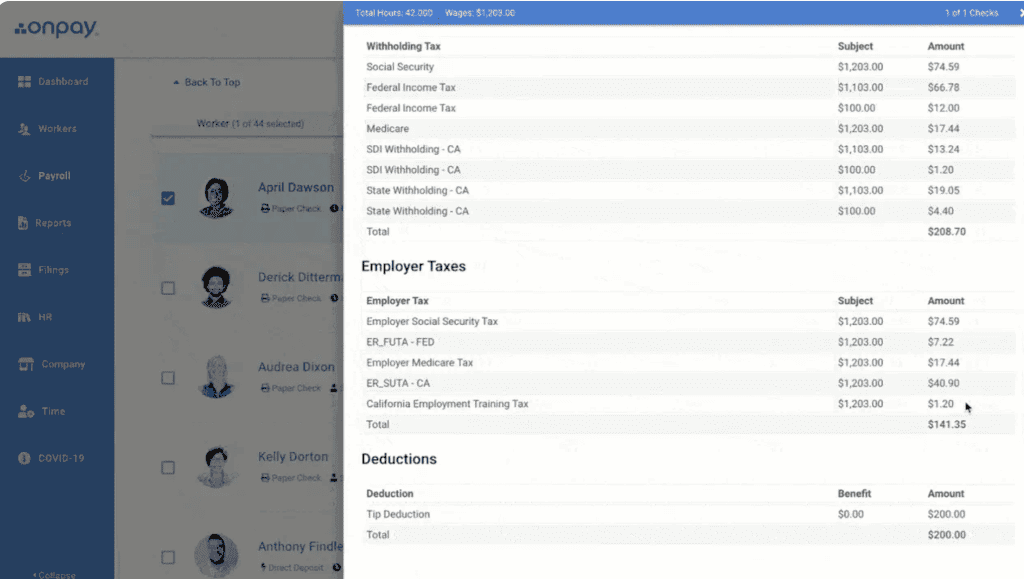
OnPay Tax Support
OnPay offers payroll tax support at the federal, state, and local levels, including automatic tax calculation, filing, and payment on your business’s behalf. Here’s a look at OnPay’s additional payroll tax support features:
- Automatic payroll tax filing, calculation, and payment
- Support for local, state, and federal level payroll taxes
- Nonprofit FUTA exemption management
- Separate tax filings for agricultural workers and non-farm employees
- Payroll tax support for employees on H-2A visas
Reporting
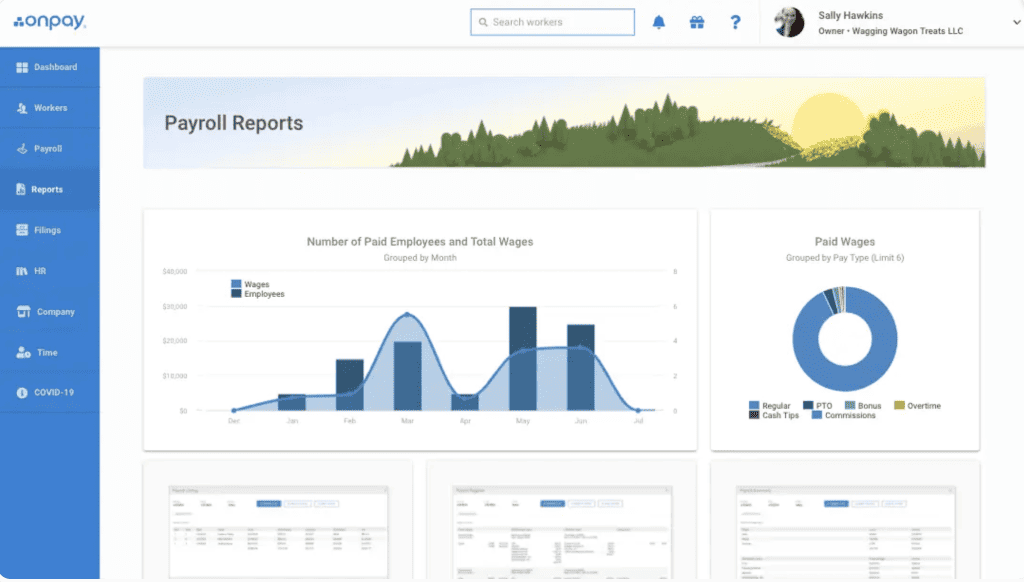
OnPay Reports Dashboard
OnPay offers built-in payroll reports and a customizable report builder for businesses that need an in-depth look at their payroll data.
HR & Onboarding
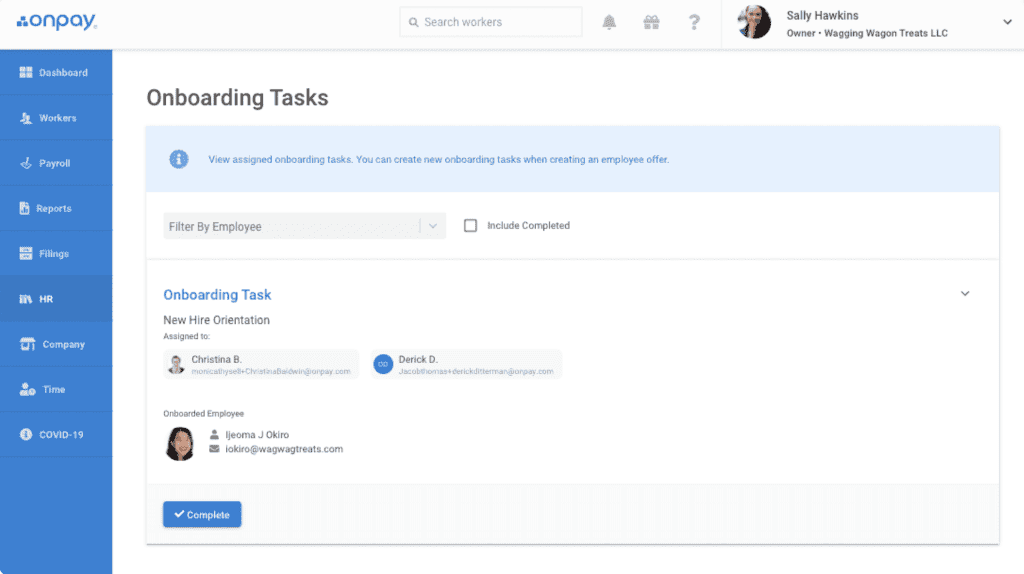
OnPay Onboarding Dashboard
Despite being a payroll-focused software, OnPay’s HR and onboarding features cover all the basics and should suit the needs of small businesses needing minimal HR support. OnPay’s onboarding and HR features include:
- Employee self-service onboarding
- Document storage, templates, and eSigning
- HR resource library
- In-app messaging
- New hire reporting
- Compliance audits
- Task delegation
- Digital tax forms
- Offer letters
- Customizable personnel checklists
Note that some of these features require the paid HR add-on.
Benefits Administration
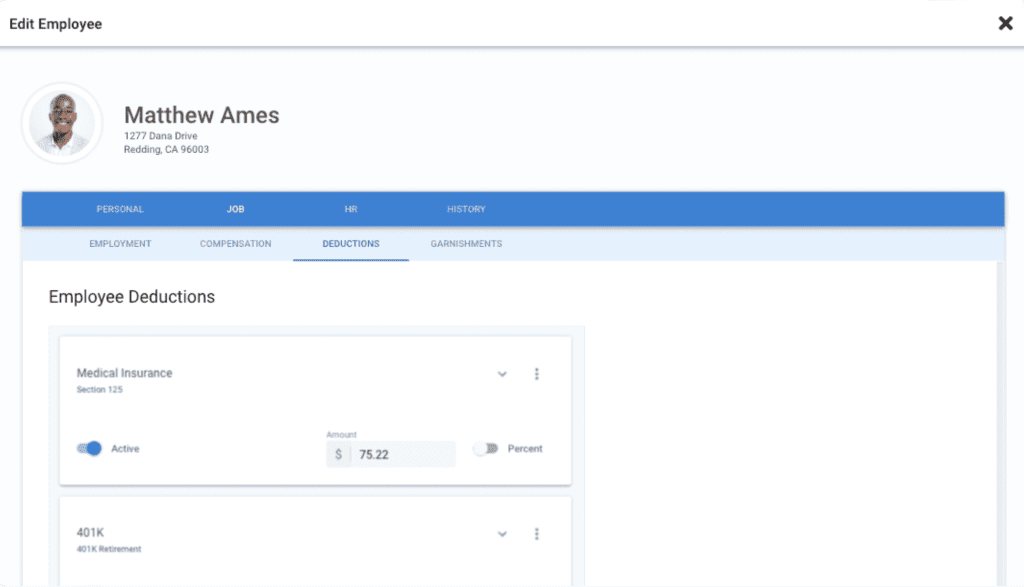
OnPay Benefits Deductions
OnPay’s benefits administration features are on par with leading payroll service providers and include all basic benefits options. Here’s a look at what OnPay’s benefits administration features offer:
- Health, vision, and dental insurance
- Life insurance
- 401 (k) retirement plans
- Benefits available in all 50 states
- In-house licensed brokers
OnPay Customer Service
| Customer Service4.1 |
|---|
| Personal Support 3.2 |
| Self-Service 5.0 |
OnPay’s customer service performs well. However, the software has room for improvement in the personal support department, as OnPay doesn’t offer personalized software training and could extend its live support hours to weekends. OnPay does offer access to an extensive knowledge base and video tutorials.
OnPay’s customer support can be reached by phone, via in-app chat, and by mail.
Here’s a full breakdown of OnPay’s customer support options:
| OnPay Customer Service | Availability |
|---|---|
| Phone Support | |
| Email Support | |
| Support Tickets | |
| Live Chat | |
| Dedicated Support Representative | |
| Knowledge Base or Help Center | |
| Videos & Tutorials | |
| Company Blog | |
| Social Media |
Ultimately, OnPay’s customer service is generally well-received by customers, though some customers noted issues during implementation and some negative interactions with customer service. In my experience, customer service reps were generally helpful and quick to answer calls.
OnPay Integrations
OnPay integrates with 20+ apps, including When I Work, Deputy, QuickBooks Time, Vestwell, QuickBooks Online, and Xero.
Although OnPay’s integrations include some of the most popular software options on the market, its selection is very limited compared to other top payroll software with hundreds of integrations.
OnPay Reviews
| User Reviews4.7 |
|---|
| Customer Feedback 5.0 |
| Review Site Aggregate 4.6 |
OnPay’s reviews are generally positive across the board. Based on 1,000+ reviews across G2, TrustPilot, and GetApp, OnPay earned a 4.6/5 star rating. The vast majority of users were happy with the service’s ease of use, functionality, and customer service.
Negative reviews cited bad experiences with payroll tax filing and customer service. But overall, it seems that most of OnPay’s customers have had a positive experience with the service.
Negative OnPay Reviews & Complaints
- Onboarding issues
- Payroll can’t be fully automated
- Integrations can be glitchy
- Lacks customization options
- Customer service reps were unhelpful
Positive OnPay Reviews
- Pricing is affordable
- Solid feature set
- Ease of use
- Integrations work well
Is OnPay Secure?
OnPay is secure and has no history of data breaches. According to its privacy policy, OnPay utilizes the following security protocols:
- Industry-standard SSL encryption
- Secure data facility with 24/7 guards and surveillance
The Final Verdict: Is OnPay Worth It?
Ultimately, OnPay is a strong standalone payroll service for small to midsize businesses that want full-service payroll, transparent pricing, multistate payroll, and basic HR tools without navigating multiple payroll tiers.
While OnPay includes many payroll essentials in its base plan, some HR features now require a paid add-on. It also lacks built-in time tracking and has a smaller integration library than some competitors.
Businesses with complex payroll, advanced HR needs, or a need for broader workforce management tools may want to compare OnPay with Gusto, ADP, Paychex, or a PEO.
Davina Ward
Expert Contributor
Davina began writing for small businesses in 2018 and has since gained expertise in the SaaS industry. She earned her Bachelor’s of Arts in English Literature from SUNY Geneseo in 2018.
View Davina Ward's professional experience on LinkedIn.

Latest posts by Davina Ward (see all)
- Homebase Payroll Review - December 18, 2023
- OnPay Payroll Review - December 1, 2023
- Toast Payroll Review - April 18, 2023
- How To Process Gusto Payroll - January 26, 2022
- Roll By ADP Review - September 8, 2021
To learn more about how we score our reviews, see our Payroll Software Rating Criteria.



