


Homebase Payroll Review
This employee-scheduling and time tracking software functions well on its own, and the payroll add-on might fit the bill for small businesses with modest payroll requirements.
-
WRITTEN & RESEARCHED BY
Expert Contributor
Last updated onUpdated
-
REVIEWED BY
Editor & Senior Staff Writer


Our content reflects the editorial opinions of our experts. While our site makes money through referral partnerships, we only partner with companies that meet our standards for quality, as outlined in our independent rating and scoring system.
Homebase

| Total Rating |
3.8 |
|---|---|
| Pricing3.6 | |
| Ease Of Use2.7 | |
| Features4.0 | |
| Customer Service4.4 | |
| User Reviews4.4 | |
Payroll Processing Time
2+ daysPricing Range
up to $120/month per locationBusiness Size
Small to large businesses with 1+ employeesHomebase At A Glance
- Homebase is an online employee scheduling and time and attendance tracking software designed for businesses of all sizes.
- As a part of its payroll services add-on, Homebase offers essential payroll features, such as custom deductions, payroll tax support, PTO management, and more.
- Homebase is among the best payroll software for small businesses that are looking for affordable basic payroll processing, mobile time tracking, and extensive employee scheduling features.
Pros
- Excellent mobile app
- Extensive employee scheduling tools
- Several integration options
- Easy to use
- Affordable payroll pricing
Cons
- Limited benefits administration
- Very basic reporting
- Many features are limited
- Lack of customization options
Table of Contents
What Is Homebase?
Homebase is an online employee scheduling and time-tracking software designed for use by small to large businesses with one or more locations.
Homebase also offers payroll services as an add-on for businesses that want to combine employee management and payroll processing into a single space.
Additionally, Homebase seems to be very well-loved by its users, boasts an excellent mobile app, and provides small businesses with a free plan that includes basic employee scheduling and time-tracking features.
Homebase Pricing
| Pricing3.6 |
|---|
| Software Plans 4.8 |
| Pricing Transparency 5.0 |
| Pricing Customization 3.0 |
Homebase is affordable for businesses that primarily need scheduling and time tracking, especially because it offers a free plan and transparent payroll add-on pricing. However, some advanced tools require higher-tier plans or add-ons.
Here’s a look at Homebase’s pricing:
| Homebase Plans | Price | When To Use |
|---|---|---|
| Payroll Add-On | $39/month + $6/person | If you need basic payroll processing paired with scheduling software |
| Basic | $0/month | If you need basic scheduling features for up to 10 employees with one location only |
| Essentials | $30/location/month or $288/location/year | If you need advanced scheduling and live support |
| Plus | $70/location/month or $672/location/year | If you need advanced scheduling, live support, and strong employee management features |
| All-In-One | $120/location/month or $1,152/location/year | If you need advanced scheduling, live support, and strong employee management features, and support from HR advisors |
Homebase’s four pricing plans start at $0/month for one location with 10 or fewer employees paid and increase up to $120/month per location on its most expensive plan.
Homebase also offers payroll as an add-on service. At that price point, Homebase is affordable but isn’t rated as one of the best cheap payroll software services.
Homebase is best for businesses that have extensive scheduling needs and very basic payroll needs. For businesses that just need payroll, Gusto, Square Payroll, or OnPay offer stronger payroll processing features at a similar or lower price point.
Homebase Payroll Add-On
Homebase’s payroll add-on includes:
- Unlimited payroll runs
- Automate hour tracking
- Tax calculation and payment at the federal and state level
- Automatic 1099 and W-2 filing and delivery
- Attendance tracked in Homebase automatically syncs with payroll
- eSigning for payroll forms
- Autoscheduled payroll processing
- New hire reporting
- Timecard record storage
- Support for multiple pay rates and schedules
- Off-cycle payroll
- Pay by direct deposit and paper checks
- Online employee self-service portal
- Payday emails and direct deposit notifications
- Early payday access for employees
- Free payroll transfer services
Homebase Basic
Homebase’s Basic plan is free for businesses with one location with up to 10 employees and includes:
- Weekly schedule building
- Clock in options
- Timesheet management for up to 90 days
- Real-time team messaging
- Early pay benefit option for team members
- Mobile app access
- POS integrations
- Help center and email support options
Homebase Essentials
Homebase’s Essentials plan includes everything from the Basic plan, plus:
- Live phone and chat support
- Custom overtime and break settings
- Time off and availability request management
- Employees can manage their shifts (trading, covering, and claiming open shifts)
- Location-based time tracking
- Photo capture for clock-ins
- Real-time notification automation
- Timesheet management and storage for up to 4+ years
- Payroll integrations
- Notifications when employees view schedules
- Custom messenger channels
- Announcement sharing
- Custom shift notes
Homebase Plus
Homebase’s Plus plan includes everything from the Essentials plan, plus:
- Custom careers page
- Job board access
- Job posting templates
- Custom screening questions
- Text-To-Apply support
- Interview scheduling support
- Team attendance tracking
- Late alerts
- Milestone tracking
- Employee certification management
- Performance notes
- Break waiving
- Time off dashboard
- Time off request limiters (require advanced notice/specific dates)
- Custom PTO policies
- Set custom account permissions
- Organize by department
Homebase All-In-One
Homebase’s All-In-One plan includes everything from the Plus plan, plus:
- eSigning
- Onboarding packets
- Automate new hire tax forms and direct deposit requests
- Secure document storage
- Live support from HR advisors
- HR professional review of your company documents
- Labor law news notifications
- Job costing reports
- Overtime alerts
- Early clock-in prevention
- Automatic clock outs
- Advanced reports
- Schedule according to sales forecasts
- Advanced insights
- API access
Extra Homebase Costs & Fees
| Homebase Extra Costs | Price |
|---|---|
| Job Posting via Craigslist or ZipRecruiter | $79/post |
| Task Manager | $13/month per location |
| Hiring Assistant | Starts at $30/post |
| Background Checks | $30 |
| Tip Manager | $25/month per location |
Homebase has a few add-ons available, including:
- Tip Manager: Calculates your tip pool from your POS and adds it to timesheets
- Background Checks: Run background checks right from Homebase
- Task Manager: Build, assign, and track tasks for your team members
- Job Post Boosts: Promote your jobs on Craigslist and ZipRecruiter
- Hiring Assistant: Streamline the hiring process from job posts to interviews
Is Homebase Easy To Use?
| Ease Of Use2.7 |
|---|
| Set Up 3.4 |
| Software Reliability 4.0 |
| Everyday Use 4.6 |
| Integrations 0.5 |
Homebase is easy to use for scheduling, time tracking, and day-to-day team management, though integration limits and occasional reliability complaints may affect the overall experience.
Sign-up is a breeze, and new users are treated to a 14-day free trial of Homebase’s most expensive and feature-rich All-In-One plan.
The software is generally easy to navigate, save for a very minor error on the reports page and a slightly unintuitive start-up flow. However, features such as reports, scheduling, time tracking, notifications, and more were very easy and worked as expected.
Homebase’s mobile app is also exceptionally well-designed and does well across both the App Store and the Play Store. However, user complaints did cite software reliability as a pain point.
Homebase Features
| Features4.0 |
|---|
| Payroll Processing 4.2 |
| Employee Management & PTO 5.0 |
| Time Tracking 3.0 |
| Payroll Tax Support 4.5 |
| Reporting & Tax Forms 5.0 |
| Onboarding & HR 5.0 |
| Benefits Administration 0.0 |
| Niche Features 5.0 |
Homebase is strongest as scheduling and time tracking software. Its payroll add-on covers core payroll needs, but payroll-specific reporting and customization are limited compared to dedicated payroll providers.
| Homebase Features | Availability |
|---|---|
| Payroll Tax Support | |
| Auto-Schedule Payroll | |
| Bonus Payroll | |
| Off-Cycle Payroll | |
| Employee Management | |
| Paid Time Off | |
| Time Tracking | |
| HR Support | |
| Onboarding Support | |
| Benefits Administration | |
| Number Of Reports | 10+ |
| Number Of Integrations | 25+ |
| Number Of Users Supported | Unlimited |
For businesses with basic payroll needs, Homebase’s features will serve well and won’t break the bank. However, as your business grows, builds out a software stack, adds an employee benefits package, or needs more extensive reporting, you’ll start to notice where Homebase falls flat as a payroll solution.
Ultimately, Homebase has room to grow as a payroll service provider, but should be able to meet the payroll and scheduling needs of many small businesses, especially those in the retail or restaurant industries.
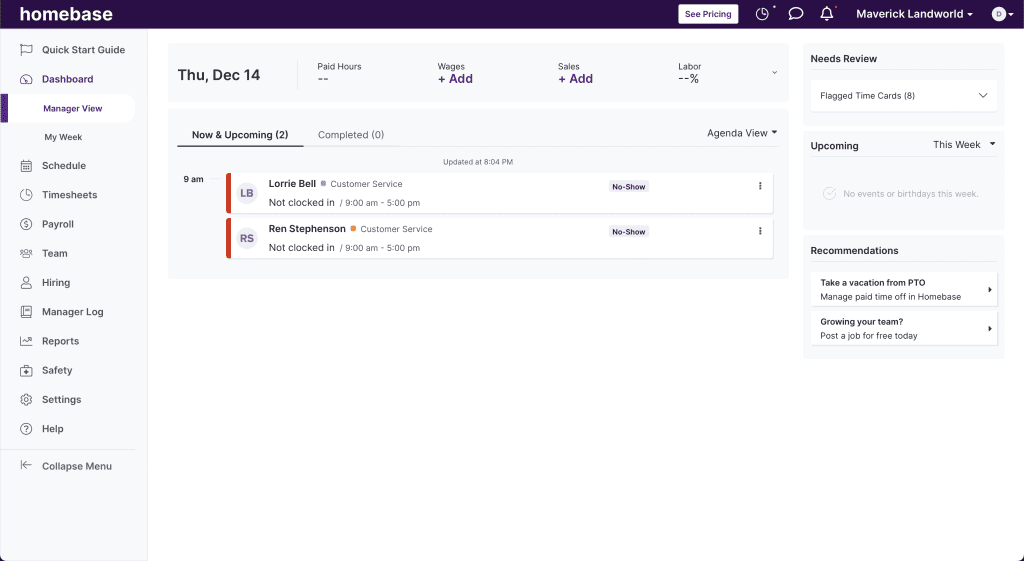
Homebase Home Dashboard
Payroll Processing
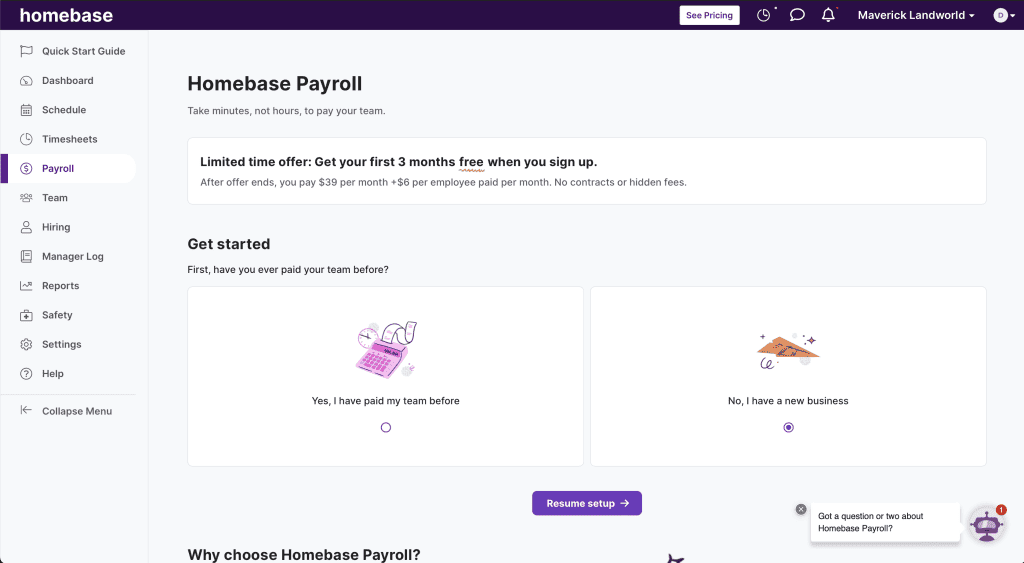
Homebase Payroll Dashboard
Although Homebase’s payroll processing features aren’t as comprehensive as other options, businesses should be able to handle the basics of paying their employees and contractors. Homebase’s payroll processing features include:
- Unlimited payroll runs
- Pay employees and contractors
- Set custom deductions
- Free payroll service transfer
- Full payroll tax support
- Automatic timesheet sync
- Form eSigning
- New hire reporting
- Autoschedule payroll
- Off-cycle payroll
- Direct deposit and paper check payment options
- Payday emails and direct deposit notifications
Employee Management & PTO
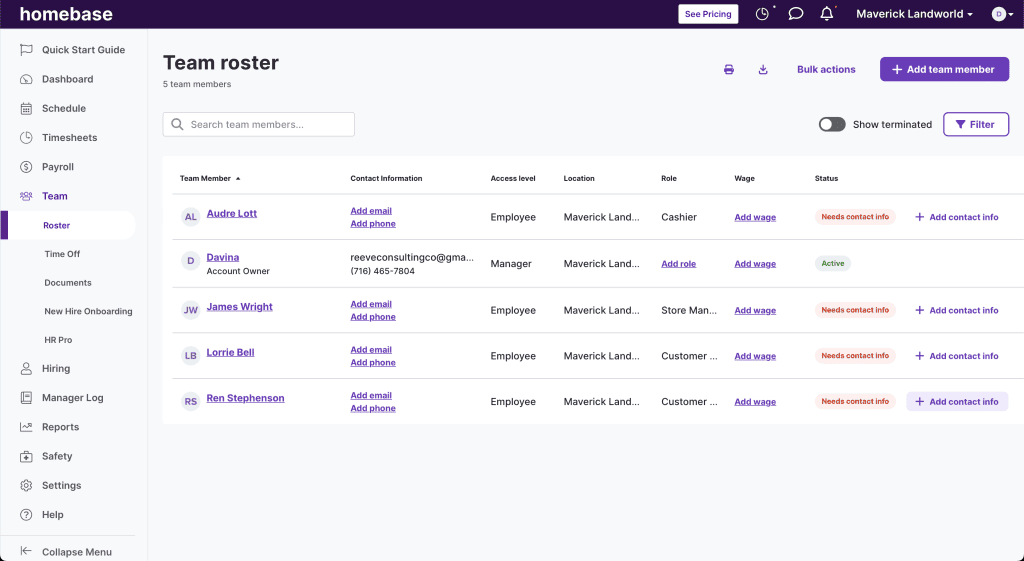
Homebase Team Dashboard
Homebase’s employee management and PTO features are shining points for the software. Homebase’s users get plenty of customization options that should allow them to easily manage and organize their teams and tailor time off policies to best suit their business’s needs.
Here’s a look at Homebase’s employee management and PTO features:
- Labor cost reports
- Auto-clock out at shift’s end
- Set custom PTO policies
- Manage time off requests
- Employee-self-service portal online and in-app
- Messaging within the software
- Custom notification settings, including “read” alerts
- Shift performance notes
- Employee “Shout Outs” for good work
- Manager logbook
Time Tracking
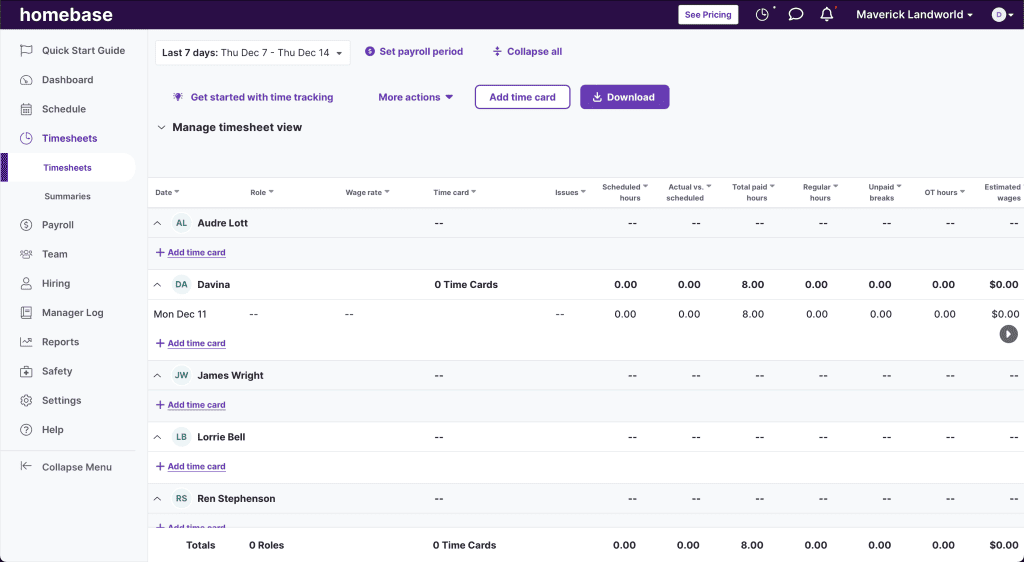
Homebase Timesheet
As Homebase is primarily a scheduling and time-tracking software, businesses should have no trouble tracking and managing employee attendance. Homebase’s standout time-tracking features include:
- Mobile app for time tracking and clocking
- Support for web-based clocking
- Employee self-service schedule management
- Geolocation for mobile time tracking
- Clocking verification options
- Set custom overtime rules
- Get late clock alerts
Payroll Tax Support
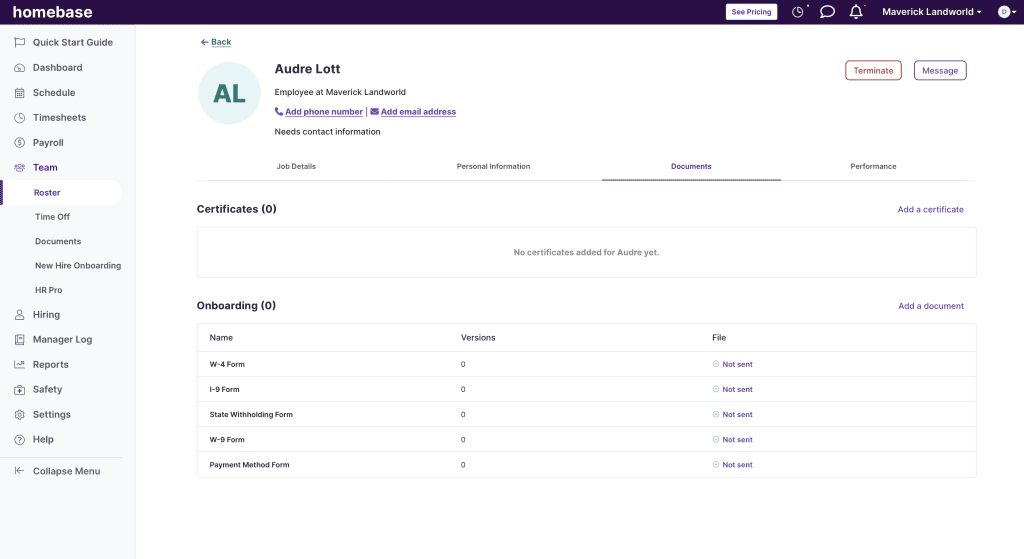
Homebase Employee Tax Forms
Homebase offers industry-standard payroll tax support, including:
- Payroll tax calculation, filing, and payment on behalf of your company
- Automatic payroll tax support at the federal, state, and local level
- Tax reports
- New hire reporting
- Employee portal for access to tax forms
- Secure document storage
- Automated onboarding with eSigning W-4s, W-9s, and I-9s
- Set custom pre- and post-tax deductions
Reporting
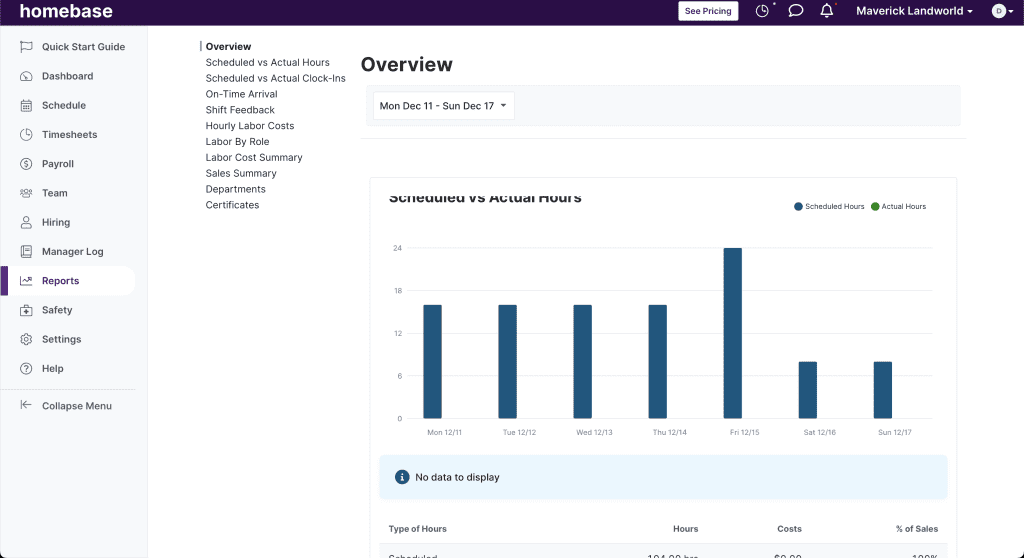
Homebase Reports
Even on its highest plan tier, Homebase’s reports were more scheduling and time-tracking-focused, rather than payroll-focused. However, there were report customization options and reports were easy to read. Here’s a look at Homebase’s reporting features:
- 10+ built-in reports
- Report customization options
HR & Onboarding
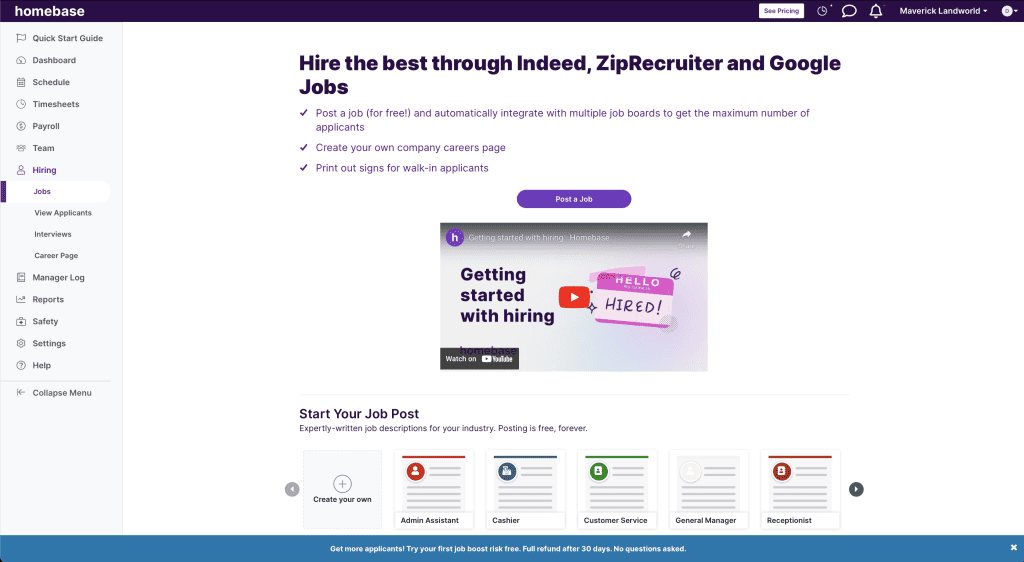
Homebase Hiring Dashboard
Homebase offers solid HR and onboarding features designed to let your business let new hires onboard themselves and provide valuable HR resources. Homebase’s HR and onboarding features include:
- eSigning
- Secure document storage
- Online employee self-service portal
- Job posting templates
- Text-To-Apply support
- Applicant tracking and screening
- Applicant messaging and interview scheduling
- New hire reporting
- Employee certification tracking
- Labor law compliance alerts
- Get advice from HR professionals
- Set employee safety protocols
- Employee performance notes
Homebase Customer Service
| Customer Service4.4 |
|---|
| Personal Support 3.8 |
| Self-Service 5.0 |
Homebase offers several support options, though live support availability depends on the plan.
Here’s a look at Homebase’s customer service options:
| Homebase Customer Service | Availability |
|---|---|
| Phone Support | |
| Email Support | |
| Support Tickets | |
| Live Chat | |
| Dedicated Support Representative | |
| Knowledge Base or Help Center | |
| Videos & Tutorials | |
| Company Blog | |
| Social Media |
One thing to note is that Homebase’s free Basic plan does not include live support options, so smaller businesses using the service are somewhat less prioritized.
Otherwise, Homebase’s customer service seems to perform well, with customers citing few complaints.
Homebase Integrations
Homebase integrates with 25+ third-party software solutions, including POS software, payroll software, online job boards, and restaurant-specific business tools.
Standout Homebase integrations include Clover, Toast, Shopify, Square, QuickBooks, Revel, Indeed, Gusto, ADP, Rippling, and more.
Businesses using Homebase’s highest-tier plan also gain access to the software’s API.
Homebase Reviews
| User Reviews4.4 |
|---|
| Customer Feedback 4.0 |
| Review Site Aggregate 4.5 |
Homebase generally receives positive reviews from customers, who often praise its ease of use, generous free plan, scheduling tools, and mobile app.
The very few negative reviews came from users who weren’t satisfied with Homebase’s lack of customization options, pricing increases, and the limitations of its features.
Across the G2, Software Advice, and Capterra review sites, Homebase earned 4.5/5 stars with 2,000+ reviewers weighing in. More impressively, Homebase’s mobile app is exceptionally well-reviewed with the same 4.5/5-star rating and over one million downloads.
Negative Homebase Reviews & Complaints
- The software can be glitchy
- Excessive notifications
- Pricing has increased
- Reports are limited
- Customization options are limited
Positive Homebase Reviews
- Ease of use
- Excellent time-tracking functionality
- Solid scheduling features
- Helpful customer service
- Generous free plan
Is Homebase Secure?
Homebase publishes security and privacy information through its security page and Trust Center. Security highlights include TLS data encryption, access controls, multi-factor authentication support, employee security training, and regular security testing.
- Industry-standard NIST SP 800-171 framework
- Onsite security team
- TLS data encryption
- Bug bounty programs
- Access control
- Quarterly security scans
- Multi-factor authentication support
- Employee security training
Final Verdict: Is Homebase Worth It?
Homebase is a solid investment for small businesses that want to combine scheduling software and payroll services at an affordable price point.
Homebase is not the best fit for businesses that want payroll-first software with advanced payroll reporting, benefits administration, or deep payroll customization.
If payroll is your main priority, compare Homebase with payroll-first options such as Gusto, Square Payroll, OnPay, or Payroll4Free.
Davina Ward
Expert Contributor
Davina began writing for small businesses in 2018 and has since gained expertise in the SaaS industry. She earned her Bachelor’s of Arts in English Literature from SUNY Geneseo in 2018.
View Davina Ward's professional experience on LinkedIn.

Latest posts by Davina Ward (see all)
- Homebase Payroll Review - December 18, 2023
- OnPay Payroll Review - December 1, 2023
- Toast Payroll Review - April 18, 2023
- How To Process Gusto Payroll - January 26, 2022
- Roll By ADP Review - September 8, 2021
To learn more about how we score our reviews, see our Payroll Software Rating Criteria.



