About Our Ratings
Merchant Account Review Criteria
As mentioned in the "About" section, we don't rely on rates and fees much to base our reviews. Publicly displayed rates and fees are a horrible initial metric to use when trying to compare merchant accounts.
Here's why:
- Fraudulent MSPs (Merchant Service Providers) can list whatever fees they want, in order to "bait" you in.
- Rates and fees are never set in stone, and can always be negotiated to fit your business profile.
- There are a labyrinth of hidden rates and fees when it comes to merchant accounts that can only be uncovered with careful scrutiny.
So to sum up, you won't see a listing of the MSP's rates or fees in our reviews. You can easily find them on the MSP's own website if you want. I recommend that you educate yourself and ask as many questions about their rates and fees as you feel would make you comfortable.
Now that we have that out of the way, we'll move on to what really matters when trying to review a merchant service company.
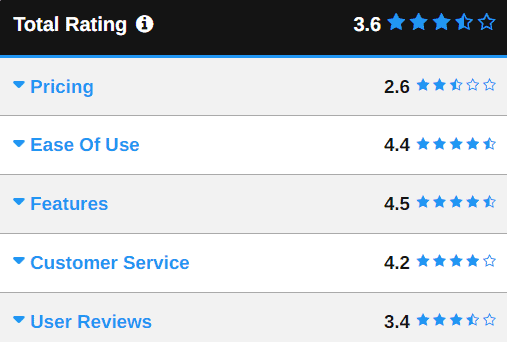
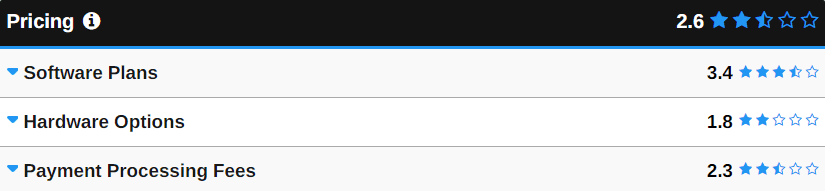
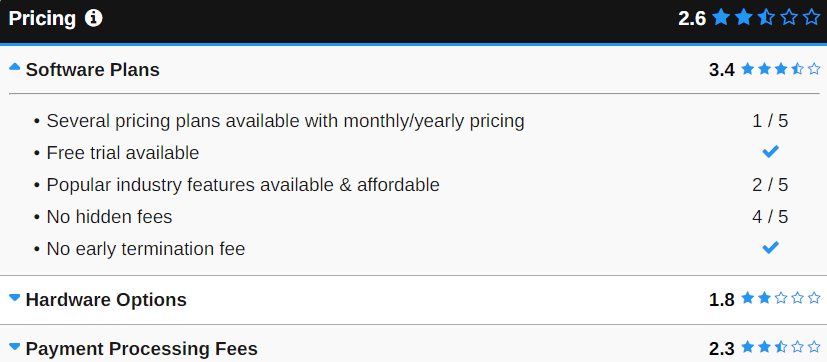
We've laid out our process below, and you can probably just use it as a blueprint to do your own research. Each of our reviews will include most, if not all, of the criterion we've listed in this article along with Merchant Maverick's personalized 5 star rating system.
Example:

(The above would be a 4.5 out of 5 rating.)
Last Updated:
Outdated reviews are pretty much worthless, that's why we do our best to keep ours updated. Reviews are updated on an "as needed" basis which means that as new information comes our way, we'll update accordingly. If you feel your company has been misrepresented, please let us know.
Overview:
We like to provide a brief summary at the top of each review, that way you won't have to read through the whole thing if you don't want to.
Date Established:
How long has the company been around? If they've been in business for a while, then chances are they have at least a few satisfied customers and some experience at what they do.
Location:
Are they local? Can you drive to their location if you need to?
Domain Name(s):
What other domains does the ISO/MSP operate under? Many of these providers use multiple domains to do business with. It's always good to know what those domains are, so you don't unknowingly submit an application to a provider you've already ruled out.
Parent/Partner Company:
Most of these smaller ISOs (Independent Sales Organizations) and MSPs (Merchant Service Providers) are either owned by or partner up with a larger parent company. If that parent/partner company runs unethical business practices, then those practices will most likely trickle down to the businesses under their umbrella. Finding the parent/partner company is a great way of qualifying a handful of candidates at once.
Type:
Are they an ISO/MSP, issuing bank, acquiring bank, third-party processor, registered agent or independent sales representative? Pretty darn confusing huh? Check out our glossary to understand those terms. Just keep in mind that most of our reviews will be of ISO/MSPs.
Acquiring Bank(s) (Acquirer):
The acquiring bank, or acquirer (learn more), is a very important player in the merchant account game. They're the ones that underwrite the merchant accounts for the ISOs and MSPs that we review here on Merchant Maverick. Some of them offer their own merchant account services, some of them don't.
Why is the acquiring bank so important? Because they're the guys that assess your risk level as a merchant, and they're the ones that are assuming most of the financial responsibility for your merchant account. If they notice something "wrong" with one of your transactions, they have the right to withhold your funds, or even shut you down. When you read complaints about people getting their funds frozen or accounts shut down by an ISO or MSP, it's usually the acquiring bank that's doing it. Just remember, some banks are willing to take on more risk than others.
Payment Processor(s):
Who does the ISO/MSP use to process their transactions? Sometimes ISOs and MSPs process their own transactions, but more frequently they outsource the task to someone else. It's important to know who's processing your transactions, just so you're aware of who else will be charging you a fee. Don't get blindsided by a fee you weren't expecting by an entity you didn't even know exists.
Payment Gateway(s):
Similar to the processor, the payment gateway may also be a service that your ISO/MSP outsources to another party. Authorize.Net is probably the most popular payment gateway provider, but there are dozens of other ones as well. It's important for you e-Commerce merchants to know which payment gateway a merchant account provider is offering you, so you'll know if it is compatible with your online shopping cart.
Trust Symbols:
Is the company part of the BBB or some other accredited site? Monitoring organizations like the BBB give the public a platform by which to rate a company. Ratings that can be extremely valuable during a comparison.
Before you email us about how awful the BBB is, trust that we already know about their reputation. That's why we consider multiple factors when coming up with a score, not just the BBB rating.
Negative Reviews/Complaints:
Have there been any negative reviews about the company? Check RipOffReport.com, Yelp.com, Scam.com, ComplaintsBoard.com, Complaints.com ePinions, Twitter, Google and any other social media sites. The internet allows for unprecedented levels of transparency and accountability...use it to your advantage!
A note of caution about believing every negative review that you read about a company: People have a tendency to complain more than they praise, so more often than not, you'll find a higher number of complaints than you will find praise. Also, you never know if you're reading a review from an actual customer, or just a smear campaign initiated by a company to ruin their competitor's name. That's why we firmly believe in looking at patterns, as opposed to judging an ISO/MSP just by a few negative reviews. If you noticed a bunch of negative reviews on RipOffReport, then you see a bunch of complaints filed against them on the BBB, etc... etc...
We've instated a pretty strict user review and comment policy to help authenticate any user experiences.
Common Complaints:
Reading through negative reviews and finding commonalities will help you avoid the same problems by knowing about them ahead of time.
Verifiable Testimonials/References:
Most ISOs and MSPs have pretty detailed testimonials on their site, but can those people be reached for verification? Will the ISO/MSP give out references if you ask for them? It's obvious that if someone left a testimonial, that they were happy with the service provided. But, what's more important is whether those merchants are still happy with their provider. A quick email or phone call to them will answer that question for you.
Security/Privacy:
Do they offer security and privacy for your sensitive information? After all, you'll probably be filling out an online app that asks for your social security and bank account info. Make sure they're secure.
Customer Service:
Is the sales rep knowledgeable, consultative and responsive? Does customer service go out the window as soon as you sign up?
Contract Duration:
Do they require you to sign-up with them for a specific period of time? If so, how long? Knowing this ahead of time will be priceless in helping you determine a best fit. Just keep in mind that some sales reps won't give you a straight answer, so be sure to either hound them about it, or ask for a copy of their contract terms before you sign-up. You can always email us if you want a second opinion.
Cancellation Fee:
Much like the contract terms, you may not hear the whole truth, but you still have every right to ask whether or not you'll be hit with a cancellation fee if you break your contract. Cancellation fee's usually range anywhere from $100 to $500.
Interchange-Plus Pricing:
Interchange-plus is a relatively new pricing model that is much more simple and transparent, compared to the popular tiered-pricing model. We highly recommend that you sign-up with an ISO/MSP that offers you interchange-plus.
Seasonal Downtime:
Some businesses are seasonal and don't need their full processing quota during certain times of the year. If that's the case for you, ask the rep if they offer seasonal downtime for your account.
Product/Service Offering:
What products/services do they offer? Are they a jack-of-all trades and a master of none?
Product/Service Specialty:
What is their specialty? You want to find a company that specializes in what you need.
Want to Participate?
As a reader, you'll also have the opportunity to rate and review the featured merchant within the comment section of each post. You'll notice the five star "User Rating" widget directly below the "Submit" button in the comment section. Just fill out the required fields, leave your review, choose your rating and hit submit. It's that simple...
POS Software Review Criteria
Last Updated:
Outdated reviews are pretty much worthless, that's why we do our best to keep ours updated. Reviews are updated on an "as needed" basis which means that as new information comes our way, we'll update accordingly. If you feel your company has been misrepresented, please let us know.
Overview:
Brief summary about the pos software vendor including date of establishment, location, history, profitability, percentage of satisfied customers, and any big name customers known to have used this software.
Date Established:
Important to see if company is stable; has solid customer base?
Location:
Important for technical support and customer service hours.
Domain Name(s):
What domains does the vendor operate under?
Price:
Although you get what you pay for, price is still an important factor merchants need to know.
Web-Based or Locally-Installed:
Is the software web-based/cloud-based or do you actually have to download and install it on your computer?
Specific Industry:
What industries would this software be ideal for? Clothing retail? Restaurant? Manufacturing? Repair?
Specific Size of Business:
What size of business would this software be ideal for? Small? Multi-store? High transaction volume?
Ease of Use/User Friendly:
Does the interface look dated? Clustered? Difficult to navigate? Is it easy to learn and train others.
Hardware/Operating System Required:
You need to know which hardware and what operating systems the POS software works with. You wouldn't want to purchase the software to later find that it's not compatible.
Product Basics:
Does it process debit cards, credit cards, checks, cash, gift cards? How long does it take for cc authorization? What does it allow you to print on the receipt? How does it work for refunds?
Product Specialties/Features:
Focuses on special features that make this software different from others. Also ties into industry specifications (certain industries will require certain features). Things like accounts payable integration, inventory integration, cataloging capabilities, customer lists, sales tax tracking, and other various financial reports.
Integrations/Add-Ons:
What else does the POS software integrate with? Can you integrate it with your favorite shopping cart (e.g. Magento Commerce or Shopify)? Can you integrate it with your invoicing service (e.g. FreshBooks)? How about your accounting service (e.g. Quickbooks)?
Compatible Credit Card Processors:
Is the software only compatible with certain credit card processors, or can you process payments through any provider?
Customer Service/Technical Support Rating:
How is their customer service/technical support? Are they easy to get a hold of? Available 24/7? Willing, knowledgeable, helpful on the phone? How many technical support staff do they have? What’s the waiting time to get a hold of a staff member?
Negative Reviews/Complaints:
Are there a lot of glitches/problems with the software? Is it lacking in any crucial features? Is the customer service/technical support terrible?
Positive Reviews/Testimonials:
Any specific praise people who have used the software have for it? References?
Final Verdict:
Closing thoughts on the product.
No trackbacks yet.


January 8th, 2010 - 11:22
The Merchant Maverick reviews would be greatly improved if they were dated. For example, it would be nice to know if a review was written a year ago or ten years ago. Indeed, I would argue that an undated review of a merchant account provider is almost useless.
January 8th, 2010 - 11:28
Hi Docu,
Thanks for the recommendation. The reviews actually are dated (top-left corner). Once I create a system for regularly updating the reviews, the updated date will also be shown.
Thanks again!
February 25th, 2010 - 09:22
You may want to consider adding this feature to your list of questions to ask: Discounting with Enhanced Billback. Many FirstData ISO’s use this type of billing, which is not generally in the best interest of the merchant. Most use it to help keep their attrition down as it makes it difficult for the average merchant to know what exactly they are paying. Simply put, downgrades for this month on placed on the following month’s bill! I’m not aware of any ISO or processor using this that is not tied to FirstaData, but that does not mean they do not exist.
Curtis
February 25th, 2010 - 12:52
Thanks Curtis! I had read about that a while ago, but didn’t think to include it as part of my reviews…good tip! If you have any other thoughts on how I can improve, let us know here, or shoot me a PM.