


Square Credit Card Reader Review
The Square Reader is an affordable, entry-level choice that comes packed with value for small business credit card processing needs.
-
WRITTEN & RESEARCHED BY
Expert Contributor
Last updated onUpdated
-
REVIEWED BY
Expert Contributor


Our content reflects the editorial opinions of our experts. While our site makes money through referral partnerships, we only partner with companies that meet our standards for quality, as outlined in our independent rating and scoring system.
Square Credit Card Readers

| Total Rating |
4.7 |
|---|---|
| Pricing4.6 | |
| Ease Of Use5.0 | |
| Features4.8 | |
| Customer Service4.1 | |
| User Reviews4.2 | |
Get a free card swiper from Square at no cost when you create a free account. Claim your card reader.
Square Credit Card Readers At A Glance
- Easy-to-use device for chip and contactless payments
- Financing available for device and charging dock
- Syncs easily with Square software
Pros
- Supports EMV & contactless (NFC-based) payment methods
- All-day battery life
- Free software plans
- No additional monthly fee for additional devices
- Offline mode to take payments with no internet
Cons
- No integrated magstripe reader
- Only works with a Square account
Table of Contents
What Is Square Reader?
For many small business owners, the Square Reader for contactless and chip (as it’s officially called) is a great entry-level device that’s compatible with EMV-enabled cards. Also, it supports NFC-based payment methods, such as Apple Pay and Google Pay.
The Square Reader differs from most competing devices in that it doesn’t include magstripe swiping capability. This isn’t so much a limitation as it is a means of future-proofing the device while still maintaining a small, portable form factor. EMV is now the standard method of accepting a credit or debit card in the US, Europe, and many other countries.
Businesses That Would Benefit From Square Reader
Square Reader is intended for smaller retailers like food trucks or individual vendors like farmers’ market operators looking for a quick way to take card payments. But Square has enough features, and its rates are affordable enough that it’s still a practical option for slightly larger businesses like cafes.
Businesses that are just starting out can also easily scale up to some of Square’s other hardware options if they expand as well.
Pricing
| Pricing4.6 |
|---|
| Hardware 5.0 |
| Payment Processsing 4.0 |
Square has done well at keeping its hardware affordable, and because it handles sales directly, pricing is also consistent. The Second Generation Square Reader for contactless and chip sells for $59, and the older, first-generation version retails for $49.
Square offers a 30-day money-back guarantee on all hardware purchases. You can return the device within that time frame for a refund, no questions asked. Because Square charges no monthly fees and has no contracts, you can simply stop using the app without worrying about a penalty.
Pricing Overview
| Item | Value |
|---|---|
| Pricing Range | $0 - $149/month |
| Account Setup Fee | $0 |
| Contract Length | Month-to-month |
| Processing Model | Flat-rate |
| Card-present Transaction Fee | 2.3% - 2.6% + $0.15 |
| eCommerce Transaction Fee | 2.9% - 3.3% + $0.30 |
| Keyed-in Transaction Fee | 3.5% + $0.15 |
| Equipment Cost | $59 |
Note that businesses processing over $250K/year can qualify for discounted processing rates.
Monthly Plans
| Square Credit Card Readers Plans | Price | When To Use |
|---|---|---|
| Square Free | $0/month | If you need basic in-person and online selling features. |
| Square Plus | $49/month per location | If you want more advanced features |
| Square Premium | $149/month per location | If you want the most advanced features and discounted processing rates |
You can use a Square reader with any of Square’s monthly software plans, either by itself or with additional hardware. Even better, you will not pay any added monthly fees to use additional readers, or other Square hardware such as a Square Terminal. However, there is an additional fee per business location.
Extra Costs
| Square Credit Card Readers Extra Costs | Price |
|---|---|
| Charging dock | $39 |

You might also want to spring for the Bosstab Dock, which conveniently holds your reader in place for countertop payments and charges your device. The dock is compatible with both the first and second-generation reader.
Hardware Design
The Square Reader for contactless and chip excels in fundamental product design. Rounded edges and a smooth, slick surface allow it to pair well with the smartphones and tablets intended to work with it.
Like any good tech device, the Square Reader also has various optional accessories you can add, such as cases, receipt printers, and cash drawers. Many of these are third-party products, but they can be conveniently ordered from the Square website.
Ease Of Use
| Ease Of Use5.0 |
|---|
| Initial Setup 5.0 |
| Device Use 5.0 |
Square is one of the few merchant services providers in the industry specializing in meeting first-time business owners’ needs.
The company emphasizes simplicity and affordability in its products and services, which applies to the Square Reader and Square POS app. If you can follow simple directions, you should be able to set up your reader and start accepting transactions without the need for hours of training, something that is reflected in our scoring system.
While basic processing tasks are very simple, there’s naturally going to be a bit more of a learning curve if you want to take full advantage of Square’s more advanced features and customization options.
At the same time, the company’s offerings can sometimes be a bit too simple for more advanced users. Customization options are often limited, so don’t expect to have the same level of granular control over your checkout interface that you would have with something like Stripe.
Getting Started With The Square Contactless & Chip Reader
The easiest way to get your hands on a Square Reader is to order it directly from the Square website. It will usually arrive within five to seven business days. If you’re eager to start processing with Square and can’t afford to wait that long, the Square Reader is also available from many large retailers, including Amazon, Best Buy, and Walmart.
Unlike the traditional countertop terminals you get with a merchant account provider, the Square Reader doesn’t need to be preprogrammed with a software load that connects your merchant account to your provider’s payment processing network.
That said, Square offers a warranty on products purchased directly from its website. If you get your reader from anywhere else, the same warranty doesn’t apply. You’ll need a compatible mobile device to set up the reader. Be sure to download the free Square point of sale app and enter your Square account’s login credentials before you start.
Start by enabling Bluetooth on your mobile device. You’ll also need to activate a few permissions when you first log on (location services, access to the microphone (for magstripe transactions), and push notifications. And you’ll need to set up all of the inventory, sales tax rates, and any other app features you plan to use before you can start selling with Square.
If you’ve done all of that ahead of time, good! If not, ensure you’ve at least set up the sales tax feature before making your first sale.
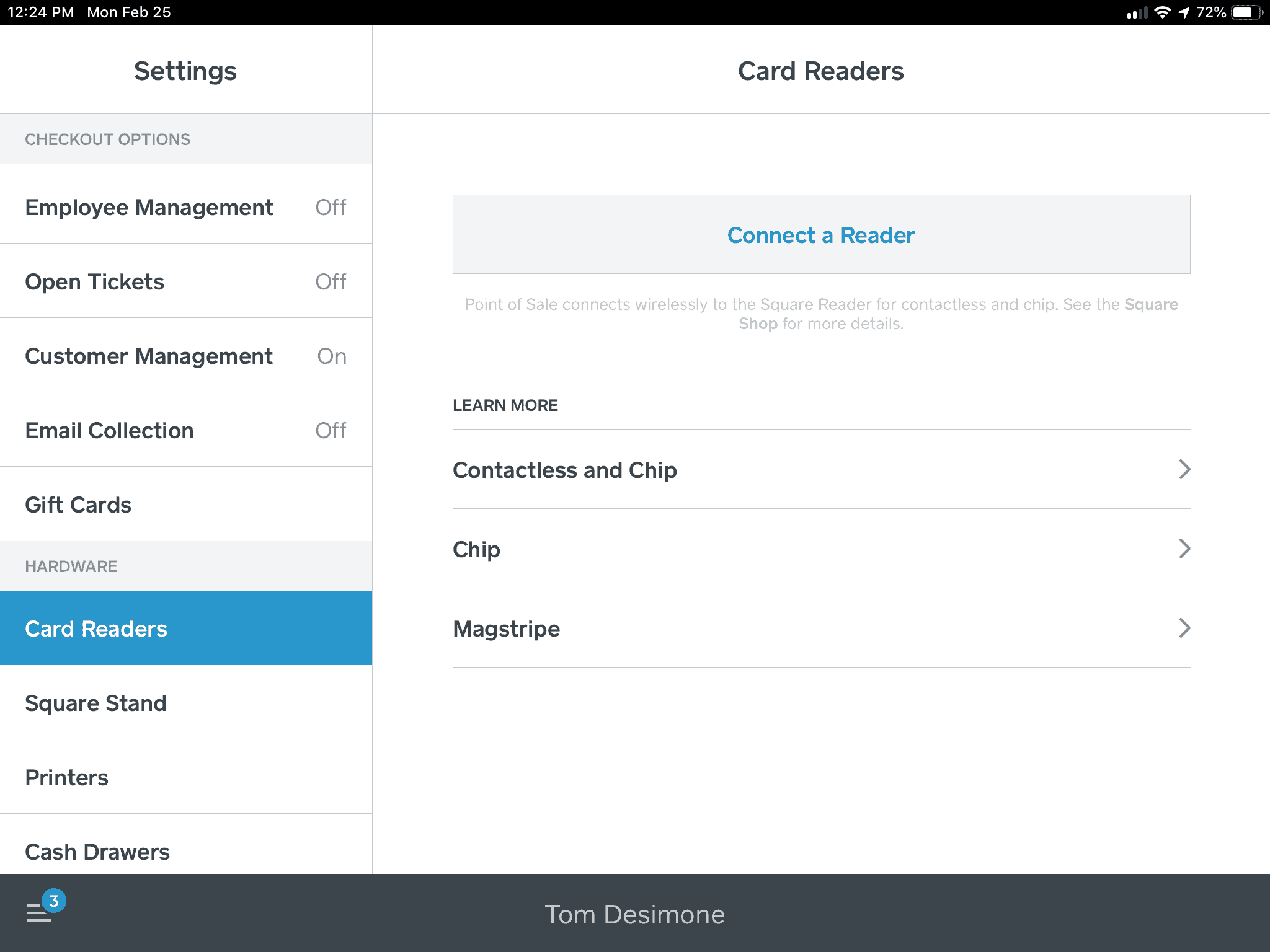
Once the Square point of sale app is open, go into the settings menu, scroll down to “Card Readers” and press “Connect a Card Reader.” Square will ask you which kind of reader you’re using. After selecting the Square Reader for contactless and chip, the Square app will give you on-screen instructions on how to pair the device. It’s pretty simple:
- Press and hold the power button at the bottom of the reader until you see four lights on the reader flash orange.
- Follow the prompts on the screen (if any) to approve the pairing request.
After you’re connected, the Square Point of Sale app will download any firmware updates for the reader, which can take a few minutes. It will notify you that your new Square Reader is ready to use!
Software Features
| Features4.8 |
|---|
| Device Hardware Features 4.8 |
| Device Software Features 4.8 |
The free Square POS app is your gateway to unlocking the potential of Square’s mobile processing system and associated services. It’s available for Apple devices running iOS/iPadOS 12.0 or higher and Android (operating system requirements vary by device, so contact Square if you have an older model).
Square is a good, general app that works well for most small businesses, and even includes industry-specific features for retail, service-based, and restaurant businesses.
You can learn more about Square’s software features by reading our full Square POS app review, and also check out an overview of available features below. Some features, such as delivery management and marketing tools, carry additional fees.
| Square Credit Card Readers Features | Availability |
|---|---|
| Multi-Store Support | |
| Contactless Payments | |
| Multi-Channel Selling | |
| Gift Cards | |
| Customer Loyalty | |
| Marketing Tools | |
| Online Ordering | |
| Inventory Management | |
| Reporting | |
| Menu Management | |
| Delivery Management | |
| EBT Acceptance | |
| Employee Management | |
| Text Messaging |
One Square software feature worth pointing out when it comes to considering the Square Reader is Tap to Pay. This feature allows you to accept NFC payments using just your iPhone or Android and the Square POS app. This means that if you are OK with processing only contactless payments (no EMV/chip card payments), you don’t necessarily need to purchase a Square Reader in order to take mobile payments.
Customer Service & Support
| Customer Service4.1 |
|---|
| Personal Support 3.5 |
| Self-Service 4.6 |
Square has invested a lot in building its customer support resources. The support center is loaded with helpful informational articles, walk-throughs, and troubleshooting tips that cover every aspect of Square’s services, including advice for dealing with all of Square’s hardware.
| Square Credit Card Readers Customer Service | Availability |
|---|---|
| Phone Support | |
| Email Support | |
| Support Tickets | |
| Live Chat | |
| Dedicated Support Representative | |
| Knowledge Base or Help Center | |
| Videos & Tutorials | |
| Company Blog | |
| Social Media |
In addition to the self-help knowledgebase, there are other support options:
- Telephone Support: Square’s phone lines are open from 6 AM to 6 PM PT, Monday through Friday, although they can sometimes be tricky to track down. Note that if you upgrade to Square Terminal or Square Register, you will have access to 24/7 support. Premium subscribers also get 24/7 phone support.
- Email Support: If your question isn’t urgent, Square’s email support tools will let you message the Square team, and they’ll get back to you.
- Social Media Support: You can tweet at Square for help if you need it or reach out on Square’s Facebook page. This is likely the best option if you’ve tried the self-support resources and can’t find what you need, but it’s not ideal for account-specific questions.
On the whole, Square offers an impressive number of customer support options, including exhaustive self-help resources. However, some customers complain about the quality of said support (see User Reviews section below).
User Reviews
| User Reviews4.2 |
|---|
| Customer Feedback 4.0 |
| Review Site Aggregate 4.3 |
Customer reviews of the Square Reader itself is mostly positive, though many reviews cite issues with Square Payments as a whole—namely account instability and unsatisfactory customer service.
Square is BBB-accredited and has an A+ score with the BBB. On their BBB profile, the company has received over 3,000 complaints in the past year, and 937 complaints filed in the last 12 months. However, those are normal complaint numbers for such a large processor.
On TrustPilot, the company has a score of 4.3/5, out of over 5,600 reviews.
Of course, those reviews mainly discuss Square’s services in general, rather than just the Square Reader.
How Square Reader Compares To Other Devices
Final Verdict
| Square Credit Card Readers Review Summary | |
|---|---|
| Pricing Range | $0 - $149/month |
| Choose If You Need |
|
With Square, the overall value is astounding — you get a free POS app, free software for invoicing, inventory management, a virtual terminal, and the ability to add loyalty programs, marketing tools, employee management, and payroll features.
Considering the predictable, flat-rate pricing for payment processing, the total lack of commitment required to sign up, and the lack of mandatory monthly fees, it’s a great deal, especially for new and low-volume businesses.
Nonetheless, the Square Reader for contactless and chip isn’t perfect. The lack of an integrated magstripe reader won’t be a problem in the future, but today it can put you in an awkward situation if you need to switch to the magstripe reader while trying to complete a transaction.
The price point is appealing, and it’s one of the lowest-priced options for contactless payments around.
Need more options? Check out our roundup of the best mobile POS systems.
Matt Sherman
Expert Contributor at Merchant Maverick
Matt has been helping small businesses make decisions since 2017. He has written reviews and articles across many different channels but specializes in the point of sale, payroll, and small business insurance categories and has been quoted in articles for Fox Business, Forbes, and other publications. Prior to joining Merchant Maverick, Matt was a journalist and editor for 14 years for a pair of weekly newspapers. He is a graduate of the University of Oregon and currently resides in Gladstone, Oregon.
View Matt Sherman's professional experience on LinkedIn.

Latest posts by Matt Sherman (see all)
- Odoo POS Review - November 13, 2024
- Tips For Keeping Your POS Secure - October 31, 2024
- What Is Shippo? - October 1, 2024
- What Is ShippingEasy? - October 1, 2024
- What Is Stamps.com? - September 30, 2024



