
How Does Square Work? The Beginner’s Guide To Square For Small Business
What is Square and how does it work for your small business? Read this guide to find out about pricing, integrations, how to set up a Square account, and more.
-
WRITTEN & RESEARCHED BY
Expert Contributor
Last updated onUpdated
-
REVIEWED BY
Expert Contributor


Our content reflects the editorial opinions of our experts. While our site makes money through referral partnerships, we only partner with companies that meet our standards for quality, as outlined in our independent rating and scoring system.
Key Takeaways
- Square offers simple and affordable payment processing to small business owners that is simple to use and set up
- Square has a full suite of small business products including point of sale, payroll, and eCommerce software
- Setting up a Square account can be done in minutes and a free trial is available
Square’s business model is to be many things to many different types of businesses, but at its core, it is a solution to help businesses manage how they process payments from transactions both online and in-person. It is one of the best credit card processing companies for small businesses available.
In this post, we’ll answer all of your most basic questions about Square for small businesses, including how Square works.
Table of Contents
What Is Square?
Square is a company that provides payment processing, point of sale software, and a variety of other services to small businesses. It prides itself on its ease of use and affordability as an all-in-one system for retail shops and restaurant owners.
Think of Square as a credit card processing service that makes it easy for businesses to start accepting card and mobile payments. Merchants can use Square to take mobile credit card payments from their customers and create a seamless selling process from anywhere. Square’s services also include point of sale, inventory, and employee management.
How Does Square Work?
When businesses use traditional merchant accounts, card payments for goods and services temporarily go into a private merchant account for deposit. Square, on the other hand, pools all of its subscribing users’ accounts into one big merchant account, which makes it a third-party payment processor. With Square, businesses don’t need to wait for banks to process fees on deposited funds while the merchant account provider holds onto them.
Square is not just about payment processing, though. Square’s free POS app helps with day-to-day business management, and there are loyalty and payroll apps as well. Cash App was designed to compete with similar services like Venmo. Cash App is a peer-to-peer payment service allowing customers to easily pay for products and services from their mobile devices while taking a small fee.
How Much Does Square Cost?
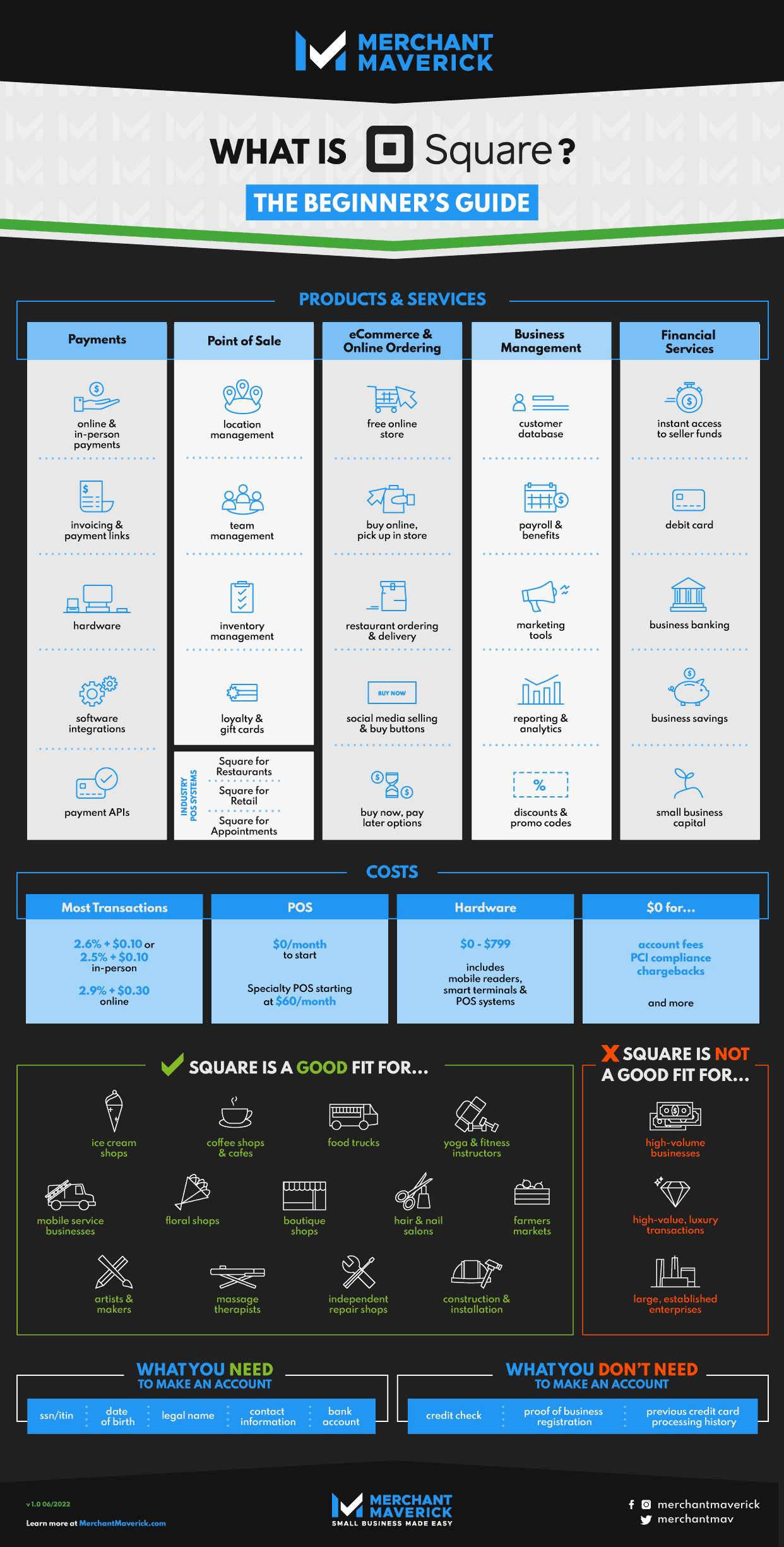
Square’s rates at a glance vary by the type of transactions businesses are processing. Without breaking out a calculator and crunching numbers, here’s a look at how much Square charges:
- Standard Card-Present Fee: 2.4% - 2.6% + $0.15 (lower fees on paid plans)
- Online & Invoiced Transactions: 2.9% - 3.3% + $0.30 (lower fees on paid plans)
- Manually Keyed-In Transactions: 3.5% + $0.15
Per-transaction rates and fees aren’t exactly attractive all on their own to small businesses. Square promises no monthly fees, statement fees, or minimums to help growing businesses remain flexible.
In addition, Square has excellent hardware options. There is a free strip reader for basic payments and a chip reader for $59. Square Terminal, Square’s mobile payment processor, costs $299, and Square Register, an all-in-one POS and processing system, starts at $799. Square’s latest hardware addition, the mobile Square Handheld, goes for $399.
What Does Square Do? A Quick Guide To Square Products & Services
Open this infographic in a popup!
Square has become much more than just a swipe-based smartphone processing system. The Square business model has evolved, and features like a robust mobile POS app, payroll, inventory and employee management, online store, and email marketing have all come together under Square’s umbrella of business-centric services.
There’s a lot to cover when it comes to Square services. In general, though, the list below introduces the product’s core features:
Is Square Good For Small Businesses?
Square offers an all-in-one system for small businesses, including payment processing, point of sale, software, hardware options, and a unique app store, all for upfront, affordable pricing.
For newer small business owners or ones who are looking to simplify their day-to-day operations, Square is a simple option that is highly scalable with no long-term contracts to worry about. It comes with strong customer service and is extremely well-reviewed.
Advantages Of Using Square
- Free POS solution: Square Point of Sale is a household name in mobile card payment processing and is a reliable solution that instantly integrates with businesses’ payment processing solutions without stacking on fees or hidden contract clauses.
- Hybrid payment processing: This makes it simpler for up-and-coming businesses to let customers browse online and pay in person. Square accommodates merchants in niche industries, online retailers, and micro-merchants who need payment processing solutions that don’t interrupt their customers’ purchasing experience.
- Transparent pricing: Square has no monthly fees or statements attached. One of Square’s biggest draws is its pricing structure, one that stands in stark contrast to the typical sign-up and application processes that traditional merchant providers require.
Disadvantages Of Using Square
- Lost or incomplete sales: These can occur with keyed-in credit card processing attempts that get rejected. Businesses run the risk of losing out on funds that never get successfully processed by Square, which is an implicit disadvantage to using any third-party processor.
- Limited feature set: Some small businesses may need specialized payment processing solutions, and for many higher functions, Square requires a paid subscription.
- Indefinite funding holds: Although the risk of this occurring is small, Square, like most other third-party processors, is able to investigate, freeze, and terminate the funds they process as they see fit. It’s most likely for higher-volume merchants or high-risk businesses to experience issues with funding holds and investigations; these businesses may want to consider other, more premium payment processing solutions instead.
How To Open A Square Account
Small business owners who are ready to use Square to process payments can get started by providing a minimal amount of personal info and zero bank statements or proof of revenue. The free POS app and mag stripe mobile credit card reader come ready for use after a business creates a new account.
The entire process takes 10 minutes to get started at the most, and there is no credit check or upfront fees to get started. After your account is up, you are ready to start accepting payments immediately. And if you’re still on the fence, Square offers a 30-day free trial to test its software.
Here is the quick process for setting up your free account:
- Go to squareup.com and select Get Started
- Select your business type
- Enter your name, social security number, US-based bank account, date of birth, and mailing address. You also have the option to enter your employee identification number and your business bank account
- Enter your phone number or email address to receive a link
- Tap the link to download the app to your mobile device
Read more about how to set up a Square account.
Is Square The Best Choice For Small Businesses?
Square offers merchants a value that’s hard to beat, especially since it’s a third-party processor that lets businesses start using it for free. With Square for small businesses, a wide range of services allows for flexibility when accepting online and in-person transactions.
When it comes to ease of use, affordable pricing, and a feature set that makes it simpler to create an eCommerce presence, Square is pretty tough to beat. Square may not be the right solution for businesses of all types and sizes, and there are great alternatives to Square, but it provides enough support to make it stand head and shoulders above the competition.
Matt Sherman
Expert Contributor at Merchant Maverick
Matt has been helping small businesses make decisions since 2017. He has written reviews and articles across many different channels but specializes in the point of sale, payroll, and small business insurance categories and has been quoted in articles for Fox Business, Forbes, and other publications. Prior to joining Merchant Maverick, Matt was a journalist and editor for 14 years for a pair of weekly newspapers. He is a graduate of the University of Oregon and currently resides in Gladstone, Oregon.
View Matt Sherman's professional experience on LinkedIn.

Latest posts by Matt Sherman (see all)
- Odoo POS Review - November 13, 2024
- Tips For Keeping Your POS Secure - October 31, 2024
- What Is Shippo? - October 1, 2024
- What Is ShippingEasy? - October 1, 2024
- What Is Stamps.com? - September 30, 2024