
Clover POS Pricing
In our Clover pricing guide, we set the record straight on how much you should pay for a Clover POS and where you can get the best deals.
-
WRITTEN & RESEARCHED BY
Expert Contributor
Last updated onUpdated
-
REVIEWED BY
Expert Contributor


Our content reflects the editorial opinions of our experts. While our site makes money through referral partnerships, we only partner with companies that meet our standards for quality, as outlined in our independent rating and scoring system.
Clover POS pricing comes down to three things: the hardware you pick, the software plan you need, and the payment processor you sign up with.
Clover is one of our top-rated POS systems because it’s flexible, easy to use, and works for almost every type of small business, but the total cost can vary significantly based on your setup.
In this guide, we’ll break down Clover’s hardware costs, software subscriptions, and processing fees so you know exactly what you might pay per month (and how to avoid overpaying).
Table of Contents
What Is Clover Pricing?
Clover’s total cost is affected by your hardware, software, and processing rates. Before we dig into the details, here’s a quick overview of what most Clover users pay:
- Clover Hardware: $49 (Clover Go) $599 – $649 (Clover Flex and Clover Pocket Flex) $1,699 – $1,799 (Clover Station)
- Clover Software: $0 - $84.95/month (for one register)
- Clover Payment Processing Fees: 2.3% - 2.6% + $0.10 per transaction per card-present transaction
Clover Hardware Pricing
Clover’s hardware costs vary depending on where you buy your device and which models you choose. Clover software only runs on Clover-branded hardware, so if you’re switching from another POS or starting fresh, you’ll need to purchase Clover equipment.
The prices below reflect Clover.com’s direct pricing. Third-party vendors may offer different pricing or bundled deals.
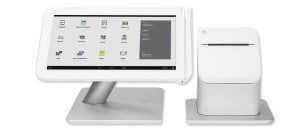
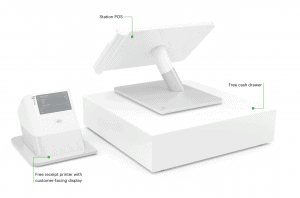
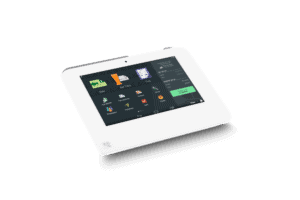
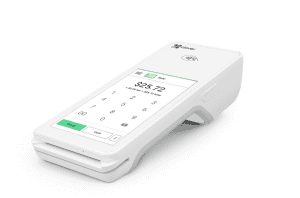
| Clover Station Solo | Clover Station Duo | Clover Mini | Clover Flex or Flex Pocket | |
|---|---|---|---|---|
 |
 |
 |
 |
|
| Visit Site Read Review |
Visit Site Read Review |
Visit Site Read Review |
Visit Site Read Review |
|
| Pricing | $1,799 | $1,899 | $849 | $699 – $749 |
| Hardware Included | Station, cash drawer, receipt printer | Station, customer-facing display, cash drawer, receipt printer | Clover Mini with built-in receipt printer and scanner (cash drawer sold separately) | Clover Flex with built-in receipt printer and scanner (cash drawer sold separately). Flex Pocket is smaller and more portable with no printer |
| Compatible Software Plans | Retail Growth, Restaurant Growth | Retail Growth, Restaurant Growth | Retail Growth, Table Service Restaurant, Counter Service Restaurant | Essentials, Retail Growth, Table Service Restaurant, Counter Service Restaurant |
| Monthly Payment Plan (Hardware Plus Software) | $174 – $179/month | $180 – $185/month | $45 – $135/month | $40 – $125/month |
You can also add optional Clover hardware like scales, barcode scanners, kitchen printers, and PIN pads — all of which increase your total system cost.
Some third-party vendors sell Clover hardware for less than Clover.com’s MSRP, but there’s often a trade-off. Lower upfront prices may require signing a long-term payment processing contract, and those agreements can end up costing you more over time.
Clover Software Pricing
Clover charges a monthly software fee, but you’re required to sign a 36-month or 48-month contract. If you cancel early, you’ll owe an early termination fee equal to the remaining balance on your contract.
These terms aren’t ideal, but they’re fairly common in the POS industry.
Here are Clover’s monthly software fees when you buy your hardware upfront:
To add additional POS devices to any of these plans (at the same physical location), you’ll pay an additional monthly software fee of $14.95/month/device Note: There is also a Clover Virtual Terminal plan ($14.95/month) that does not require you to purchase or lease any hardware upfront. On this plan, you can only accept keyed-in card payments (3.5% + $0.10).
Clover Processing Fees
Credit card processing fees are one of the biggest factors in your total POS cost. With Clover, those fees vary based on the merchant services provider you choose.
Clover always comes bundled with a merchant account. If you buy directly from Clover.com, you’ll get a flat-rate pricing structure with the following rates:
- In-Person Transactions: 2.6% + $0.10 (Clover Essentials Plan) or 2.3% + $0.10 (Retail Growth, Table Service, or Counter Service plans)
- Card-Not-Present Transactions: 3.5% + $0.10 per transaction
(all plans)
Card-not-present rates apply to online orders, invoices, virtual terminal payments, phone orders, manually keyed numbers, and payments processed through third-party integrations. If most of your revenue comes from online sales, Clover’s processing may not be the most cost-effective option.
Note: Clover offers custom credit card processing fees for larger businesses. If your business grows substantially within the first six months of processing payments with Clover, you are eligible for a payment rate review.
Can You Get A Better Rate For Clover Processing Fees?
Not all Clover sellers use flat-rate processing. Some providers, such as Payment Depot, offer interchange-plus rates, which can be a better deal for higher-volume businesses processing more than $10K/month.
Some Clover vendors offer tiered pricing or enhanced billback pricing, which are both confusing and expensive. Some vendors provide flat-rate processing, but their rates may be higher than Clover processing fees.
Best Place To Buy Clover POS
Even though Clover is a Fiserv product and usually comes paired with a Fiserv merchant account, you can buy Clover hardware from many different places, including national banks, merchant services providers, and even retailers like Sam’s Club.
These providers offer fair pricing, transparent terms, and month-to-month contracts, making them significantly safer than long-term Fiserv contracts:
- Dharma Merchant Services
- National Processing
- Payment Depot
- VizyPay
- Host Merchant Services
Each of these vendors supports different pricing models (flat-rate, interchange-plus, or cash discount), so the best fit depends on your processing volume and the type of fee structure you prefer.
[/accordion_item][/accordion]To learn more about where to buy your Clover system, read our post on the best Clover resellers.
Why Clover Fees Can Vary
Though differences in Clover pricing may seem minor at first glance, these costs can add up over time. There are a few reasons for this:
- Payment processing model variations
- Contract length
- Leasing hardware (rather than buying it outright)
- Setup, early termination, and hidden fees (very common in long-term contracts)
Here are a few examples of good and bad Clover POS hardware/software deals:
- Bad Deal: “Free” Clover hardware, but the processor uses a tiered pricing model that ends up costing your business far more each month than a flat-rate or interchange-plus plan.
- Bad Deal: A reseller that requires a hardware lease. You pay less upfront, but the lease will cost you thousands more over the full contract term — and leases are usually non-cancelable.
- Good Deal: A vendor offering simple interchange-plus pricing, a month-to-month contract, no hidden fees, and a small monthly membership (typically $10–$25). Transparent, predictable, and cost-effective for most merchants.
The Bottom Line On Clover Pricing & Credit Card Fees
To recap, Clover pricing is a good deal for various types of brick-and-mortar businesses that need POS hardware, software, and payment processing. The Clover hardware is on the pricier side, but it is attractive and high-quality; the monthly Clover software plans are affordable and include useful industry-specific features.
However, Clover credit card processing fees vary depending on where you buy your Clover POS system.
For the best Clover pricing, we recommend buying from a merchant services provider that:
- Lets you buy your Clover POS hardware upfront
- Offers month-to-month contracts
- Uses either flat-rate or interchange-plus pricing
In terms of Clover software plans, know that while the Clover Payments and Clover Essentials plans have a lower monthly fee (or no fee when it comes to the Clover Payments plan), you will save on Clover processing fees if you purchase the Register plan or one of the Restaurant plans.
If you’re not 100% sure whether you want to use Clover as your POS, or if you feel Clover POS pricing is too high, you might want to evaluate some of the best Clover alternatives.
Shannon Vissers
Expert Contributor at Merchant Maverick
Shannon has been writing for Merchant Maverick about small business software and financing since 2015. She started writing professionally about business topics in 2005. Shannon has been featured in the Washington Post, Reader's Digest, US News, MSN, Yahoo Finance, Business Insider, and other publications. She has a bachelor's degree in English from San Diego State University and currently resides in San Diego, California.
View Shannon Vissers's professional experience on LinkedIn.

Latest posts by Shannon Vissers (see all)
- Helcim vs Stripe: Comparison - January 23, 2025
- Payment Nerds Review - December 11, 2024
- Wave Payments Review - October 31, 2024
- U.S. Bank Merchant Services Review - October 1, 2024
- Tap To Pay: A Guide For Merchants - August 29, 2024