


Helcim Smart Terminal Review
Streamline business operations with the Helcim Smart Terminal, a sleek piece of hardware equipped with a free mobile point of sale system.
-
WRITTEN & RESEARCHED BY
Expert Contributor
Last updated onUpdated
-
REVIEWED BY
Expert Contributor


Our content reflects the editorial opinions of our experts. While our site makes money through referral partnerships, we only partner with companies that meet our standards for quality, as outlined in our independent rating and scoring system.
Helcim Smart Terminal

| Total Rating |
4.4 |
|---|---|
| Pricing4.4 | |
| Ease Of Use4.9 | |
| Features4.1 | |
| Customer Service4.7 | |
| User Reviews4.1 | |
Helcim Smart Terminal At A Glance
- Handheld POS terminal includes built-in Helcim POS software, card reader, and receipt printer
- Free software plan works well for service-based businesses and retailers
- Accepts chip cards, dip cards, and mobile wallet payments
Pros
- Completely free pre-installed POS software
- Built-in receipt printer
- Allows surcharging
- Create invoices and accept invoice payments from the POS
- All payment types accepted (including cash and store credit)
Cons
- Average inventory management features
- Not cost-effective for very small businesses
- No built-in loyalty program
What Is Helcim Smart Terminal?
The Helcim Smart Terminal is a mobile point of sale (POS) system that allows retail and service-based business owners to make sales, take digital payments, and print receipts from one handheld device.
The Helcim Smart Terminal only runs Helcim POS software and uses Helcim Payments for payment processing.
Since our last review update, Helcim has launched a new and improved Smart Terminal.
Helcim Smart Terminal Pricing
| Pricing4.4 |
|---|
| Hardware 4.5 |
| Payment Processsing 4.3 |
The Helcim Smart Terminal device itself costs $349 and has earned an above-average pricing rating. Payment plans are available to help offset upfront costs.
The device earns points because of its competitive pricing, built-in interchange-plus payment processing (which is great for midsize and larger sellers), and equipment financing options. We also like that you can sign up for a Helcim account with no credit card required and try out the software before ordering your handheld POS hardware.
It loses points mostly on the payment processing front for smaller sellers. If your average transaction size is $25 or less, you may end up paying more than industry-standard flat-rate payment processing rates (2.6% for in-person transactions and 2.9% for online transactions).
Helcim Terminal Pricing Overview
| Item | Value |
|---|---|
| Pricing Range | $0/month |
| Account Setup Fee | $0 |
| Contract Length | Month-to-month |
| Processing Model | Interchange-plus & cash discount |
| Card-present Transaction Fee | Interchange + 0.15-0.40% + $0.06-$0.08 |
| eCommerce Transaction Fee | Interchange + 0.15-0.50% + $0.15-$0.25 |
| Keyed-in Transaction Fee | Interchange + 0.15-0.50% + $0.15-$0.25 |
| Equipment Cost | $349 |
Helcim’s interchange-plus processing fees are determined by the merchant’s processing volume and nonprofit status; high-volume businesses and nonprofits receive transaction fees at the low end of the above ranges.
Monthly Plans
| Helcim Smart Terminal Plans | Price | When To Use |
|---|---|---|
| Standard plan | $0 | If you need to process $5,000+/month in sales and want free retail/invoicing POS software |
| Fee Saver plan | $0 | If you want to pass on your credit card processing fees to your customers. |
The POS software that comes installed on the device is completely free. There are no monthly fees for the POS app, online store builder, and customer account management tools.
Extra Costs & Fees
| Helcim Smart Terminal Extra Costs | Price |
|---|---|
| Receipt paper | $9.40 for 10 rolls |
| Fee Saver (cash discount plan) transactions | 0% when customer pays credit (customer pays 3%) |
While the Smart Terminal comes with two rolls of receipt paper, you will have to order refills eventually. You can purchase any type of paper that fits the device from a store like Staples or online from Amazon.
Also, note the above transaction fees for Helcim’s optional Fee Saver (cash discount/surcharging) processing plan.
Overall Design

The Helcim Smart Terminal is a sleek handheld POS system that’s easy to set up and navigate. It has a large screen, a tap card reader at the top, a chip card reader at the bottom, and a receipt printer above the screen.
In addition to the Smart Terminal, you also get two rolls of receipt paper, a charging cable (USB-C to USB-A), an additional USB-C cable, a charging cradle, and a QR code you can scan for more setup information. One receipt paper roll is already installed when you receive your Smart Terminal.
The most noticeable potential design issue is the size of the Smart Terminal. While you can carry it in apron pockets or your hands, it is slightly larger and heavier than a smartphone, so it may feel a little more unnatural. However, this is mostly due to the built-in contactless card reader at the top.
However, it is worth noting that the latest model is sleeker and lighter than the previous model.
If you’re looking for more handheld options, read our post on the best mobile POS systems.
Ease Of Use
| Ease Of Use4.9 |
|---|
| Initial Setup 4.7 |
| Device Use 5.0 |
The Helcim Smart Terminal earns a very high rating when it comes to ease of use. The hardware is easy to put together, does not require a representative to set up or maintain the hardware or software, has a simple charging setup, and is easy to connect to other devices like barcode scanners. The hardware has Helcim POS software pre-installed so all you have to do is charge up the device, turn it on, and customize the software settings.
To test out how easy the POS software is to use, I set up a test account for an art store that sells retail items directly to consumers and other businesses. I tested the online store builder and created an example subscription art supplies box to get a sense of the subscription management software built into Helcim. I also set up an example bridal shop that provides retail sales, services, and item rentals.
In general, I found it easy to set up and use Helcim for inventory management, employee management, and niche features like B2B customer management and membership management. Features like the online store builder and invoice creator have enough options to work for any business, but there are not so many customization options that you get overwhelmed.
Helcim Smart Terminal Features
| Features4.1 |
|---|
| Device Hardware Features 4.5 |
| Device Software Features 3.6 |
Helcim earns an average rating in the features category. It earns points because the hardware allows you to take virtually any payment type, print receipts with the built-in receipt printer or email receipts, track inventory and manually edit stock, add customers and invoices, and make exchanges and returns.
To test out Helcim’s Smart Terminal features more thoroughly, I set up a test Helcim account for an art store and performed several test transactions. In doing this, I could test inventory management functions, online sales capabilities, admin management features, and niche features such as comprehensive invoicing and B2B customer management. I also created an example bridal shop to test out service appointments such as dress preservations and item rentals such as veils.
- Related: Read our full Helcim POS review for a more thorough walkthrough of the software’s features and setup.
Helcim Terminal Features Overview
| Helcim Smart Terminal Features | Availability |
|---|---|
| Multi-Store Support | |
| Contactless Payments | |
| Multi-Channel Selling | |
| Gift Cards | |
| Customer Loyalty | |
| Marketing Tools | |
| Online Ordering | |
| Inventory Management | |
| Reporting | |
| Menu Management | |
| Delivery Management | |
| EBT Acceptance | |
| Employee Management | |
| Text Messaging |
Helcim Terminal Features In Detail
Inventory Management
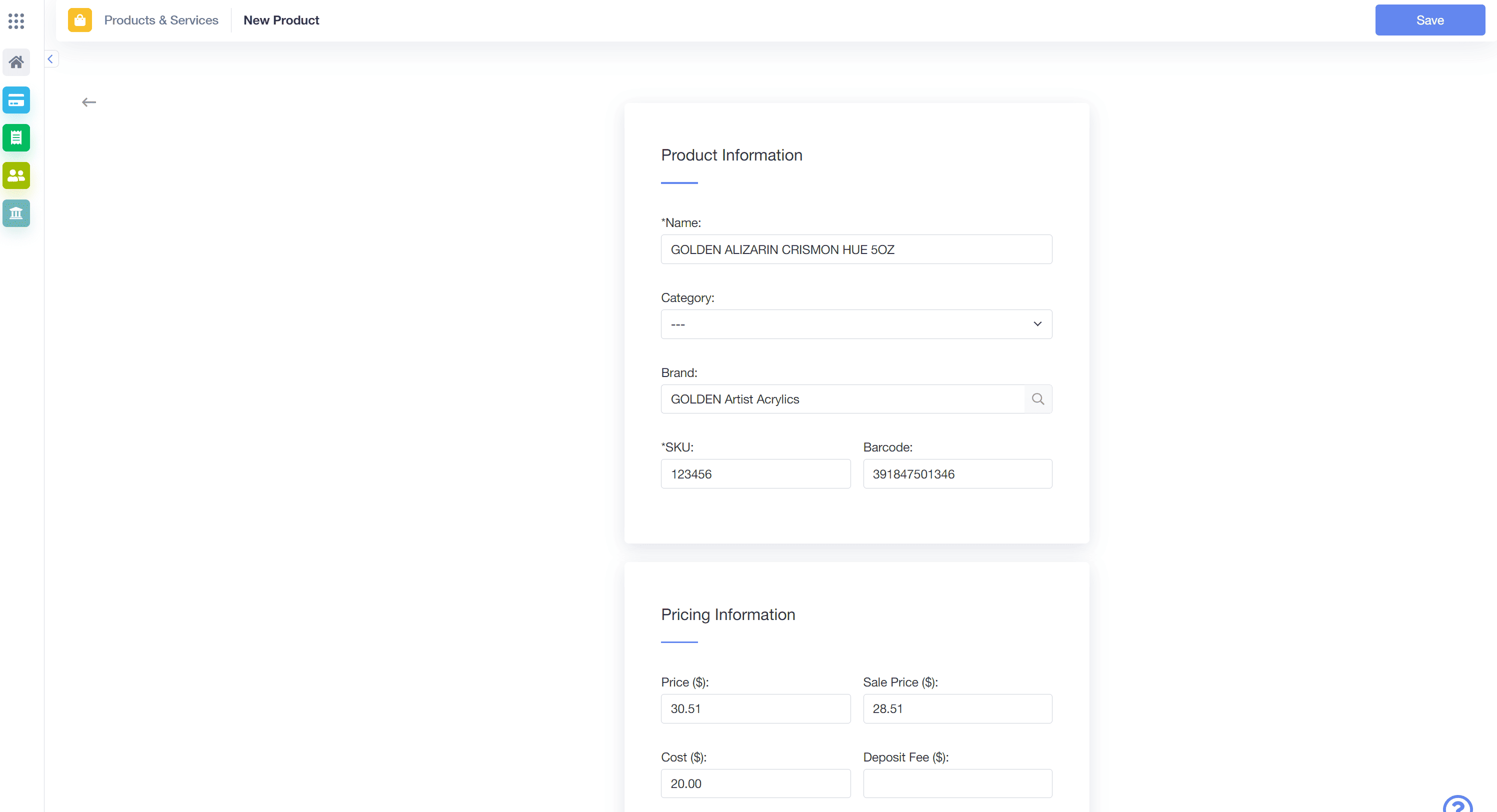
Create a new inventory item in Helcim POS.
Note: Most inventory management features are in the Helcim admin dashboard.
Helcim offers a lot of preset options when it comes to entering products and services. You can enter a product name, brand, cost, and price (in multiple currencies), create item variants, include add-ons, add products to a catalog, create tiered pricing structures, add wholesale pricing, and add advanced product details. Advanced product details include features like weight and dimensions, plus Level 3 data like units of measure and commodity codes.
Wholesale products are only available to designated wholesale customers, and you can set wholesale products to require a customer to log in to view wholesale pricing information. When testing Helcim’s inventory management functions, I created inventory items that can be purchased in small quantities by end consumers or in bulk by institutions such as schools. I designated “schools” as a unique customer group and created a percentage discount that can be applied to any large order from a school. I also created pricing tiers for B2B customers such as paint studios that encourage purchasing in larger quantities.
You can track inventory, easily modify inventory, and set low-stock alerts. If you use QuickBooks Online or another spreadsheet-based inventory/finance management tool, you can import and export product and service information.
While Helcim offers decent retail inventory management, these are the best retail inventory POS systems for large and complex inventory needs.
Online Sales
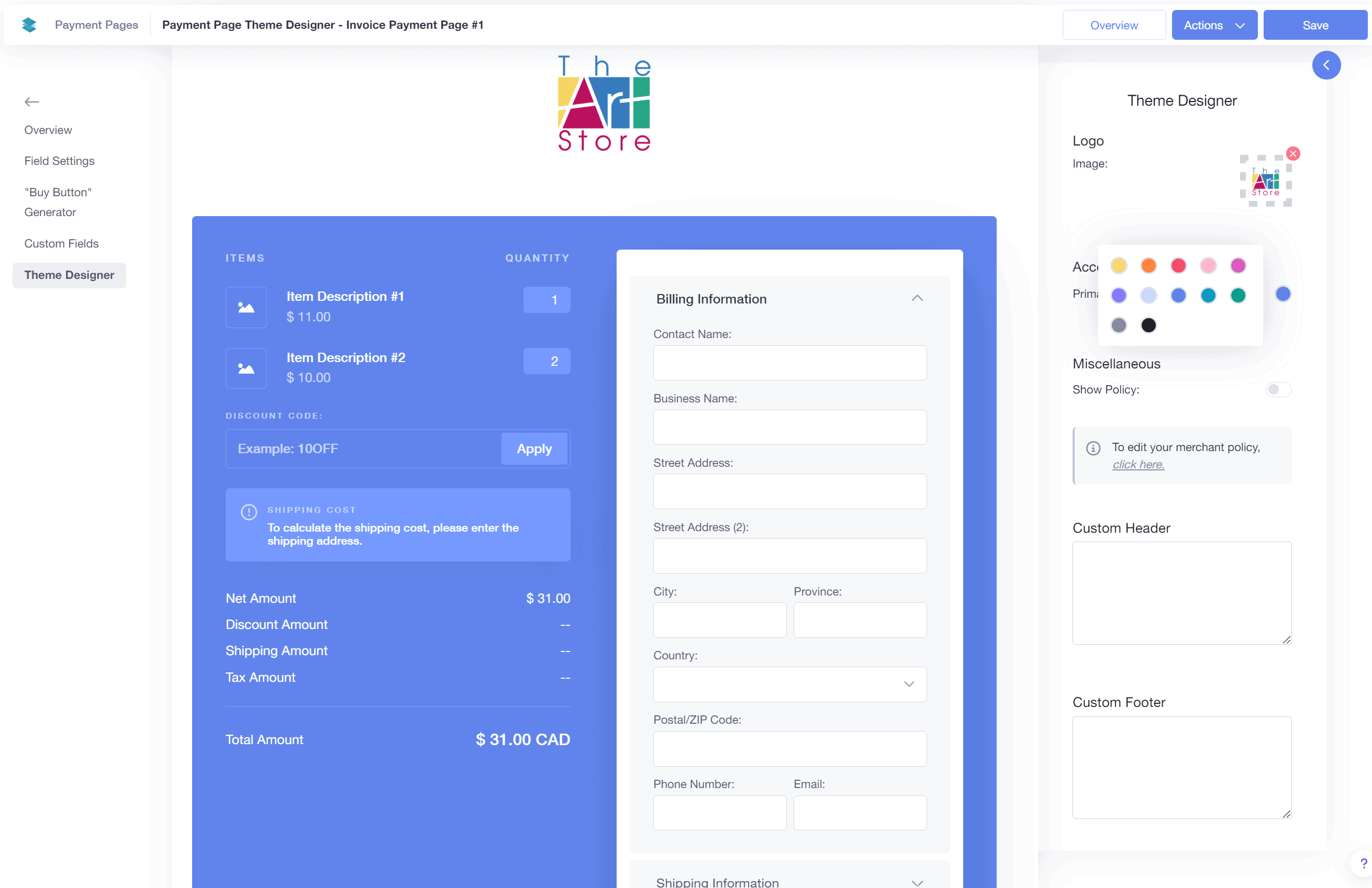
With Helcim, you have several ways to sell online, which include:
- Hosted Payment Pages: Hosted payment pages are checkout pages hosted by merchant services providers instead of web hosting providers. PayPal is a popular hosted payment page provider. Payment pages include a specific cost for a specific product or service and are very commonly used to generate buy button URLs and QR codes to sell products on an existing website, blog, or social media profile.
- Virtual Terminal: Accept payments over the phone by having customer service representatives enter transaction and customer payment information during a call. Helcim allows you to attach virtual terminal payment information pages to an existing customer or invoice to speed up the payment process. We believe Helcim is one of the best virtual terminals for small businesses.
- Online Invoice Payment: Send customers a payment request with custom messaging via text or email. Payment requests include a link to an online invoice payment page.
- Online Store: Helcim’s online store builder is an intuitive, customizable product, catalog, and payment page builder. While your online store won’t have as many customization options as store builders from providers like Shopify or BigCommerce, most businesses will find what they need and can get a live store up faster.
I created custom invoices using the invoice template designer. I then populated invoices with information such as business contact information, line items including products and shipping costs, applicable discounts, tax settings, deposit requests, and repayment terms. Repayment terms included a 60-day repayment schedule with a partial payment due at the 30-day mark. I sent a deposit request and the invoice itself via email to my test customer. Customizations were easy, and the invoices looked very professional.
On the Smart Terminal device, you can check for new orders that need to be picked and packed for shipping and BIPOS (buy online, pick up in-store.) You can turn on new order notifications so employees can quickly fulfill orders.
In-person invoice payments can be linked to invoice numbers or customers. You can search through invoices or find customers with the Smart Terminal, so you can take invoice payments out in the field instead of having to send invoices later on when you’re near a computer or tablet.
Niche Features
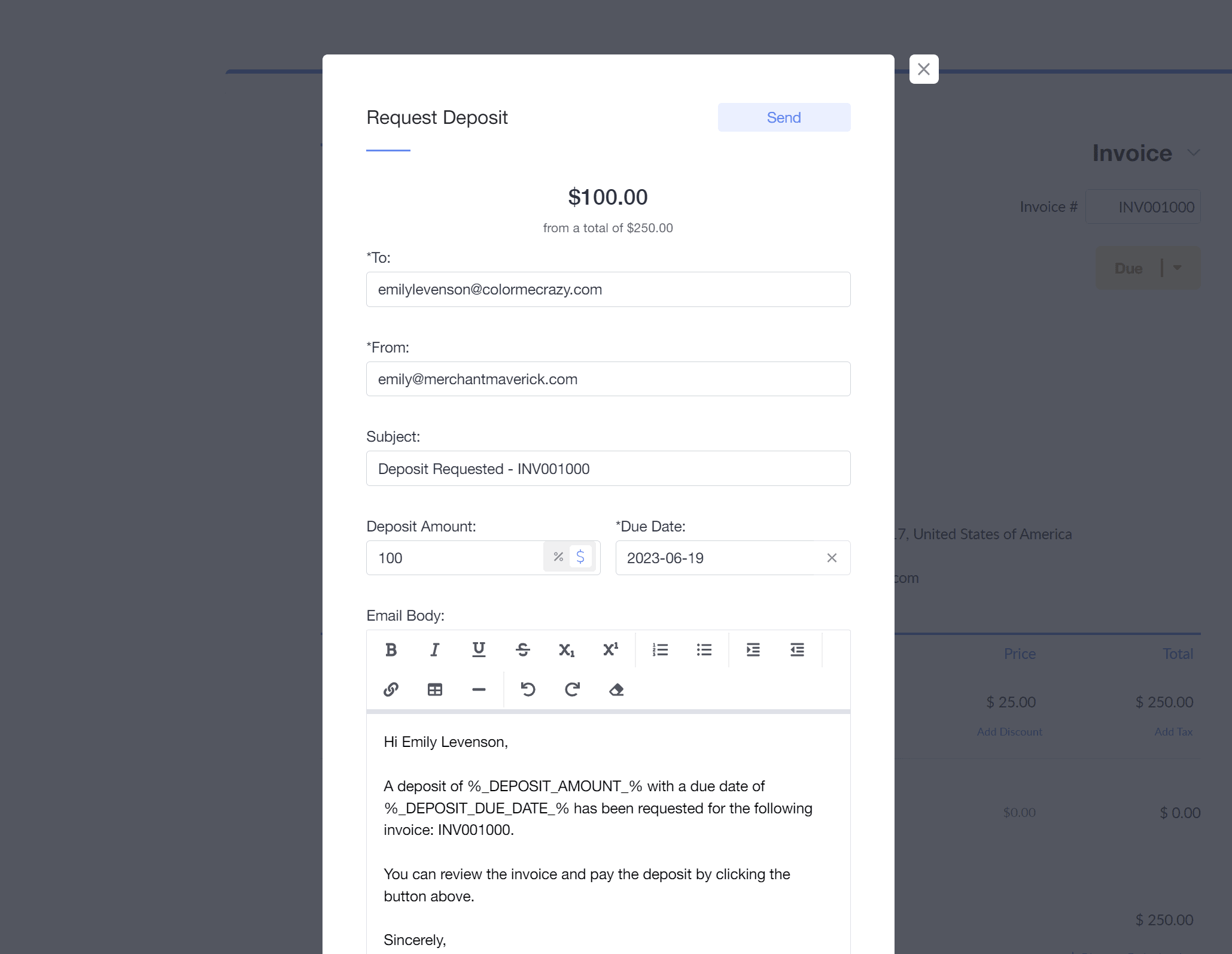
Helcim POS example art store invoice deposit request.
Helcim also offers some niche features, including a subscription manager and Level 3 card data entry. The subscription manager allows you to create very specific subscription settings and monitor customer activity. Level 3 card data entry is a great way to lower payment processing fees because there is more information available on payments from B2B/B2G (business to government), and transactions are more secure.
Customer Service & Support
| Customer Service4.7 |
|---|
| Personal Support 5.0 |
| Self-Service 4.4 |
Helcim earns a high score in customer service because there are highly rated customer service reviews from real customers, it’s easy to talk to representatives over the phone or through support tickets, and the self-service help articles are easy to follow.
Helcim Customer Service Channels
| Helcim Smart Terminal Customer Service | Availability |
|---|---|
| Phone Support | |
| Email Support | |
| Support Tickets | |
| Live Chat | |
| Dedicated Support Representative | |
| Knowledge Base or Help Center | |
| Videos & Tutorials | |
| Company Blog | |
| Social Media |
Helcim offers fast, high-quality customer support for US and Canadian merchants. Business owners can call customer support Monday – Friday from 9AM – 9PM EST, submit a support ticket from their Helcim dashboard, or send a help email and get a response within one business day.
Business owners can also check out Helcim’s learning center or YouTube videos to learn more about configuring their POS software.
Customers highlight the excellent customer support they receive when reviewing Helcim, and the company continues to show its commitment to providing transparent, attentive merchant services.
Payment Processing With Helcim Smart Terminal
Helcim offers merchant accounts with transparent interchange-plus payment processing for all business owners without any minimum amount of revenue or time in business. Helcim has a tiered interchange-plus pricing model, which means that the more money your company makes and the higher your average transaction size, the lower your payment processing rates are.
It’s important to note that companies with low average transaction sizes ($15 – $25) will not benefit from Helcim’s payment processing fee model.
Your payment processing rates will update automatically based on your sales volumes over an average of three months. This means that if your business performs well in the summer, you’ll have lower payment processing rates at the end of it. If your business has a rough few months, though, you may see your processing rates increase by some measure.
Helcim is a great option for accepting premium, corporate, and government spend cards because you can enter Level 3 transaction data for any product or service.
Adding Level 3 data allows you to minimize payment processing risks and reduce payment processing fees when other businesses and government organizations use credit cards to make larger purchases. Examples of Level 3 data include invoice and order numbers, product and commodity codes, item description and quantity with the unit of measure, freight information, and duty information.
Business owners can estimate payment processing rates on the company’s pricing page based on their monthly sales volume, average transaction size, card type, percentage of in-person and online/keyed-in transactions, and industry.
Read our Helcim Payments review for more information on the company’s payment processing offering and setup.
Contract & Commitment
Helcim is extremely honest about its month-to-month merchant agreement, with a detailed breakdown of merchant fees on the company website and a copy of Helcim’s merchant agreement available online for anyone to view.
The Helcim Smart Terminal itself is a one-time purchase. If you are not satisfied with your purchase, you may return it within 30 days of receiving your hardware. The device has a one-year warranty.
You can easily terminate your agreement with Helcim at any time by emailing [email protected] and following the instructions you are provided. There is no early cancellation fee associated with canceling your account.
Helcim may require a reserve of funding to cover any debt for transactions (chargeback fees, late fees, fees related to court decisions) initiated before terminating your agreement. The company will release any funding held after any debt is paid or after six months of termination, whichever comes first. This is a rare occurrence, and as long as your business operates above board, you won’t run into this situation.
User Reviews
| User Reviews4.1 |
|---|
| Customer Feedback 4.0 |
| Review Site Aggregate 4.2 |
Helcim earns a high rating in customer service reviews because there are several positive genuine, non-incentivized reviews, earning the following scores from popular review platforms:
- Trustpilot: 4.3/5 stars based on 607 reviews
- G2: 3.9/5 stars based on 16 reviews
- GetApp: 4.0/5 stars based on 24 reviews
Helcim is also BBB-accredited with an A+ score. The company has received 5 total complaints on the BBB in the last three years, including 2 complaints closed in the last two months (those are very good numbers).
Note: Helcim’s POS app and Smart Terminal are relatively new, which explains the lower number of software reviews on G2 and GetApp.
How Helcim Smart Terminal Compares To Other Handheld POS Systems
Let’s take a closer look at Helcim versus some of its top competitors.
Final Verdict
| Helcim Smart Terminal Review Summary | |
|---|---|
| Pricing Range | $0/month |
| Choose If You Need |
|
We believe that Helcim is one of the best POS systems for businesses in the retail, subscription, and/or service industries, especially B2B and B2G businesses, with higher average transaction sizes and higher monthly sales volumes. This is because larger businesses will be charged lower per-transaction payment processing fees under Helcim’s interchange-plus payment processing model.
The Helcim Smart Terminal itself is a great option for service-based businesses needing to generate and accept payments on invoices when they’re not near a computer and for retailers that can search through an inventory database to create simple orders or accept manually entered payment amounts. It also works as a sleek countertop card reader for businesses of all sizes and in most industries.
We appreciate Helcim’s transparent pricing structure, month-to-month contracts, free POS and online store builder, invoicing features, and B2B/subscription customer management portals. We also appreciate a free POS system, especially one that works on any device, and believe that Helcim is one of the best free POS systems available.
Nicolette Kier
Expert Contributor
Nicolette began writing on small business topics in 2020. After hundreds of hours researching, testing, and assisting small business owners with web building and point of sale software, she is now an expert on all things eCommerce and point of sale. She has a bachelor’s degree in English from the University of Pittsburgh and resides in Pittsburgh, Pennsylvania.
View Nicolette Kier's professional experience on LinkedIn.

Latest posts by Nicolette Kier (see all)
- Restaurant POS Hardware Guide - March 12, 2024
- How Much Does A Restaurant POS System Cost? - March 7, 2024
- What Is A Restaurant POS System & How Does It Work? - March 4, 2024
- Complete Toast Pricing Guide - January 11, 2024
- Helcim Smart Terminal Review - October 31, 2023



